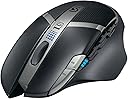
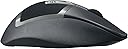
๐ฏ Dominate your game with precision and power that never quits.
The Logitech G602 Wireless Gaming Mouse delivers exceptional endurance with up to 250 hours of battery life and 11 programmable controls for ultimate customization. Featuring a lag-free 2.4GHz wireless connection and durable mechanical switches rated for 20 million clicks, itโs engineered for high-performance gaming on both PC and Mac platforms.


| ASIN | B00ESVLW0O |
| Antenna Location | Gaming |
| Are Batteries Included? | Yes |
| Are Batteries Required | Yes |
| Battery Average Life | 250 Hours |
| Best Sellers Rank | 307,295 in Computers & Accessories ( See Top 100 in Computers & Accessories ) 5,251 in Mice |
| Box Contents | Batteries |
| Brand | Logitech G |
| Brand Name | Logitech G |
| Button Quantity | 11 |
| Colour | Black |
| Compatible Devices | Laptop, Laptop, Desktop |
| Connectivity technology | wireless |
| Customer Reviews | 4.4 out of 5 stars 3,131 Reviews |
| Enclosure Material | Plastic |
| Global Trade Identification Number | 05099206047617, 08082014022010 |
| Hand Orientation | Right |
| Hardware Platform | PC |
| Item Weight | 261 Grams |
| Manufacturer | Logitech |
| Manufacturer Part Number | 5099206047617 |
| Model Name | G602 |
| Model Number | 910-003823 |
| Mouse Maximum Sensitivity | 2500 Dots per Inch |
| Movement Detection | USB / scroll wheel / tracking resolution selectable / 5700 dpi laser engine / adjustable weights / PTFE feet / SetPoint Software |
| Movement detection technology | USB / scroll wheel / tracking resolution selectable / 5700 dpi laser engine / adjustable weights / PTFE feet / SetPoint Software Movement detection technology USB / scroll wheel / tracking resolution selectable / 5700 dpi laser engine / adjustable weights / PTFE feet / SetPoint Software See more |
| Network Connectivity Technology | wireless |
| Number of Batteries | 1 AA batteries required. (included) |
| Number of buttons | 11 |
| Operating System | Mac |
| Pattern | G602 |
| Power Source | Battery Powered |
| Product Features | Wireless |
| Product Finish Type | Textured |
| Product Warranty | 2 years |
| Range | 3 meters |
| Special feature | Wireless |
| Style Name | West European Version |
| Theme | Video Game |
| UPC | 082014033052 |
| Unit Count | 1.0 count |
C**L
Hooray for optical!
It's so great to see Logitech employing an optical sensor in one of their higher end mice. It's about time people finally realise lasers are not the answer for gaming - they all have the inherent problem of hardware side acceleration of anywhere from 2-10%, something gamers do not want! Optical mice track 1:1 - perfect. The goods: - Optical! - The superior sensor with no built in acceleration compared to laser mice. It's not the most recent optical sensor but I cant detect any jitter or tracking issues in paint. Would have been nice to see them employ the new ADNS-3310 though. - Shape is great, very similar to the G700/S but with a better 'ledge' for your ring/pinkie to sit on making it easier to pick up. The extended thumb rest allows the thumb to sit relaxed and comfortable. - Build quality is outstanding. It really is the best build Logitech mice I've had the pleasure of using - on my desk sat next to it I have the G500S, G700 and G700S and this knocks them all out of the park. The sandpaper like grip on the previous mice has been refined and is now much smoother and nice to the touch while offering good grip. The top of the mouse really stands out though! The buttons employ a soft matte paint somewhat akin to the Roccat mice - great to touch and after a days use there are no sweaty fingerprint marks at all. The rear 'patterned' area is rubbery and very comfortable/grippy and gives a unique design. There are no rattles like you experience on the G700. ALL the buttons are much more clicky and defined compared to the 700's mushy feeling side buttons. - Claimed battery life is big and I'm looking forward to seeing how far it'll stretch. After a day its nice to see it at full still whereas I'd now be thinking of charging my 700! The OK's: - It weighs a fair bit, like the G700. However it isn't so rear heavy so its easier to lift. It can also be run on one battery (I'm doing this) to reduce weight by around 20g. It feels perfect to me with one. The bads: - Mouse wheel feels somewhat mushy to scroll. Its much less defined and it's easy to scroll too far without feeling it. I'm not a fan of Logitech's rattly hyperscroll wheel though and I'm glad they didn't use it. - 500hz max polling rate. This is gonna put a lot of people off. Why? I dont know. I can't notice any difference between 500hz and 1000hz. Unless your monitor refresh rate is 1ms you aren't going to care. Overrall I'm going to keep this mouse. It feels of higher quality than my G700S due to it being a totally newly designed product opposed to a sensor upgrade. The comfort is top notch and its simply really, really nice to use! Would heartily reccomend this mouse.
E**Y
Great Gaming Mouse
I found the Logitech G502 Wireless mouse to be really comfortable and well designed for long use. The sensor is very precise, and I liked how customizable the buttons are it worked great for both gaming and everyday tasks. The wireless connection felt reliable with almost no lag, which was important to me. I also found the battery life to be good, easily lasting through hours of use without needing to recharge frequently. Overall, itโs a versatile, high quality mouse that Iโd definitely recommend to both gamers and anyone looking for a solid productivity mouse.
S**N
A very nice quality mouse.
I've been on the hunt for a MMO/FPS hybrid type mouse for a while now, Let's start with the basics, It is a very sturdy mouse, although you can hear a minor rattle when you shake the mouse about but I'm pretty sure that's just a normal component. The material on the mouse is unlike any other it has a soft sandpaper type feel to it which helps when you get sweaty and clammy hands when gaming! It has a rubber texture on the top which Helps grip and a matte plastic for the left and right click. The six buttons on the left hand side are positioned really nicely, much better than a lot of the MMO type mouses I've tried (trust me I've bought and returned a lot!) I can't really say much for the sensor like most people but it is really responsive, and lays to rest the mythic input lag that people say about wireless. It has two modes in terms of battery, endurance and performance. I'm not sure if I can tell between the two but on paper endurance seems to provide a lot more usage hours. After about 50 hours of use so far it is still going strong. Being an ex-console gamer, I felt really comfortable using a gamepad, so I found a lot of comfort in still using my thumbs for a lot of actions while gaming (which is why I also have a Tartarus keypad) I absolutely love (and always will) my razer deathadder because it is just pure class, but I wanted something with more thumb buttons to help with my gaming style. I tried all sorts, the g502 spectrum, which didn't feel that comfortable for me and made a strange sound on the right click, The razer naga, I hated how my pinkie and ring finger lay and there were a couple of others but nothing seemed to fit what I wanted in terms of grip and functionality at the same time. But then I tried this..... And it suited me down to the T. If like myself you are a palmed user with a deathadder and want a few more thumb keys, then this is literally the perfect mouse for you. I only have one gripe so far and that's the scroll wheel, it does feel a little "vague" but I guess I can get used to it.
D**N
Batteries have lasted 4 months!
I'm writing this review now as I wanted to see how long the batteries lasted. I used the Duracell ones which came with the mouse. I purchased this in November 2013 and its now March 2014. They died last week. And its not as if I haven't used it. I'm a gamer and used the mouse daily, sometimes up to 6 hours in one sitting. I switched between the two different modes "endurance" and "performance". Performance for when playing games and endurance for anything else. Amazing! I used a Logitech G500 for many years and thought it was time to upgrade. This mouse fitted my hand perfectly if not better than the G500. That's not to say it'll fit yours. I think this mouse is better for the palm grip players rather than the claw. I would recommend this for any sort of game. I've used it on for BF4, Skyrim, Total War, Hitman, Assassins Creed. The mouse works well. I had to setup different profiles for each game which the logitech gaming software allowed me to do. I know allot of people say its downfall is the max dpi but I can't find any game which needs that much. I would say I'm an above average player on FPS games and have only ever used a max of 1800dpi. Which is what I currently use with BF4. And using this mouse hasn't affected my stats or gameplay in the slightest. The additional buttons on the side are great and you can map, sometimes hard to reach keys, from the keyboard to them. This especially comes on handy when switching weapons, throwing grenades etc. The only downside I've found so far is the no horizontal scroll on the wheel. Other than that this mouse it great!!
C**N
Great price, great performance, some very small issues
I've been buying and using logitech mice for over a decade and have never been let down, this is no exception. It's a great little mouse. It's very comfortable for those who like myself have beefy hands, the thumb rest is a little high but I got used to it very quickly. The AA batteries (amazon basics) last for about a million years, even when the software says its at 0%, its not, easily got another 8-12 hours in it in my experience. I only ever turn it off if I'm moving around with it. Inside the battery compartment is a small space for the wireless USB nub, just in case you were wondering if you'd lose it or not. It's super responsive, the 'high performance' mode provides a nice bump in fidelity, which I don't really turn on for gaming since I'm not a 1337 gAmEr, but I find it very useful with programs like illustrator, font forge or something where the application can benefit from a bit more precision. It tracks adequately on mouse mats (cloth & plastic), white ikea desks, paper, note-books, the arm of a cloth sofa, bed-sheets and even bare skin in a pinch. All buttons are reprogrammable with the software and can save that data to the mouse which is useful for someone like myself who uses multiple devices. And aesthetically it just looks like a well-to-do mouse, and the blue/green LEDs dont stay on for long. There are a couple of small caveats, as with all things: My one (purchased lightly used) sometimes registers a double left click, its occasional and only a little annoying, I haven't rated it down because I have a sneaking suspicion that might be the reason this particular unit was returned by the original owner. The macro buttons are a grease magnet if you get sweaty palms and might require a cotton bud to clean properly. The pads on the bottom can lift at a corner and catch a bit, but that's nothing that a bit of glue cant fix. And, at least with my unit, I get the best range & wireless results by using the included extension cord and just keeping it wrapped up and out of the way -- that is to say, just using the USB nub by itself makes the connection a bit spotty, despite only being four feet or so away from my PC. Strange, but not major. Honestly, I'm just nitpicking though. All in all, it's a great product, espcially with a used hardware discount.
U**8
Brilliant quality and batteries last forever
9 Months of use and I have changed the batteries once so far... AMAZING. I just got a notification saying that I am now at 5% of my second set of batteries. in 9 months of daily usage. Gaming included. My main concern was how fast this thing would burn through batteries. So glad I made the change from wired to wireless because batteries are of no concern. I have small hands but it fits ergonomically. I would be a bit hard pressed to use some of the side buttons when gaming due to how far back they are but these are not really much use to me in the games I play. I dont tend to use the high performance mode but did notice a small difference in it. If you are a competitive games you probably will benefit from this mode more than I do. Build quality is great and the mouse looks the part. Would prefer a bit more weight to the mouse (or perhaps being able to add some weights like my previous mouse) but this is not a big complaint. Being able to set macro profiles and switch between them with the logticech software is useful but I don't tend to use it very often. If anyone is after a reliable, easy to use and long lasting mouse then look no further than the G602. It is a great little performer that you will be glad you purchased. The only downside is that I believe the wireless adapter that goes into the USB socket on PC is causing conflicts with my wireless keyboard connector (Also a logitech product). It happens randomly and will cause input lag on my keyboard which can be frustrating at time.
R**I
Worse than G700s in everything except battery life
Overall it's a great mouse, but coming from a G700s, most things feel like a downgrade. The biggest advantage it has over the G700s is the battery life. G700s is a far better mouse that is only let down by the placebo effect of 1000 Hz laser sensor that eats through batteries like there's no tomorrow. G602s is worse in the following areas: - almost none of the functions I need can be assigned to the G keys unless I keep Logitech software running. I used the on-board memory of G700s to store all of those settings (e.g. one of the buttons was media play) so I can connect it to my other computer and still have them. G602s _cannot do this_. They tell you it has onboard memory, which is true. They tell you you can assign media keys to G buttons, which is true. But you cannot combine the two. Onboard memory is so limited it's nearly useless. (or, another way to put it is, most of those G buttons will be useless if you require onboard memory) - no mousewheel will ever feel the same after G700s with the switchable wheel. I thought I didn't use that fast scroll option on G700s often enought. Boy was I wrong. I miss it more than anything. I don't miss the wobbly feel though. The scroll wheel on G602 feels cheap but solid. It also has the bug that many cheaper mice have: if you wiggle the scroll wheel up/down slightly, it will generate up/down scroll events. This must not happen in an expensive mouse; no scrolling unless you move the wheel past a notch! G602 fails this. - the shape is worse, at least for me. This is a highly subjective aspect, but I absolutely hate the curve on the right side of the mouse. They tried to make some sort of a rest there, which I don't want because I let my fingers touch the desk for extra control. The curve makes it very awkward to lift the mouse when you're readjusting it (which you may do subconsciously without realising it). - the buttons form the very front edge of the mouse. If you bump it into anything (the keyboard, stuff that lies on your messy table), you _will_ generate a click. Every bump generates an undesirable click. Maybe you don't think you bump your mouse into things, but I didn't realise this either - until I bought this mouse. G700s doesn't suffer this problem. Of course tidying up my desk solved this problem to some extent, but the keyboard cannot be tidied out of the way, and I continue bumping into it and generating unwanted clicks. - the balance is slightly worse than the G702. It's back-heavy even with one battery. With two batteries it's much too heavy overall, and even more back-heavy in terms of balance. Now onto the good sides: - there is no noticeable difference between G700s at 1000 Hz and G602 at 125 Hz. It does go all the way up to 500 Hz, and there is a switch to enable a "performance" mode. - it runs on one battery or two batteries, it's up to you. With one battery it weighs the same as the G700s. - those 6 thumb buttons aren't as awkward as I was worried they might be. It's easy enough to press the one you need. They're also clicky. I prefer the feel of the G700s "mushy" thumb buttons, but this is a personal preference. Those just felt more luxurious. - the rubbery area around the logo on the top feels amazing. I'd describe it as "silky-soft". The only issue is that I can only feel the silky-softness with my fingers, not with my palm, so that area is a bit of a gimmick. That's about it! Regrets? Hm. Not really. G700s required new batteries every 3 days. That's nuts. Both of these mice are approximately equally far from perfect. If I had to pick again, I don't know which one of the two I'd buy. I'm really rather tired of swapping and charging batteries for G700s.
D**E
Fantastic but fatally flawed mouse
EDIT 28/03/2016: Unfortunately I have had to reduce my rating due to a severe, recurring issue. This mouse has a critical design flaw where the middle click becomes intermittent after several months of use. Logitech replaced the mouse fairly easily, but the replacement has just had the same thing happen to it. It's such a shame because other than this, the mouse is outstanding, and I stand by the review I left previously as shown below. Logitech need to re-think this mouse and fix whatever component in the middle click is failing so quickly. --- There are many long, detailed, and technical reviews about this mouse already and I agree with much of what has been said. Nonetheless I'll add me 2ยข... I use this mouse both in Windows and in Mac OS X, switching between them seamlessly. It's a comfortable mouse for my rather large hands, and the buttons have a nice resistance to them. I often found with other mouses than the weight of my fingers often resulted in inadvertent clicks; not so with the G602. I use this mouse for World of Warcraft, as well as many other games that require fewer buttons. The Logitech software is actually very good; much better than it used to be. I can use the same app to configure the G buttons on this mouse as I do for my Logitech G-series keyboard, so it works seamlessly together. The Logitech app can allow configuration on a game-by-game basis so you can have different keystrokes or commands set automatically depending on which game you're running. The battery life on this mouse is outstanding; I think it might be magic. At first I was concerned as my previous logitech mouse had a dock that allowed easy charging. It was the only part of this I was apprehensive about, but I needn't have worried. The battery lasts months, and replacing it is as simple as popping in two new AA batteries. Easily the best battery life I've had on a mouse; I really don't know how they've done it. I loved this mouse so much that my partner is now using this too, so I've bought a second for him. Naturally mice are a very personal thing, and I can't promise the feel and shape of this will suit you. Ideally you should try and hold any mouse first, especially if you plan to use it for prolonged periods. Assume you like the feel of it though, I cannot fault this mouse in any other way.
Trustpilot
1 week ago
2 weeks ago