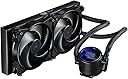
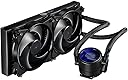
❄️ Stay cool, stay ahead — liquid cooling redefined.
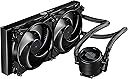
The Cooler Master MasterLiquid Pro 280 is a high-performance all-in-one CPU liquid cooler featuring a 280mm radiator and dual 140mm PWM fans with FlowOp technology. Designed for efficient heat dissipation and whisper-quiet operation, it includes stylish blue LED lighting and a compact form factor, making it an ideal upgrade for professionals seeking reliable, sleek cooling solutions.


| Brand | Cooler Master |
| Product Dimensions | 30.99 x 13.79 x 2.69 cm; 1.65 kg |
| Item model number | MLY-D28M-A22MB-R1 |
| Manufacturer | Cooler Master |
| Colour | MasterLiquid Pro 280 |
| Voltage | 12 Volts |
| Wattage | 5 |
| Are Batteries Included | No |
| Item Weight | 1.65 kg |
| Guaranteed software updates until | unknown |
A**R
Great cooler - fantastic for me!
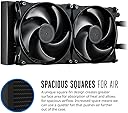
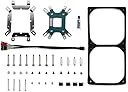
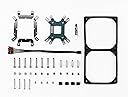
Can only sing this cooler's praises. Chose it after looking at lots of other reviews online (have a look at eteknix for an example)Main concerns for me were - risk of leaking, which is what ultimately put me off building a custom loop Coolermaster are a large and respected company and I'm sure will take their guarantees seriously.I wanted direct power connections to my motherboard - this cooler is designed for that. The fans are attached to 2 standard PWM 4 pin power connectors with a splitter so you can plug them plug them into the cpu fan where it draws current. The AIO plug into the AIO pump header on my motherboard (ASUS ROG Crosshair VI)I wanted something quiet and that provided great cooling (who wouldn't!)The scientist in me was impressed with the dual chamber design and flow optimization in the water blockTaking it out of the box the first ting that strikes you is "solidity and quality" it feels like a premium product - large sleeved hoses. Solid high quality plastics. The screw holes into bare alluminium (I think) are the only slight thing I can see. But the radiator itself has nice square fins closely packed and again looks like a quality device.Installation was easy enough - just follow the pictographic instructions, points to be careful with - the metal parts that screw to the water block to enable it to be compatible with AMD and intel mounts have a bend in them - make sure you put this the correct way round (i did but other people haven't and it can mess up your installation.The back piece of the mount is simple enough to mount - I configured mine for an AM3 mount (as the asus rog crosshair VI has AM3 and AM4 mounting holes) I'm sure coollermaster will send you an AM4 bracket if you want one (indeed it may be possible to mount one from the bits inside the box - bit I couldn't see how to do it easily, probably worth checking with them (or buy a rog crosshair VI :-))).One thing that could have made it easier would have been some rubber gromets to hold the back plate in position on the motherboard whilst getting the water block in position for the "moment of truth" when applying it to the processor.I used arctic silver (5s?) thermal paste. With the mount the correct way round the waterblock mounted easily onto its mount and the processor.Fitting the radiator in position I realised the fans were set up for a pull configuration pulling air into the case - this wasn't what I wanted, unmounting them and mounting them again in the top of the case was relatively easy although it would have been easier to have done it beforehand, and my case is rather large (corsair obsidian 750d airflow). Mounting them as pull through the case itself might be a bit difficult/require you to get your own screws as there isn't much spare thread and I worry that screwing too longer thread (i.e. not one supplied by the manufacturer used in a way not suggested by them(:-)) could damage the radiator- so be careful if you do this - although I'd like to know:-)!). Mounted as push with the fans exhausting through the radiator and case it is fine though.In terms of performance it's fantastic. I haven't properly overclocked my processor yet but R7 1800x running full load at 3.6GHz (CPU z stress test) the temperature is reading at 65C which with AMD's bizarre offset means it's actually a very comfortable 45C full load!!In terms of noise from the outside of the case sitting about 2 feet away I can't hear the pump at all. (Note I have it connected to a AIO header so it's running at constant speed full power all the time - if you connect it to a variable voltage/pwm header and change the speed then it won't be working as intended and you may generate some noise - not the pumps fault!). The fans are also nice and quiet - my quiet ML corsair fans are making more noise at the moment (not very much and probably because I have them running unnecessarily quickly:-)!). Honestly at one point I took the side off to make sure it was working!All in all PROs great quality first impression (I have no concerns about longevity but can't attest to that), quiet, fantastic cooling.CONs None - for me.Being hugely picky - only possible reasons I can think of for why not to choose this cooler:Power - The cooler taking its power from the Motherboard was a pro and most modern decent quality mbs should be fine with it but if you're buying a cheaper one be careful (check the instructions on the manufacturer's support page) again standard headers should be fine - with the proviso that again as far as I know it's designed to be run at a constant speed (and best cooling at full speed).No RGB (If you really want that) the Cooler master logo is a nice soft blue glow - looks great to me, the logo was the right way up for me but I don't think you can turn it (as far as I can discover)AM4 mount - not immediately obvious how to do this from the parts in the box, I'm sure talking to coolermaster would produce one - probably worth asking as you order rather than waiting for it to arrive.(These are all small things though - overall if you want a quiet well built fantastically performing cooler and you have space in your case and control over it via your bios - get this one)
M**Y
Cooler Master MasterLiquid Pro 240 AIO Liquid CPU Cooler - The best in class customer support/service.
I purchased the Cooler Master MasterLiquid Pro 240 AIO Liquid CPU Cooler 240mm Radiator, to replace a Corsair H100i V2 I originally bought for an Asus TUF mark 1 + Intel i7-7700K - 32GB ram system I built.The failure of Corsair is described here in my review here https://www.amazon.co.uk/gp/customer-reviews/R2XP8HH4PL91KZ/ref=cm_cr_arp_d_rvw_ttl?ie=UTF8&ASIN=B019EXSSBGThe Cooler Master MasterLiquid Pro 240 AIO Liquid CPU Cooler 240mm Radiator, purchased and dispatched by Amazon arrived, it was the old model with the corrugated hoses, and I preferred the newer model, Amazon just said if it is not, send it back for refund, which is fair enough. But I went a different way with this, and contacted Cooler Master via Live Chat on their FANZONE (Requires account/Login).Cooler Master representatives are the most friendly and helpful Ive come across from any peripheral or PC equipment manufacturer and provide the best in class (in fact they are so fantastically great, they are in a league of their own). I explained I wanted the new model since it performs better than old model due to wider hoses and also look better, but the main issue was performance.Cooler Master offered to replace the item for a new Model (and brand new item) for no extra charge, and so they did.I received the older model from Amazon on Monday and on Wednesday same week, the replacement was delivered and they collected the older model at own expense via UPS.If that is not truly excellent service and support, I dont know what is.Now for the actual product review.This liquid cooler looks the part and is well built, the radiator is striking with the square fin design,the hoses are wide and have a nylon sleeve. The fact that it has hoses on either side of the pump is different, but it is also different that the fixtures pipe to pump arent fixed, they have some movement which ultimately once assembled the pipes are under no stress whatsoever.As I never assembled one of these before, I took my time and it went OK, they key is to make sure you are putting the brackets onto the pump the right way around. Assembly was a piece of cake, no parts were missing, no odd gaps between back plate and PUMP and everything plugged into motherboard with no need for any extension cables. EXCELLENT.Assembling the fans onto the radiator is done by sandwiching a vibration absorber rectangular shaped frame where the fans fit into, this works well and it well thought of.The Asus TUF Mark 1, has a dedicated PUMP 4 pin header, and the Cooler Master's MasterLiquid Pro 240 PUMP, plugs into here.The PUMP is designed to run at full speed which is around 9300 RPM +/- and it is silent, so silent in fact you need to hold one of the pipes gently to feel the liquid zooming inside.The CPU runs at 76 Celsius under 100% load and over-clocked to 4800MHZ and it runs at 25 Celsius on idle. Cant get fairer than this.I used Artic Silver 5 as thermal paste.In conclusion, while there maybe better liquid coolers out there, the fact remains this works, simply does its job, is silent and doesnt cost a bundle, if you take into account the piece of mind, knowing that Cooler Master's are there for you, are fast friendly and deal with any issues without any delays or fuss, this is a golden combination, no one should dispense with.The only downside is that the LED is blue on the pump and that you cant turn it off, but this is not the end of the world, for windowless cases like I have but would be easily fixed by using some coloured filter sheets like https://www.amazon.co.uk/HQ-Power-VDL25CS-Coloured-Filter/dp/B002N59NYY/ref=sr_1_1?ie=UTF8&qid=1488546328&sr=8-1&keywords=coloured+filters and some imagination.Love it, its hard for me to go 5 stars on most reviews, but this one easily deserves a 10 star review.
Trustpilot
2 months ago
1 month ago