


🔥 Unlock your beat-making potential with AKAI MPX16 – where pro sampling meets instant groove!
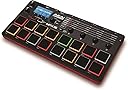
The AKAI Professional MPX16 is a portable, standalone finger drumming sample pad controller featuring 16 velocity-sensitive, backlit MPC-style pads. It supports pro-quality 16-bit/48kHz sampling via onboard stereo mic or 1/4-inch inputs, with MIDI integration for seamless studio and live use. Expand your sound library easily through an SD card slot supporting up to 48MB of samples, all managed via an intuitive interface designed for quick setup and performance.


| ASIN | B00J4JPUFS |
| Guaranteed software updates until | unknown |
| Item model number | MPX16 |
| Manufacturer | inMusic Europe Limited |
| Product Dimensions | 14.63 x 29.57 x 3.05 cm; 680.39 g |
P**O
Great product
I put off buying this for a long time, mainly due to reviews here and elsewhere online. After watching a product demonstration on YouTube I decided to buy and I am very glad that I did. This is an excellent piece of kit that does exactly what I needed. I was looking for a stand-alone sample pad that did not need to connect to a laptop and would fit straight into my existing keyboard rig. The MPX16 ticks those boxes, resting neatly on one of my keyboards on its non-slip rubber feet. The menu system is so intuitive that within a few minutes of unboxing I had figured out most of the functions without referring to the manual. The pads themselves are robust and dynamic, responding well to velocity and colour-coded to indicate in play, sample assigned etc. Within a couple of hours the MPX16 was part of my set-up and I was using it live; it's that easy to use. I need it to trigger phrases so I won't say much about the internal sounds; they seem OK but most of them (like the hip hop kits) won't be of any use to me. I want to address some of the comments in other reviews. There have been a number of comments about how difficult people found it to load samples, not knowing what format they should be in. The user manual on page 9 makes it pretty clear which formats are acceptable so before the product arrived I had prepared my samples in Audacity (if you're working with samples and you don't have Audacity, you should download it immediately). It was a simple task to drag and drop my samples onto my correctly-formatted card (also page 9) and the MPX16 picked them up immediately. If you want to use the MPX16 as the card reader, the instructions on page 12 are quite clear on how to do this. Alternatively, you can download the converter from the Akai site. I have seen a number of comments that the maximum capacity of samples that can be loaded into a kit at any time is 30MB - in fact, it's 48MB (page 9 again!). Most of the problems encountered by other reviewers would have been avoided if they'd read the manual! However, it is true that each kit takes a while to load from the card. I have one kit containing 38MB of samples and it takes about 2.5 minutes to load. Having said that, if you arranged your set and your kits appropriately, you could still probably get away with it. Again, use Audacity to optimise your samples to make them as lean as possible. I haven't tried sampling on the device; at the moment, it's not what I need it for. Having said that, like everything else about the MPX16 it appears to be fairly straightforward. Overall, I am very pleased that I went with the MPX16. It may not be for everyone, but it's perfect for my requirements.
V**N
Great buy
Glad that I bought this and didn't pay attention to some of the reviews on here. I don't know maybe I didn't get a bad one. Super simple to use, does what it says, extremely straightforward to adjust pad parameters, easy to record with the usual AKAI threshold type settings. easy to adjust start and end points for looping. Sound is nice. Bought this to use for sample loop playing and finger drumming when gigging. Doesn't seem to take an excessive time to load kits evn with a few longer samples in their. Took me a little while to realise which SD card to use but bought the same 32GB cards that are recommended items to buy alongside the MPX16 anyway, which are fine. The cards have to be formatted as FAT32 so your limited to 32GB cards anyway
R**D
This sampler is great but I have found it a little bit anti ...
This sampler is great but I have found it a little bit anti user friendly. I have never owned a sampler before though so I am learning still.
T**O
This is what it's for
I have a Roland electronic drum kit. Another reviewer has asked "What is this for?" I wanted to expand the sound pallette of my drum kit beyond its 125 built in sounds. The nearest competitor is the Korg Volca-Sample Digital Sample Player Synthesizer , but comments from users indicate that unit responds to any MIDI signal by playing the currently selected sound. That is no good for me as I need different sounds triggered depending on the note signals sent from the kit. The other option is the KORG ESX2 Electribe Sampler Music Production Station which is currently more than twice the price and has a lot of features I don't need. I have hesitated to buy this due to the bad reviews, but I felt that it would be a good solution to my problem if I could get it to work, and I could always return it if not, so I decided to take the risk. I bought the MPX16 rather than the MPX8 as my drum kit has more than eight pad triggers. First problem is that It wouldn't play some samples. Even after converting them with the conversion software that is downloaded from the Akai website they still wouldn't play. However, I discovered that if just imported them into Audacity and then exported them as 16 bit PCM WAV (the default option) they worked fine. The controls are a bit counterintuitive. The pads are numbered backwards, and the plus + key moves the cursor left, whilst the minus - key moves the cursor right. This is the opposite of what left-to-right reading Westerners would expect, but of course there are cultures in the world who read left-to-right so it suits them fine. Adjusting the MIDI channel to suit the drum kit works fine, and adjusting parameters such as tuning and reverb also works fine. I had a problem with the cymbal pads not triggering my crash sample, but if I assign the crash sample to a drum pad it works fine, which seems to suggest that this is a problem with my drum kit not sending MIDI signals rather than the MPX16. I have not used the sampling and I probably never will as I mostly used paid for professional samples. If I recorded my own I would use my TASCAM DP 006 Portable recorder and process them in a computer first. This unit has its faults, but it fits a particular need in the market at a nice price. Many of the people who gave bad reviews seem to expect too much for this price. It fits the need I bought it for, but I have to deduct stars for its faulty file conversion software, its slightly awkward usability, and the inability to change the MIDI channel which is stuck on 1. The manual also lacks detail, although some things are printed on the unit itself.
U**R
約1分おきぐらいで、ジーッまたはブッブッというノイズが入る(-40db程度だが)。アダプター使用でもUSB経由でも入る。HPにもMAIN OUTにも入るので、本体由来のノイズ。カスタマーサービスに問い合わせてみたが、製品の仕様で避けられないノイズのようだ、。小さい会場なら気にならないが。。何らかの対策は必要だ。他の方も書いているが、SDの読み込みが遅くて使い方には注意が要る。POLYモードで連打すると止まらなくなったりする(強制終了できるが)。安価でスタンドアローンだからと買ったが、使い道に悩む。SDカードは伝送速度の高いものを使わないとエラーが出ます。
D**Y
Getting samples into the correct format is pretty easy if you know how to use a computer. Other than that really can't complain it was cheap, it works well, it's nice.
J**R
Ich hab mir das Gerät als Jingle-Player für's Internet-Radio gekauft, weil ich keine Softwarelösung während der Sendungen verwenden kann. Daher kam für mich nur eine Hardware-Lösung, wie das MPX16 in Frage. Dieses Gerät erfüllt meine Anforderungen voll und Ganz. Ich kann 16 Pads mit den Jingles meiner Wahl belegen, die Klangqualität ist hervorragend, die Größe des Gerätes und der Pads genau richtig. Die Beschreibung des MPX16 ist in mehreren Sprachen dabei und gibt alle Funktionen klar wieder. Ich habe sie nur der Ordnung halber gelesen. Das Gerät lässt sich aber intuitiv bedienen. Wer schon einmal Synthesizer bedient hat, kommt auch ohne Anleitung mit dem MPX16 problemlos klar. In einigen Rezensionen war zu Lesen, dass es Probleme mit verschiedenen SD-Karten gegeben haben soll. Zumindest ich hatte keine Schwierigkeiten damit, meine Jingles im WAV-Format auf eine 8GB-SD aufzuspielen und im MPX16 den einzelnen Pads zuzuweisen. Sehr gut finde ich dabei die Möglichkeit, Samples im Gerät selbst "normalisieren" zu können. Dadurch können unterschiedlich laute Samples auf maximale Lautstärke gebracht werden und man muss nicht während des Betriebes an der Lautstärke herum schrauben. Alle Klang- u. Hüllkurvenparameter sind recht fix zu erreichen. Über die separat herunterladbare Software kann ich nichts sagen, da ich diese nicht brauche. Auch wenn der Preis nicht unbedingt niedrig ist, für das Gerät, ist es für meine Zwecke wie gemacht und somit eine Kaufempfehlung.
F**G
Estoy probando el segundo sampler que me enviaron dado que el primero llegó con un pequeño defecto y se reiniciaba de vez en cuando de forma aleatoria. Amazon gestionó el cambio de un día para otro de forma excelente. El sampler cumple con los requisitos para quien necesite lanzar samples desde otro equipo midi. La lástima es que solo puede hacerse desde el canal 1 del secuenciador que utilices. El sonido es bueno, los samples se gestionan bien con la botonera y las ruedas de control y no va nada mal por el precio que tiene comparando otras opciones del mercado bastante mas caras. También sirve para aquellos que les guste hacer música a base de samples en directo. Recomiendo su uso, a mi me está yendo bastante bien aunque una actualización de firmware que permitiera secuenciar mas canales midi sin problemas estaría bien. Lo recomiendo.
A**K
Als Hobby-Musiker habe ich diesen günstigen Sampler zuerst mehr als Spielzeug gekauft, nutze ihn nun aber öfter positiv: - Preis - Größe - Robustheit - Standalone-Fähigkeit - Latenzfreiheit - Einsatz von Tasten und Drehreglern anstelle von Touchbedienung - grobe Bearbeitung (Hall, Geschwindigkeit, Lautstärke, Attack, Filter, Equalizer, Auslösezeiten, etc.) am Sampler ohne Rechner und Software möglich - beleuchtete Tasten mit Feedback über Farbe (Abspielen, Aufnahme, etc.) - integriertes Mikrofon ganz brauchbar negativ: - lange Ladezeiten für die einzelnen und insbesondere selbsterstellten Kits - Anschlagsdynamik für wirkliches Live-Bespielen gewöhnungsbedürftig, d.h. zu progressiv. Der oft werden Taps nur als "leiser" Anschlag gewertet, sodass manche Sounds etwas untergehen. Evtl. Lösung: Auslösung ohne Anschlagsdynamik einstellen (alles gleich laut) Sonstige Anmerkungen: - im Gegensatz zu Nutzern aus einschlägigen Foren habe ich keine Probleme mit der aktuellen Firmware, d.h. keine Abstürze oder sonstige Bugs
Trustpilot
2 months ago
2 months ago