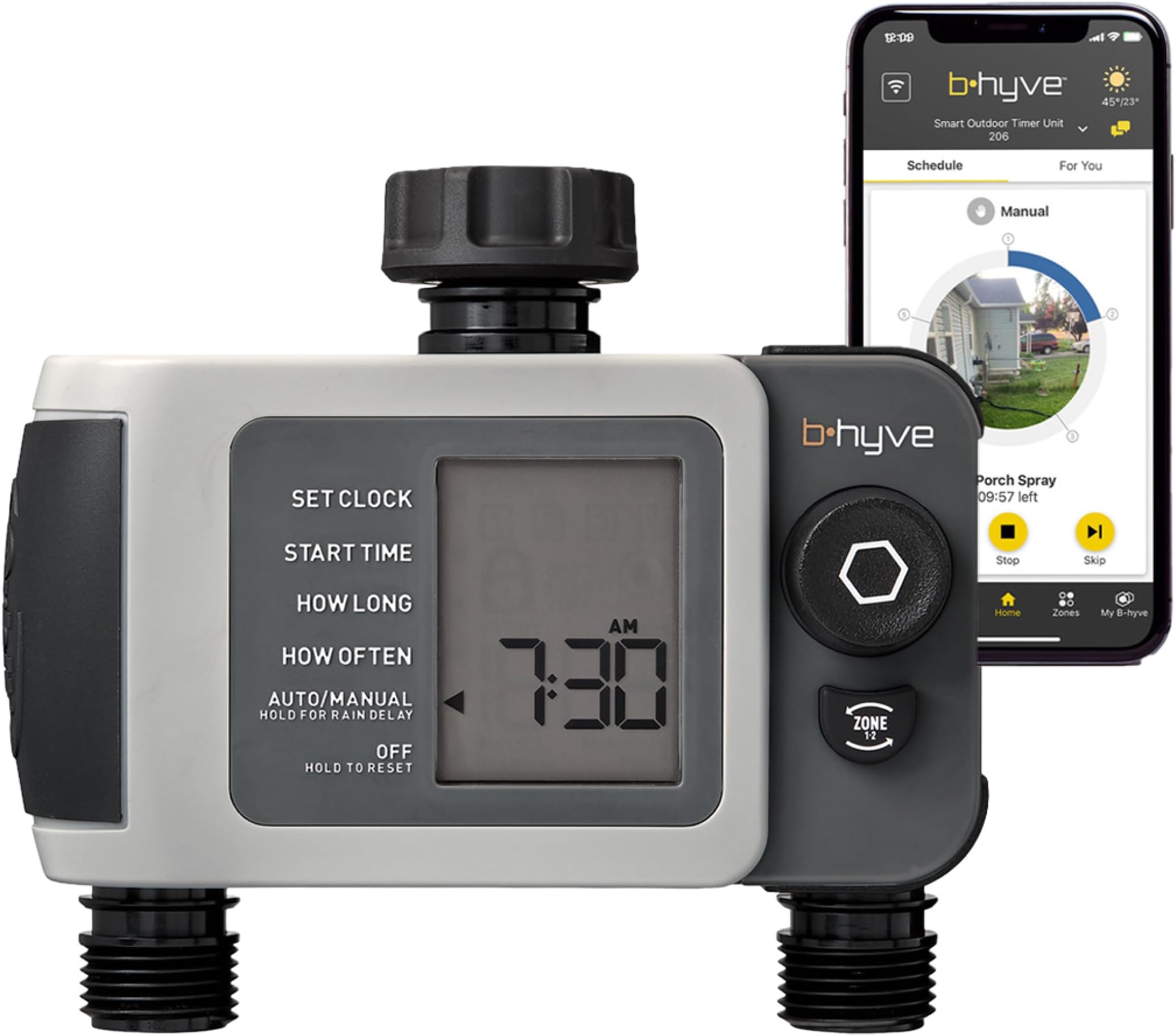
B-hyve XD Hose Faucet Timer
Product ID: 517099590
Details
- BrandOrbit
- ColorGray
- Item Weight1.1 pounds
- MaterialPlastic
- Number of settings5
💧Dual independent watering outlets
📱App-controlled Bluetooth & Wi-Fi
🌦️Weather-adaptive smart watering
Desertcart purchases this item on your behalf and handles shipping, customs, and support to Bolivia.
💧 Stay ahead of the drought—smart watering that works while you don’t.
The Orbit B-hyve XD 2-Port Smart Hose Watering Timer is a weatherproof, battery-powered irrigation controller featuring dual independent outlets and Bluetooth app connectivity. It leverages advanced WeatherSense technology to automatically adjust watering schedules based on local weather conditions, helping homeowners save water and maintain healthy landscapes with effortless smartphone management.




| ASIN | B0BSRDWMNF |
| Best Sellers Rank | #923 in Patio, Lawn & Garden ( See Top 100 in Patio, Lawn & Garden ) #5 in Watering Timers |
| Brand | Orbit |
| Brand Name | Orbit |
| Color | Gray |
| Customer Reviews | 3.9 out of 5 stars 2,011 Reviews |
| Global Trade Identification Number | 00046878246324 |
| Item Type Name | Sprinkler Timer |
| Item Weight | 1.1 pounds |
| Manufacturer | Orbit |
| Manufacturer Part Number | 24632 |
| Material | Plastic |
| Material Type | Plastic |
| Model Number | 24632 |
| Number of Items | 1 |
| Number of settings | 5 |
| UPC | 046878246324 |
O**.
Great alternative to an expensive inground sprinkler system
I have used Orbit automatic watering systems for several years. It used to be you had to program your inexpensive Smart Watering system manually. It worked great; saved me lots of time and aggravation. I say inexpensive because the B-Hyve costs $80 to $90. The alternative, which I used for years was to water my lawn and plants manually, having to move the hose and sprinklers all the time. Of course, I could spend thousands of dollars installing an underground sprinkler system, which requires expensive maintenance. Then, Orbit introduced Orbit B-hyve that could be controlled by an App connected via Bluetooth. It worked fine, but it had distance limitations, so sometimes I had to open my windows to connect the App. Later, Orbit came out with the Gen 2 wi-fi hub. From that point on it has been extremely helpful. Almost perfect. We need to understand that the complete system only costs $100 - $120. For that money you get a reliable automatic watering system that control up to 4 sprinklers (8 in my case); the system can be programmed using the App. The programming is very friendly. You program dates, times and zones very easily. Unfortunately, as in every existing App in the market, you have to read the INSTRUCTIONS. In addition to the automatic watering based on your program(s), you may instruct the system to water your lawn manually. When there is expected rain, you can delay watering by hours or days. The system is so good that using your location, they automatically delay the watering if there is forecasted rain in your area. These benefits are what I call it a GREAT product. All for one time purchase of $100-$120 Honestly, I cannot understand the terrible reviews that some "uninformed" individuals write about this product. So, everything went perfect? Not really. I had two 4 port watering system, both connected to ONE wi-fi Hub. There were times that they could not connect to the wife Hub. After talking to customer service, they suggested for me to add on more Hub (less than $30) and since then (more than one year) the system has worked as designed. Please understand that a $28 Hub, cannot provide the perfect wi-fi connectivity. It is NOT an I-Phone! Give it a try and SAVE thousands of $$$$'s but please read the Instructions before using and be patient. It has a learning curve.
J**S
An excellent addition to your watering system
You have three options when you start adding new plants to a yard: you can water manually all the time, you can do a ton of digging to add zones to your sprinkler system, or you can do one of these. I moved into the B-hyve ecosystem a few years ago when my old Rainmachine died and it was obvious that the company wasn't coming back. I've very glad that I did. - Easy to set up. Attach to your faucet, attach your hose, turn on the water, and use the app to set and forget. Each of the four valves can be controlled separately, but not at the same time (not enough water pressure). - The Bluetooth-WiFi bridge is a must if you don't yet have one. Otherwise it can only be programmed and monitored when your phone is in range. It also means no persistent data access. You can easily set this up standalone with the controls on the device should you so choose. - When the instructions say "don't leave this outside in freezing weather", it's serious. I had one valve crack because of this. When you have a freeze warning, turn off the faucet and disconnect it to prevent damage. - A pair of AA batteries lasts the entire season. It's nice to not burn through a ton of them. - The application has improved with time. It used to be a lot less intiutive. Even so, the software has some learning curve if you need to make manual adjustments. It's also frustrating that each device is managed completely separately rather than from a unified console. The web interface has been quite broken for some time and is basically unusable, but the mobile app is good enough that this is an annoyance rather than a barrier to use.
J**S
Worthless
What a waste. Do yourself a favor and pay the extra money for a better brand. I bought one of these last year for the summer, and it did great for the first two weeks. On the first trip I took away from the house, the system decided to stop working without any notification. I lost a large portion of my vegetable garden as a result. I thought at first I messed up and didn't have the programming set up correctly so I reset, only to have it happen again with no notice through the app. I wrestled with it all summer and then put it away in the fall, only to get it out again this year and find the thing completely useless. Manually watering doesn't even work anymore. The system will run for a few seconds and then shut off, helpfully informing me that the "watering completed successfully" despite watching it run for 20 seconds of it's scheduled 10 minute program. I have tried getting ahold of their customer service and have been given no solution. The first two times I was informed the model was running fine despite my observations. I was told to change the batteries, log out and log in, and finally delete and reinstall the app. After following their instructions to reinstall the app, they promptly stopped responding to my requests for help. The app claims I don't have an Internet connection." Despite my better judgement, I even ordered a second module to see if the first was defective. Turns out that no, the model isn't defective. It's just a piece of garbage like the first one. I'll be returning this and won't be giving orbit any more of my money. I strongly recommend you do the same.
S**M
A reliable product that helps conserve water
I use two of these timers to manage watering for my front and back gardens. Living in the Pacific Northwest, we may get plenty of rain for much of the year, but from July through September it's a different story. During those months, staying on top of irrigation is essential. Installation was straightforward. I connected the timer to my hose bib and purchased the optional Wi-Fi hub so I could control everything through the B-hyve app. Pairing was quick and painless. Setting up watering schedules for the four zones took a little time to learn, but once I understood the workflow, everything worked reliably. The only aspect that felt a bit unintuitive was that you first have to select which timer you're programming before creating the schedules for its four zones. If you're only running one timer, this probably won't be an issue. With multiple timers, there's a slight learning curve. One feature I absolutely love is the weather-based watering adjustment. The system can temporarily suspend scheduled watering when rain is in the forecast, and it actually does a very good job. It's a great way to conserve water without having to monitor the weather yourself. I've been using these timers for about two years now, and they've performed flawlessly. Battery life has also been excellent, with the batteries lasting roughly a year before needing replacement. In fact, I've been so impressed with this product that when the controller for my lawn irrigation system failed, I replaced it with another B-hyve controller. Now I can manage both my garden irrigation and lawn watering from my phone while relaxing on the deck with a cold beer. That's modern technology putting in a solid day's work. Overall, highly recommended for anyone looking for a reliable, flexible, and smart watering solution. 🍺🌱💧
M**W
Pretty good product, amazing customer service
I picked up two of these four port timers to set up irrigation in my backyard for over 40 trees. I live in Arizona so not only is irrigation important, but one day without can do serious damage to a young tree if something happens to the system. For the most part I have been very happy with these timers. I access them most often using the Bluetooth option from just inside my home. I do not have or use the hub, I don't find it necessary. Here's where their customer service comes into play. The only issue I've had with these timers is that they have occasionally frozen up. The one on my east faucet has frozen four times, the one on my west faucet has frozen once. When I say Frozen I mean stuck on the same screen, the timer is not activating when it's programmed, I cannot connect to it with my phone via Bluetooth. After the first occurrence of this, which I didn't notice for 3 days so my new row of fig trees took a major hit, I realized that I would be able to tell it was frozen because I could not connect via Bluetooth. If I slip the batteries out, wait 5 seconds then slip them back in the unit will work fine again for the most part. This was a real drag but it seemed like something I could work with since I have the Bluetooth application. The problem is that with Arizona's 100° plus temperatures if it freezes up for the day then I have one zone on the east side that really gets hit hard because it's all young rooted cuttings. While the rest of my yard looks fantastic, that one zone looks like it was just planted because it's been hit by system freezes four times and keeps being set back. So I reached out to their customer service using the chat option on their website. Orbits customer service was fantastic! (To be clear, I reached out to the manufacturer not to Amazon.) The agent was very friendly and for the most part knew what I was saying. He continued to come back to questions about the app, like that was the cause of the problem, but I believe that's because they have to ask a bunch of very specific questions before they can honor the warranty. I was on chat with them for about 20 minutes. I did not give them the model number because it was still in use and I didn't want to take my system apart and read it from the bottom of the unit. This was not an issue. He just asked me to hop on Amazon and send them a screenshot of my purchase 4 months ago. Which was easy enough. I did not ask for a refund. I did not ask for a replacement. I was simply reaching out to them to let them know that there is an issue with their timers. Especially since I never let either of my timers get below 80% battery life. I'm pretty neurotic about that. After a pleasant 20 minute conversation with their customer service I ended the chat with a warranty code for the orbit websites so that I could go on and order two replacement units ( under warranty replacement ) at no charge to myself. No shipping charge, no cheap little hidden charges like that, just 2 valid replacements at no cost. This has been an overall positive experience and I wouldn't hesitate to pick up their products again. As far as issues go, this is something I can work with if it happens on a new issues as long as I stay on top of checking everyday. Which is a little annoying but not the end of the world. I have otherwise had no issues. They're constructed well and for the most part function great. Other than that one issue. (I did attach several pictures to show the difference between the zones. All of these were planted in May and they were all rooted cuttings that were about 8 in tall. The first two pictures are of fig bushes on the west side that have not had as many issues. They have multiple canes and stand close to 5ft tall already. The next two pictures of the smaller trees are from the zone that got hit from the timer freezing up. Obviously, they should be much bigger going into this time of year. They stand at about 1.5ft tall currently. But, I didn't actually lose any and they should make up for lost time next spring.)
M**Y
It's been working great!
I was a bit concerned at first reading other's reviews but it has,been work really well for me. Easy to set up as well. I guess the one annoying thing is the bluetooth doesn't stay connected even if I'm staying within range so I would have to reconnect often if I want to do some manual watering or testing but once automatic watering setup successfully, no need to mess with it anymore. I'm really happy with my purchase!
Q**N
Flakey connection even with Wi-Fi
3 starts, but I still bought a second one! The bluetooth connection is terrible. It does eventually connect most of the time if I'm standing right next to it. Wifi works at much greater range and is more reliable, but it can take a long time to connect. When it connects it's pretty nice. The interface isn't the best, but it has lots of features. The smart water (wifi module required) looks pretty cool, but hasn't kicked in to start watering in over a month have having been set up. It says 8 days... perpetually. It does stop the watering for rain and wind delays just fine. The smart features really do look pretty detailed and cool... but I just don't know if they actually work (for one timer they have yet to turn on at all). All that said for your basic timer of which you can have several with 4 zones each, it's pretty decent. If you don't have buried pipe but you do have hoses, and especially if you just put down grass seed, this is a MUST have - even with all its flaws. And who knows maybe the flaws will shake themselves out (or maybe I'm doing something wrong). But just having a time for hoses is great and this is the best one out there, warts and all.
C**R
“Game-Changer for My Garden & Flowers – Automates 4am Watering Perfectly!”
I bought the Orbit B-hyve XD 4-Port Smart Hose Watering Timer specifically to automate watering for my vegetable garden and flower beds, and it has been a game-changer this season. No more forgetting to water or overwatering during hot spells—my plants are thriving with consistent moisture, and I’ve saved a noticeable amount of time and water. A nice guy I chatted with while shopping for hoses told me one thing this device could do that he couldn’t: get up at 4am to water the garden. He wasn’t wrong! I now have it set to run early in the morning on a schedule, and I sleep in while everything gets perfectly watered. Attaching it to my outdoor faucet was straightforward. The 4 ports let me run separate hoses or drip lines to different areas: one for raised veggie beds, one for flower borders, and the others for containers and a small herb garden. It comes with a Wi-Fi hub (included with this model), which I set up indoors. Pairing everything through the B-hyve app took a few minutes once I followed the instructions. You can also program it directly on the device using the digital display and dial if you prefer not to use the app. den & Flowers The smart watering is excellent for gardens. In the app, you input your soil type, plant types (it has options for flowers, vegetables, etc.), sun exposure, and location. It then pulls local weather data and adjusts schedules automatically—skipping watering after rain and optimizing run times so I don’t waste water. I’ve set different programs for each port (e.g., shorter cycles for delicate flowers, longer for thirstier veggies), with up to 4 start times per zone. The Bluetooth range is decent for quick checks, and full Wi-Fi control means I can start/stop or adjust from anywhere. If you have a garden or flowers and hate daily watering chores, this 4-port XD model is worth every penny. It keeps my plants healthy with minimal effort and has paid for itself in water savings and convenience. Highly recommend—especially the multi-port version for zoned watering. 5/5 stars! Would buy again. Perfect for busy gardeners. 🌱
E**S
Recomendada
La mejor opción para automatizar tu riego
P**N
Good Value
Works well. Needs a wifi hub to connection without Bluetooth. Also very "hard" stops and starts. Program on app confusing. Zone D doesn't correspond to outlet 4. Need to use program 4. Once worked out it works 100% though.
J**H
American fittings not suitable for Australia.
Sold in Australia by amazon.au but USA items sent to Australia not suitable for australian plumbing.
U**O
Excelente opción
Muy amigable la aplicación y el display
R**.
Decepção com o produto e com o valor a ser reembolsado.
Péssimo. Produto veio com defeito. Uma das 4 saídas não funciona. E pra completar, para devolver o produto, a Amazon só me reembolsa cerca de 50%. Decepção total.
Trustpilot
3 weeks ago
1 month ago