Desertcart purchases this item on your behalf and handles shipping, customs, and support to Bolivia.
💡 Light up your smart home game with Kasa Matter Dimmer—where control meets convenience!
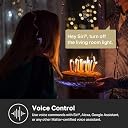
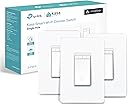
The Kasa Matter Smart Dimmer Switch KS225P3 is a sleek, Matter-certified smart switch designed for single-pole setups requiring a neutral wire. It offers full dimming control from 1% to 100%, voice compatibility with all major assistants, and remote management via the Kasa app. With advanced scheduling, multi-admin support, and easy app-guided installation, it’s a top-tier choice for millennial professionals seeking seamless, secure, and stylish smart home lighting control.


| ASIN | B0C9KJT36W |
| Actuator Type | Push Button |
| Best Sellers Rank | #952 in Tools & Home Improvement ( See Top 100 in Tools & Home Improvement ) #2 in Dimmer Switches #4 in Home Automation Devices |
| Brand | Kasa Smart |
| Brand Name | Kasa Smart |
| Circuit Type | 2-way |
| Color | White, Matter Compatible |
| Compatible Devices | Apple Home, Amazon Alexa, Google Home, Samsung SmartThings, Android, iOS, Apple HomeKit |
| Connectivity Protocol | Wi-Fi |
| Connector Type | Screw |
| Contact Material | Copper |
| Contact Type | Normally Closed |
| Control Method | Touch |
| Control Type | Full |
| Controller Type | Amazon Alexa, Android, Apple HomeKit, Google Assistant, iOS |
| Current Rating | 2.5 A |
| Customer Reviews | 4.6 out of 5 stars 1,052 Reviews |
| Included Components | KS225×3, Wall Plate×3, Wire Nuts×6, Screws×6, Quick Start Guide |
| International Protection Rating | IP00 |
| Item Dimensions | 5.04 x 3.33 x 1.78 inches |
| Item Weight | 414 g |
| Lower Temperature Rating | 32 °F |
| Manufacturer | TP-Link |
| Material Type | Plastic |
| Model | KS225P3 |
| Mounting Type | Pole,Wall Mount |
| Number of Items | 1 |
| Number of Positions | 3 |
| Operating Voltage | 120 volts |
| Operation Mode | OFF, Smart Switch |
| Part Number | KS225P3 |
| Specification Met | UL |
| Switch Type | One-way |
| Terminal | Screw |
| UPC | 840030706257 |
| Unit Count | 3 Count |
| Upper Temperature Rating | 104 °F |
| Wattage | 150 watts |
C**A
Alexa app compatible.
Very easy to install and connect to the internet. I would recommend these switches to anyone who is trying to build a smart home, as you can create routines through the Alexa app very easily, and everything is voice-controlled.
K**C
If you're a Kasa system user, you'll love this
Amazon has made it too easy to purchase Kasa/TP-link products, so I own a bunch of interior and exterior plugs for Christmas lights, fans, and outdoor security lighting. I say this because if you already are using Kasa's app with Kasa's various products this switch is a natural extension to your line-up. The instructions made it easy to install because they even include wiring lables (black, neutral, etc.). The Kasa app immediately discovered it for pairing. It works well with our LED lighting/bulbs and I've had no issues with flickering or anything unusual. Since the app let's you group switches, bulbs, and plugs, you can turn them all off or on with a single finger press. It's supposed to work with Alexa et al, but I haven't done that.
W**B
Work flawlessly and easy install!
These gems work like a champ! This is my 4th one and I still marvel at how easy they are to install and how flawlessly they work. Smooth dimming and absolutely no hum from the LED bulbs!!
A**X
Works great with Apple HomeKit
Works good for us. Install was just like pretty much any other light switch. You do need to have the white (neutral wire though). I installed it on a 3 switch box and none of the original switches had the white or ground wires hooked up, so needless to say it did take a little trial and error to figure out which neutral and ground I needed to hook up to the switch so it would work. Once installed I used the matter QR code in the box and got it connected to my apple home. After 2 failed attempts to connect to my Apple Home I noticed a reset button on the switch and pushed it. After that it connected right up. For the price I don't think this can be beat right now.
Y**G
Works Well but Integration Could Be Better
The Kasa smart switch works great, with a full set of features and smooth control through the app. However, there is a minor issue: while it stays connected in the Tapo app, it sometimes shows as offline in Google Home when connected via Matter. Not sure if this is a Google Home issue or a Kasa issue, but hopefully it can be improved.
R**C
Simple setup and work flawlessly.
These switches work flawlessly and setting them up to work on my WiFi with Alexa was simple & quick. Highly recommend these.
M**N
Bye Bye Wemo
I replaced my orphaned Belkin Wemo switches with this and am very happy. I love that the switches can be set to slowly dim the lights when they are turned off. This gives use time to get in bed, leave the room, use the stairs, as the lights are slowly turning off.
D**B
Matter support!
I first installed a Leviton smart dimmer based on a recommendation from a relative who has a dozen of them. The quality was good, and their app was fine, but Matter support was basically non-existent. It required a beta firmware and changing a setting on my router that my router didn't even support, so it was effectively unusable. It refused to connect to HomeKit no 'matter' what I tried. I ended up removing it and installing this one instead. I got the device added to HomeKit via Matter in minutes, and it works perfectly!
B**R
Easy to install and set up
Works as expected and fairly easy to program
D**O
No Pain no Gain
I have had a smart home with 50+ devices for about a decade, since Apple first brought out its HomeKit smart home system. I have a lot of experience with the benefits and also the many hassles of smart home devices. Firstly let me comment on the physical product itself, and the company behind it. Great design. Great quality. Committed brand, with a good track record I think you can trust. Easy to physically install if you are comfortable with connecting wires, and can turn off a circuit breaker. You MUST have white "neutral" wires, which typically any electrical system done since the 1980's will have. Instructions are straight forward. You might discover some of your existing switches are not wired in typical ways. If this is the case and you don't fully understand it, get an electrician. I think most people will be okay. BUT … from an all around software setup perspective, this is by far the most aggravating installation experience I ever had - until it wasn't. This is the FIRST Matter protocol device I have installed in my Apple Home. I DO have the required Matter/Thread routers that are needed. In this case of an Apple Home, several Apple TVs and HomePods. If you use Google Home, or Alexa, or other you MUST also have in your home a “Matter Hub” capable product from Google or Alexa respectively. I spent almost a full time week, googling, trying various things, getting frustrated, and I would rate myself a 9/10 on expertise in this area. Until I learned the best trick. You HAVE to FULLY commit if you want to move to the Matter, protocol and I think you SHOULD. Even if you do at first get it working without this drastic step, I think you are just pushing hidden problems into the future. Start FRESH. All those smart home rules, profiles, pairings, etc you have built over the years - you should DELETE THEM ALL, and FACTORY RESET ALL your smart home devices. Delete your ENTIRE home profile. Start over completely. Drastic yes. But just like it is much easier to build a quality new home from scratch, rather than patchy renovations to an existing home, the same applies to a smart home when moving to a very different technology, in this case “Matter”. If you want to get into the Matter ecosystem, and I think any serious smart home enthusiast SHOULD, you have to understand that you are much more on your own right now than by sticking with a current proprietary ecosystem. The attempt to make Matter work with many different platforms, means the ability for product manufacturers, and Ecosystems - like Apple, Google, or Alexa support, to assist you is very limited, even when they want to. One MORE step. Do the same with your router. FACTORY RESET. It also plays a core essential role in the reliability of your smart home. If you have a cheap router you should really consider something higher end. When I took the deep dive, and started from scratch, I was able to set up all my Matter devices with ease. Another suggestion - just because matter claims to be able to support multiple home ecosystems out of the box, DON’T do that. You are asking for trouble, Pick 1 like HomeKit as I did, or Google Home, or Alexa, or SmartThings, or other platforms, and do EVERYTHING on that ONE platform. Also install the manufacturer specific apps for direct control of your devices, outside of any ecosystem. Reduce complexity, don’t embrace it. Yes, Matter is still quite frustrating, but most of the issues should be solvable through updated ecosystem software and product firmware. I still believe it will become THE standard, likely the ONLY standard in the future. So unless you need features not yet supported by Matter, I think Matter devices are worth the initial pain, to future proof your investment. Hope that helps !
A**R
Works well
I like the geofencing feature. It knows I’m home and automatically turns on the lights.
A**N
Well worth the money!!
Great switches. Easy set up and use with the iOS home app.
P**E
Return
Didn’t work for my space return went without a problem
Trustpilot
1 month ago
1 month ago