


🎨 Elevate your 3D printing game with color, precision, and smart automation!
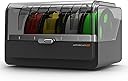
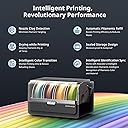
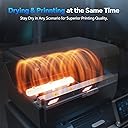
The Anycubic ACE Pro is a cutting-edge 3D printer accessory designed for the Anycubic Kobra S1, enabling multicolor printing with up to 8 colors. It features advanced filament care technologies including dual PTC heating and 360° hot air drying to maintain optimal filament condition during printing. Smart filament backup and humidity presets automate material management, reducing downtime and improving print quality. Built with metal construction and supported by a 3-month warranty and 24/7 customer service, the ACE Pro is engineered for professionals seeking reliable, vibrant, and efficient 3D printing.




| Best Sellers Rank | #75,300 in Industrial & Scientific ( See Top 100 in Industrial & Scientific ) #1,549 in 3D Printer Accessories |
| Brand | ANYCUBIC |
| Color | black |
| Compatible Devices | Laptop |
| Customer Reviews | 3.9 out of 5 stars 83 Reviews |
| Item Weight | 12 Pounds |
| Material | Metal |
| Product Dimensions | 17"D x 13"W x 13"H |
G**G
Nice
Works awesome.
B**N
Great quality, but may cause print errors without proper maintenance
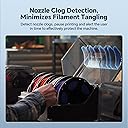
Excellent quality and customer service. However ace pro machine itself tends to clog anti blocking module and cause abnormal filament recreation errors
B**.
Not a fan
So far I am not a fan of this and don’t recommend it. I bought the S1 combo and before i received it I bought this to make it an 8 color printer. Out of the box from the combo the ace one had problems reading filament in the 1st port. Went round and round with the support and figured bad sensor. Asked them to replace it and they are going to. Which is great. In the meantime my 2nd ace pro came. Out of the box it was much better. Started printing and 11% into the print it jammed in the buffer. I cleared that restarted jammed again same buffer. Cleared it again. Then another port stopped working and now I’m trying to find out why, and hopefully fix that. So 2 ace pros and not a finished print yet. I can probably take the ace pro apart with my eyes closed now, but i cant seem to get it to run long enough to print anything. The printer itself prints well (from the lil bit i have seen since i cant get a full print done). If i wanted to print 1 color i would use my kobra plus which works great. So, I found all the clogs and removed them, and started a large print. Things were going well...until it started having the exact same issue that the 1st Ace Pro I received in the combo had. 23% into the print port 1 stopped reading the filament and gave a broken or abnormal filament error. like the other ace pro any movement to the filament caused the light detecting it to go out and send the error. Received the return label for the 1st ace pro which is going out today, but now I can only print with 3 colors, and if it is like the other unit port 3 will go out soon too. Still not happy with the Ace pro. I keep getting ACE pro lemons. from what I can see of the print i will be really happy if I can get an ace pro that will actually work. Wanted to update, and I am still not a fan of this machine. Since I have had this I have only gotten it to do to prints. The machine clogs constantly. The 1st position on both machines still act up and now the 2nd position is going bad. It will feed but not retract. In the time I fight with these to get one print I can print 3 prints on my old Kobra printer and paint them by hand. I f I could give this thing a negative rating I would.
C**S
Works, some quirks.
Bought this to store and dry filament mostly as multi-color prints on single nozzle printers can produce a ton of waste. For storing and drying filament, it works well with one caveat, you should not run any abrasive filament through this, it should be fed directly to your extruder. The reason for this is pretty simple, abrasive filaments i.e. glass-filled or carbon-fiber will wear out PTFE tubes and other plastic parts quickly. So, if you do not run any abrasive filaments, this is actually a really solid option for storing and drying filament as long while it's still ready to use as you're working with compatible materials. Obviously drying polycarbonate and PLA in the same space is not going to work super well so you'll want to keep that in mind with this machine. I've only run one multicolor print but it was multicolor on separate objects so I printed by object and got two different colored pieces. It worked exactly as expected, minimal waste and good results. Now, as far as getting this hooked up to the Kobra S1, kind of a pain due to the tiny blue clips you need for the PTFE tubes. They are not easy to remove and replace due to their size which also makes them super easy to lose. Other than that, it was easy and generally works well with the exception of filament misfeeding into the filament guide when putting in a new spool. Sometimes the filament goes in, the machine recognizes there is filament, then it starts trying to pull the filament but the filament is stuck because I didn't get it fed it just right. Annoying, but the idea here is that I don't have to swap spools on the back and not as often. Overall, it's decent for what it is but could be better. I'd also like the ability to feed externally mounted filament easily but that's more about the Kobra S1 than this in particular.
C**H
⭐️⭐️⭐️⭐️⭐️ Game-Changer for the Kobra S1 — Anycubic Absolutely Nailed It!
I’ve been running my Anycubic Kobra S1 nonstop since the day I unboxed it, and adding the ACE Pro took my printing experience to a completely new level. Setup was ridiculously easy — Anycubic clearly designed this as a perfect match. Within minutes, I was up and running, and the first print came out buttery smooth with zero stringing or under-extrusion. The speed boost alone is worth every penny. Prints that used to take hours now finish in a fraction of the time without sacrificing quality. Layer adhesion is rock solid, and fine details — especially on small mechanical parts — look laser-sharp. It’s like my Kobra S1 got a professional upgrade overnight. Noise levels dropped noticeably, and the ACE Pro keeps temps consistent throughout long prints, which means fewer surprises mid-job. The engineering here is thoughtful and precise — exactly what I’ve come to expect from Anycubic. If you’re on the fence, don’t hesitate. The ACE Pro makes the Kobra S1 feel like a flagship printer. Anycubic didn’t just make an accessory — they made the printer better. 🔥 Highly recommended for anyone serious about getting pro-level performance out of their Kobra S1.
B**S
be ready to take it apart to fix it a lot
worked good at first now there crunching sound and gives errors
J**N
Good 8-color upgrade
I picked up the Anycubic ACE Pro to expand my Kobra S1 setup from 4 colors to 8. Installation was simple and it runs the same as the one included in the bundle. You will need to buy the 8-color adapter separately, which is easy to miss if you have not used the bundle version before. The extra colors are great for multi-color prints, but you have to be careful with the type of filament you load. It struggles with cardboard spools and some third-party brands. Anycubic spools work best since the RFID tag automatically sets the right color and temperature in the printer. You can stack this on top of another hub to save space, though it gets annoying if you change spools often. I keep my least-used colors on the bottom. If you already have a Kobra S1 and want more color options, this is a solid upgrade. Just plan on also picking up the 8 way adaptor which is sold separately.
J**N
Love Anycubic
I hooked this up so I could print 8 colors! Love that it has a dryer built in. Highly recommend!
Trustpilot
2 months ago
2 weeks ago