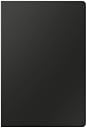
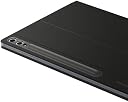
⌨️ Unlock your tablet’s full potential with AI-powered productivity on the go!
The Samsung Galaxy Tab S10+ Book Cover Keyboard AI Key is a sleek, lightweight protective cover with a full-size keyboard and trackpad designed to deliver a PC-like experience. Featuring a dedicated AI key for quick access to Bixby and Gemini, an adjustable hinge up to 150°, and wireless keyboard sharing across multiple Galaxy devices, it enhances productivity and flexibility for professionals on the move.


| ASIN | B0DB2QFWQF |
| Age Range Description | Adult |
| Best Sellers Rank | #33,936 in Computers & Accessories ( See Top 100 in Computers & Accessories ) #262 in Tablet Keyboards |
| Box Contents | Book Cover Keyboard |
| Brand | Samsung |
| Brand Name | Samsung |
| Colour | Black |
| Compatible Devices | Tablets |
| Customer Reviews | 4.4 out of 5 stars 277 Reviews |
| Enclosure Material | Polycarbonate Thermoplastic Polyurethane |
| Form Factor | Cover |
| Item Dimensions | 19.3 x 28.6 x 1.5 Centimeters |
| Item Weight Unit of Measure | 513 g |
| Manufacturer | SAMSUNG |
| Manufacturer Part Number | EF-DX825UBEGUJ |
| Material | Polycarbonate Thermoplastic Polyurethane |
| Model Number | EF-DX825UBEGUJ |
| Pattern | Solid |
| Product Features | Lightweight |
| Shell Type | Hard |
| Theme | Game of Thrones |
| UPC | 887276897653 |
| Warranty Description | No Warranty |
M**N
جميل
جميل
Q**N
Legit
Does the job. It makes my tablet a handy dandy laptop.
K**E
Good
Works great
A**O
Teclado funcional y eficiente
Veo comentarios que esperan mucho del teclado, incluso algunas funciones que claro no te ofrece este, y por el precio, se me hace un poco caro (claro que tuve que pagar importación), pero sus imanes y la forma en que queda como funda es de lo mejor. La velocidad de escritura funciona perfectamente, el trackpad igual. El botón de asistencia con la IA es un plus excelente. Los materiales son de buena calidad. Esperemos a ver qué tanta batería consume. Si te lo puedes permitir, no te arrepentirás, sobre todo si eres estudiante.
A**C
UPDATED: Must Have for Samsung Galaxy Tab S10+, No Bluetooth!
Follow-Up: Having used the keyboard cover for a while, I have a few updates to my initial review: - My primary update is regarding the touchpad. After use for a while, I will say that the palm rejection continues to be good; however, I don't find the touchpad always as useable as it could be. Primary issues are with scrolling vs selection. I haven't found how to modify the behavior. Issues are: - When doing two finger scrolling on a window, the track pad thinks I want to select instead of scroll. Might have to do with how long my fingers rest on touchpad... ??? Still, it is very frustrating when it does that. Something to be aware of. - Click Areas. I always disable the lower right touch region and prefer to use a two-finger click for a right click. This touchpad / settings doesn't appear to offer that so I usually click bottom right and get a right-click instead of a single click. - This track pad does not work properly with Termux X11. A Termux Bug I think, but still something worth being aware of if you want to use Termux X11. (Bluetooth mouse works fine). - I carry a travel mouse when I know I need to work smoothly and disable the touchpad (fn + space). Easy solution... but I do wish it was more reliable touchpad. I think that is somewhat due to Android limitations instead of purely Samsung. - I would still get this instead of the cover without a keyboard as I really like being able to detatch the keyboard but leave back case on. I also notice the keys have a little more travel than the folio cover. - To my knowledge, only Samsung has keybaord that use the Pogo Pins... which is essential for lag-free typing. ----------------------------------- ---------------- Initial Review: Have only had and used for a a few hours today. Uning right now. For reference, I also have a Microsoft Surface Pro 12" that came out last year also. Similar size and I have the keyboard for that also. - The microsoft hardware, keyboard cover, and pen are solid. - The Samsung S10+ is a little wider and the keyboard is more comfortable than the Microsoft Surface Pro 12 (SP12). I was VERY concerned that the touchpad would have insufficient palm rejection like my NexDock 360 Touch (I am always having to turn off the touchpad when I am typing because the palm rejection sucks). So far, I have been very please with this keyboard AND the touchpad. The Touchpad works really well... and the palm rejection is excellent! - The AI key is nice and well integrated with the tablet. I like that it is Gemini (or Bixby) if you choose. I hate CoPilot, so this is a huge plus to me. Unfortunately, the Micorsoft AI integration is done in their eco system. - I don't find the AI integration with the Tablet as intrusive as Microsoft's experienc was. - NOW. There are many reasons I use my tablet daily and my SP12 rarely. The key reason is that Android has better support for Microsoft OneNote and Mobile Aplication Management at work. The SP12 doesn't have MAM support (and if it exists, my company hasn't licesnsed it). The MAM makes the Android apps operate locally so note taking has zero lag and synchronizes with my office notebook. - The addition of the keyboard makes this a powerhouse but if you truly require a PC for 90% of your work, then you may be happier with a Surface Pro. Tablets have come a long way, but despite the keyboard and Samsung's DEX on external screen and windowed mode on tablet, it still is not a full laptop. - BUT, my work access for a full laptop experience using Microsoft Windows App (Azure Virtual Desktop) gives me the PC experience for work and works respectably.... keep that in mind if that is how you access your work PC. Pros: Good keyboard layout. Decent key travel Great touchpad with pretty good palm rejection. AI integration. Function Keys integrated well. BUT there i no way to lock the alternate media keys as primary (play, volume, desktop, etc..) that I have found. I think I see why because as you type, the tablet provides a "smart toolbar" for typing suggestions that are selected by the F1 - F4 keys. And when not typing, it provide quick Funciton Key access to other features like AI (redundant with a dedicated key on keyboard), translation, clipboard, et... So in essence, they are providing a contextually sensitive toolbar. - One "Media Function" is to use the keyboard with your phone via a tablet to phone bluetooth connection initiated by the Fn+F6 function. Not sure if it works with all phones... but it works a treat with my samsung S25. Unfortunately, Samsung wants a walled garden like Apple in some cases. - POGO PIN Connections mean no lag in typing!!! Screw Bluetooth keyboards. - When you fold the keyboard under the divice (flat or under kickstand on lap) they keys and touchpad inactivate. - Magnetly detatch keyboard from tablet... while the back with a kickstand remains attached. - Variable angle to screen (with / without keyboard) but constrained to landscape. - Keyboard works with Folio Case back if you prefer the fixed angle but also ability support in Portrait mode if using for book readying. - Back has a magnetically accessible pen flap that covers and protects the SPen while in charging position. BIG BIG BONUS. Also, I have noticed that the cover makes it easier to cary the tablet. Cons: - NO KEYBOARD BACKLIGHTS. My SP12 has it. I love having a lighted keyboard, so will miss it on this device, but not a deal breaker over all. - No lock for the Function Keys "media keys" settings. - The TOUCHPAD tap to select was too sensitive for me. I turned off tap in the keyboard settings and am doubly happy with it right now. - Price... but I am not sad with the quality. Tech is increasingly like tools... you get what you pay for and if you go cheap... you will regret it in most cases. - Magnet strenth could be stronger, however they are sufficient. SPens are affected by Magnets, so there are limits for devices using Wacom, non-powered, active pen technology. But, I haven't had any issues. I am bale to hold my tablet suspended by the keybard which is what I would expect. My SP12 (with a powered pen technology) has super strong magnets for the keyboard. I prefer the SP12 magnet attachments; however, the reason for Samsung's magnet strenth I mention above. - No Bluetooth built in to keyboard. This is not essential, but I would like to have ability to separate keyboard from tablet and use via bluetooth like one of the Surface Pro 11 keyboards. The SP12 keyboard is NOT bluetooth either... so they are same on this point). NOW: I was leaning toward a Type Folio (the one without a touchpad) for two reasons: - No touchpad as I was concerned it would be in the way and I would always be turning it off. I was going to lean toward keyboard + mouse. - The on-lap support. It certainly has a better profile for lap use because it supports itself on 1/2 the lid. This one uses a kick-stand, so it is less comfy for a lap use as you extend a 1/3+ more on your lap than the type folio does. - Con is fixed angle to screen with Type Folio and the keyboard is always attached unless you remove the whole case (back and front). IF I could have found a vendor to sell and ship the type folio to my APO, I would have that now instead of the Type Book Cover Keyboard. I think I am with it as the touchpad has prooven to be solid and the keyboard is detachable. Can't believe Samsung has droped the Book Cover Keyboard for the S11 line (I assume because the S11 pogo pins are on the back as opposed to the edge). But, a back placement supports a "magic keyboard" better than the edge pogo pins should those ever materialize from Samsung) Ok, I am quite sure the S10+ was a solid purchase. I am very happy with it, especially with the addition of the Book Cover keyboard. I wish I hadn't purchased my SP12 despite it being a solid device - I really missed Apps! It was passable as a one device for all, but not the solution I wanted ( and SnapDragon ARM on Windows still has drawbacks). The Samsung tablets and Android Apps have advanced considerably since my Galaxy Tab 10.1" 2012 tablet. So far, I am happy with my choice. I appologize for covering a few things beyond the keyboard, but I felt it helped explain some of my observations. Last thought: If you don't need DEX on external monitor via cable connection and a couple other things less important if a tablet only, the Fan Edition (FE) versions should be considered.
Trustpilot
2 weeks ago
4 days ago