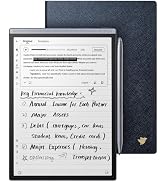
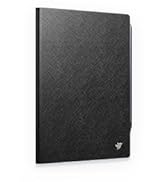
📝 Elevate your note game—where AI meets paper perfection.
The iFLYTEK Ainote Air 2 is a sleek 8.2-inch e-ink AI-powered note-taking tablet designed for professionals and students. It features real-time multilingual voice-to-text transcription in 15 languages, handwriting conversion in 83 languages, smart task management, and cloud sync via OneDrive. With a 2600mAh battery offering up to 168 hours of use, ultra-low latency stylus input, and an eye-friendly adjustable reading light, it blends traditional note-taking with cutting-edge AI productivity tools. However, users should be aware of significant firmware and Google Play certification limitations that may restrict app compatibility and system functionality.


| ASIN | B0DLKSR2P4 |
| Are Batteries Included | Yes |
| Average Battery Life (in hours) | 168 Hours |
| Batteries | 1 AA batteries required. (included) |
| Brand | iFLYTEK |
| Colour | grey |
| Connectivity Type | Bluetooth |
| Customer Reviews | 4.2 4.2 out of 5 stars (172) |
| Date First Available | 2 July 2025 |
| Graphics Card Description | Integrated |
| Graphics Chipset Brand | ARM |
| Graphics Coprocessor | Adreno 610 |
| Included Components | Stylus, Tablet |
| Item Dimensions LxWxH | 19.3 x 13.7 x 0.6 Centimeters |
| Item Height | 0.25 Inches |
| Item Weight | 231 g |
| Item Width | 5.4 Inches |
| Item model number | Air |
| Lithium Battery Energy Content | 2600.01 Milliampere Hour (mAh) |
| Manufacturer | iFLYTEK |
| Number of Lithium Ion Cells | 1 |
| Operating System | Android |
| Processor Brand | ARM |
| Processor Speed | 1.8 GHz |
| Product Dimensions | 19.3 x 13.72 x 0.64 cm; 231.33 g |
| Resolution | 1920 x 1440 Pixels Per Inch |
| Screen Resolution | 1440 x 1920 |
| Series | Air 2 |
| Standing screen display size | 8.2 Inches |
| Wireless Type | 802.11n |
M**F
This tablet feels perfect for handwriting and everyday note-taking. The stylus is responsive, the screen is easy on the eyes, and the pressure levels make writing feel natural. The voice-to-text feature works well and saves a lot of time. It’s light, organized, and really helpful for meetings and study sessions.
N**1
This device is a complete disappointment and should not be sold as a standard Android 11 tablet. The iFLYTEK AINOTE2 is so locked down, it borders on fraud. It fails to meet even the basic Android functionality expectations, which are not clear in the listing. Here's what you're not told until it's too late: ❌ No volume buttons — seriously. No screenshot combo possible. ❌ No Developer Mode access — “Build Number” is hidden or removed. ❌ Not Play Protect Certified — blocks Gmail, Drive, Docs, even Play Store. ❌ ADB shell is blocked — can't run system commands or extract device info. ❌ ADB push fails — even file transfer to /sdcard/ is locked out. ❌ Sideloading is limited — many APKs silently fail or crash. ❌ Screenshot apps don’t work — “Screenshot Easy” won't install. ❌ File transfer mode missing — can’t drag files from PC to tablet. Even after installing the “Google Complete App,” I received this error: “This device isn't Play Protect Certified. Contact the manufacturer to request a certified device.” That’s precisely what I plan to do—because this tablet appears to be one of three things: - A demo or developer unit - A region-locked export model - Or a deliberately crippled education/government edition Whatever it is, it has no business being sold to the public on Amazon, and this is particularly true given its primary marketing as Android 11 with productivity features. If you're looking for a real writing tablet, digital notepad, or Workspace companion, do not waste your time or money on this. Get a Google-certified device like a BOOX Note Air 3, Lenovo Tab P11, or any Pixel/Chromebook that works. This tablet is going back. This is a follow-up to my original review -- Since I resolved the "NON-Google Play Protect Certification issue." However, I am now confronted with an issue relating to the device's firmware that is proving to need a replacement product (Device). 2nd Review: I wanted to love this device. I really did. The iFlytek AINOTE tablet has standout features: excellent voice-to-text transcription, an elegant E-Ink display, and a very useful camera + flashlight combo for document scanning. But after spending countless hours troubleshooting, I’m left with a sleek, promising device that refuses to function as advertised. The core issue? Google Play Store is broken. It either won’t open at all or displays the dreaded “Something went wrong. Try again.” message. And even worse: Google Play Protect certification cannot be verified, which cripples app compatibility and security. Even more alarming: the system hid core permissions after a firmware rollback—meaning I could no longer manage app access, system behavior, or reinstall critical components. I've done everything: • Factory resets • Reinstalls of Google services • Server toggles • Cold reboots • Clean networking setups Nothing resolves the core flaws. This points directly to a firmware-level defect or a system update designed to block or override Google's services. Until iFlytek can prove it has stable, Google-certified firmware, I cannot recommend this device for anything beyond a digital notepad. And even then—you'll always be watching over your shoulder waiting for it to self-sabotage. A replacement may fix it, but the experience has already cost me more time than any “smart” device should. Use caution. Or better yet—use something else.
Y**A
I basically use this tablet everyday now. I didn't know how good this tablet is until I got it. It makes my work more efficient, and in my spare time, it's good to read fun books, especially good for comics. The shine point I like about it is the 4 microphones. They are not just listerners, they can figure out who is talking and where they are probably located in a room and mark those details on the screen and records. This makes my notes very clear when I'm working on group projects and multiplayer scripts creation. I also like the E-ink screen for reading. Dragging e-books resources into it is very easy as well. I just need to drag and drop. I don't have to deal with annoying extra steps like emailing files or converting formats, which often causes the contents look wired on the screen. It’s a very user friendly experience for me.
J**N
I’ve had a few tablets like this before and not had very much luck with them. This one is amazing. Super high quality and feel. I love the size of the unit as it allows me to easily carry it around, throw it in my briefcase or have it in my console in my truck. It’s super easy to just grab and jot down a few notes or to take notes during a long meeting. The responsiveness of the tablet and the stylist is fantastic. I’ve used ones before where it doesn’t always pick it up when you’re writing, but I’ve had no issues with that using this one. The battery life is super long as well. Allows me to go all day in meetings and not need to recharge. I’ve even gone multiple days when I forget it at the office and still can work all day.
A**K
I really wanted to love this e-ink notebook. The idea behind many of its unique features is quite innovative. But the execution is lacking. First, the good. It does a great job of listening to and recording meetings, and frankly, a pretty good job of transcribing them. And the AI meeting summary is excellent. That is where they are trying to distinguish themselves and they do a good job at something that no other notebook is even attempting. Second, the form factor is amazing. I love the size of this notebook. I have both a reMarkable 2 and a reMarkable Pro. I love them both, but occasionally want something a little smaller to carry with me. This was the perfect size. However, when it came to actually using it as a notebook/organizer, there were issues. First, the handwriting-to-text has much to be worked out. My handwriting is pretty good and it was consistently unable to correctly title my notes. It doesn’t save me time if I have to re-write my note title seven times for it to correctly transcribe it. Further, when I tried to convert my notes to text, it just wasn’t even close. And again, my handwriting is pretty good. With respect to external network drives, it only allows connections to OneDrive. Most other e-ink notebooks allow multiple options, including Dropbox. Not going to happen with this notebook. But the big let down, was the calendar. The last thing I need is another calendar. What I need is for it to connect to my current calendar, which is Exchange/Outlook. It will connect to Google calendar, but that’ s it. I can download Outlook from Google Play but it won’t talk with the device calendar, which makes the device calendar worthless. At this price point, I need this to be a little better at handwriting-to-text and more compatible with other calendar formats.
Trustpilot
1 week ago
3 days ago