Desertcart purchases this item on your behalf and handles shipping, customs, and support to Bolivia.
🚀 Upgrade your connection, upgrade your life!
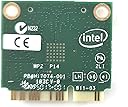
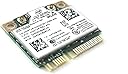
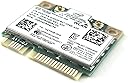
The Intel 7260.HMW Dual Band Wireless-AC 7260 is a compact PCIe Half Mini Card network adapter delivering up to 867 Mbps dual-band Wi-Fi (802.11ac) and Bluetooth 4.0. Designed for seamless integration with 4th gen Intel Core processors, it offers enhanced speed, coverage, and capacity for laptops and desktops. Ideal for professionals seeking a reliable, high-performance wireless upgrade with Intel Smart Connect and Hotspot Assistant technologies.
| ASIN | B00MV3N7UO |
| Best Sellers Rank | #183 in Internal Computer Networking Cards |
| Brand | Intel |
| Built-In Media | Network adapter |
| Color | multicolor |
| Compatible Devices | Desktop |
| Compatible Operating System Family | Windows |
| Customer Reviews | 4.5 out of 5 stars 1,589 Reviews |
| Data Link Protocol | 802_11_ABGNAC |
| Data Transfer Rate | 867 megabits_per_second |
| Global Trade Identification Number | 00735858283083 |
| Hardware Interface | Bluetooth |
| Item Dimensions L x W x H | 0.5"L x 0.5"W x 0.5"H |
| Item Type Name | Intel 7260.HMWG.R Dual Band Wireless-AC 7260 Network adapter PCI Express Half Mini Card 802.11 b/a/g/n/ac |
| Item Weight | 9.07 g |
| Manufacturer | Intel |
| Mfr Part Number | 7260.HMWG.R |
| Minimum Required Operating System Version | Windows 1 |
| Model Number | 7260.HMW |
| Number of Items | 1 |
| Product Dimensions | 0.5"L x 0.5"W x 0.5"H |
| UPC | 735858283083 768451100136 012024017124 |
| Warranty Description | no warranty |
L**L
Amazing upgrade to an older laptop... do your homework and ensure it will work in your PC
Perfect replacement for my Dell's B/G/N adapter. Before you try this for your laptop, here's what you need to know; 1. Do I have a 1/2 height mini PCIe slot? Find an exact replacement for your laptop and read the description... if it's a 1/2 height mini PCIe, continue... if not, look elsewhere. 2. Does my laptop manufacturer 'whitelist' components in the BIOS? Whitelist is a method the vendors use to limit your options to only hardware they allow. The questions is a hard one to answer too; I had to google quite a bit to find out the Dell does not whitelist. Your vendor might... If they don't, continue... if they do, consider a USB adapter. 3. Can you get to the card and are you comfortable with the task? Again, google and youtube are your friends... I youtube'd how to replace my wifi card and a perfect video showed me how to remove my keyboard to gain access to the card and how to swap the card. If yes, continue... if no, look elsewhere. I installed the card in my 18 month old Dell Inspiron 17R, Core i3, 8 gig, Win10... I downloaded and installed the Intel drivers from a comment in a review before I installed the card. When I powered back on and booted up, the adapter worked instantly with no additional action required. My 5 Ghz network was immediately available and connected with no issues. Previously speedtest.net put my downloads from Charter at 35 average from my TP-Link AC1750 router. After installing this card and connecting to the 5Ghz network, my speedtest results easily top 120. It's a huge change for $30 and about 15 minutes of actual installation work. I spent about 2 hours googling the various compatability questions and watching how-to videos. Highly recommend this card to anyone willing to do the research ahead of time to ensure it works. The AC speeds are fantastic and I don't have a USB dongle or external card to worry about snagging or breaking.
J**S
No problems on my HP Pavilion G6-2249wm with (Windows 8.1/10)
I've got a G6-2249wm POST 2012 production so I didn't have to worry about HP's infamous and dreaded "whitelist" or a "BIOS restriction that only allows HP certified WiFi cards to be used". This prevents user from easily upgrading their crappy HP certified WiFi cards with good ones like the intel7260. In this case, an upgrade requires the user to "flash" or "mod" their factory BIOS with a sketchy, 3rd party, un-tested, boot-able app in order to remove or modify this "whitelist". No thank you. I highly recommend that all PRE 2012 HP, Levono and Toshiba users do a little research on your laptops specific model to see if you have a BIOS whitelist prior to purchasing the intel7260. Though this upgrade is still feasible it may not be worth your time, depending on your skill level. The installation for my laptop was literally plug and play. I uninstalled the factory Ralink3920 drivers prior to removing and re-installing the new hardware, booted up and just like that everything was working! I tried to upgrade drivers and I got a message that the most recent drivers were already installed! Upgrading from a Ralink3920 to an Intel7260 was like upgrading from the "Wright Brothers" first flying machine to a F-22 fighter jet! Went from a lousy unstable 30-72mbps to a stable 144mbps using wireless N. Also, NO more Bluetooth audio dropouts! The Ralink Bluetooth was garbage would hardly work even from 3 ft away, the Intel has a range of at least 10 ft or better! I do notice while using Bluetooth and Wireless N at the same time, my WiFi bandwidth will sometimes fluctuate between 144mbps and 130mbps. My internet connection maxes out at 60mbps so for all basic purposes, this is minimal interference and completely unnoticeable unlike my experience with the factory Ralink. I haven't tried on a wireless AC network yet, but I certainly plan on upgrading to an AC router shortly. Perhaps with the extra bandwidth l will be able to simultaneously stream to a Bluetooth audio device and 1080p over a wireless AC router to my VGA projector server! Wishful thinking.
S**Z
867 Mbps. That's right!
I am thoroughly satisfied with this network card. I was skeptical because I intended to use it on a 2008 Dell Inspiron 1545 (with an Intel processor). I was worried if such a modern (relative to the computer) card would be compatible. I am running Windows 8.1 Pro, so I knew that the drivers were present, it was just a matter of the chipset accepting this wireless card. Other concerns like, if the full bandwidth could be attainable on such an old device were also present. And turned out, none of those concerns were a problem. This card is incredible and extremely backwards compatible. I recently upgraded this PC to Windows 8.1 and just had my WiFi router upgraded to a dual channel, 802.11ac with dual streams. The maximum AC (link) speed advertised both by my router and on this card was 866 Mbps. And if you look at the image on this review, this theoretical link speed was achieved with this card on a 7 year old laptop. I haven't installed Plex Media server after the Windows 8.1 upgrade, however I can not wait to have Plex up and running. My Roku and other plex apps are going to be thrilled. I tried chrome tab morroring on the chromecast and it was almost real time and was flawlessly casting HD videos from Vimeo (I'm not a big vimeo user, but I used vimeo because it streams the video on the computer as it is an unsupported site for direct casting, supported services like Netflix or YouTube would stream directly to chromecast, which would have made this casting test useless). While it beat up my good old Core2 Duo processor, the WiFi card just performs. Additionally, I use Xender app to transfer files between my phone and the PC. Now the app transfers faster than the wired USB connection. Additionally, the card came with a bonus Bluetooth 4.0 LE upgrade, earlier my Bluetooth headset only worked in the room this computer was in and maybe the neighboring room...Now it works everywhere in the house. Even outside. Latest drivers are always posted and updated periodically on Intel's site. P.S: My Internet connection nowhere nears this link speed. My 7 year old card could handle triple the speed of my Internet plan. The reason to have this card was not internet speed, at all. I have an ecosystem of intraconnected devices, that interact with each other. The update to the WiFi router and this upgrade to my laptop takes the intraconnected communications to their best potential.
C**C
Easily installed and recognized in Linux Mint, lacks antenna and bolts.
I tried a broadcom based chipset at a lower price - cheaper card, and couldn't install the darn thing after trying for an hour - specially when drivers had to be downloaded... without network. after fooling around for an hour, I decided to have a little patience and buy the intel chipset card. after installing the card, nothing else had to be done and the network was up and running. Sure, it needs the bolts, and without it, the card springs up slightly - i rigged it with some tape serving as a push down "spring" pushing against the hard drive ( hp compaq elite 8300 usdt). it's not pretty but I'm not looking at it. Now the linux system is running replacing my old win7. i guess i'll teamview my work system when i need to use MS Access, otherwise i'll live with the free or open office, or the google office apps.
M**O
For those of you with BT not coming on or other issues, read on
I purchased a card here and while I have not installed mine I do have a friend who asked me to install her card and it had all the issues listed here such as AC band or BT not working or other issues. She has an Acer 5742G which is a few years old but not obsolete by any means. When I installed this card in her laptop it became unbelievably slow. I am talking about 20 minutes to boot up instead of the usual 3-4. Even when it booted into Windows 7 everything ran really slow. Wireless showed up and would connect but BT was nowhere to be found. I removed the card and installed the old one, everything ran smoothly. I did research to see if it was a BIOS issue since some manufacturers like HP and Lenovo code so-called "whitelists" or what products are certified, or more like allowed, to work on the laptop. Acer does not use whitelists so I continued to be baffled and thought it was just a compatibility problem, a bad card or something wrong with the laptop itself. While searching on the Acer site I found a post that mentioned these problems with the same laptop and wlan card and low and behold they found a solution: to tape off pin #51 and maybe even pin #20 on the card. It seems Intel uses these pins to provide on/off signals for the BT function and of course they didn't seem to think about backwards compatibility for older laptops or even newer ones that don't support this. I taped off pin #51 with regular scotch tape and the laptop started up normally recognized all the wireless radios, including bluetooth. I let Windows download and install the drivers for everything and tested the wifi and bt functions: all is working perfectly. It has been about 3 days and she has not reported any problems. She said her bt mouse, keyboard and headset all work fine without any type of audio choppiness or lag the usb bt module she was using caused. She does not have an AC router so I cannot attest to that part but the wireless N was working great and getting speeds of 500 when transferring large files. I hope this can help others here who have been suffering from the same problems. https://www.google.com/url?sa=i&rct=j&q=&esrc=s&source=images&cd=&cad=rja&uact=8&ved=0CAcQjRw&url=http%3A%2F%2Fwww.elektroda.pl%2Frtvforum%2Ftopic2901200.html&ei=HcxfVaTiKomagwSW8IGADQ&bvm=bv.93990622,d.eXY&psig=AFQjCNFE4vXlojVuVh3Zmcv5e3nWe1Iw_A&ust=1432427900389760 If this doesn't work just google 7260 AC Pin 51 and you will get plenty of results.
R**Y
Great WIFI & Bluetooth Mini-PCI Express Card
I bought 4 of these . . . 1 to replace the the card in my laptop - the other 3 to put in to 3 HP EliteDesk 800 Mini desktops. The one in the laptop greatly improved my WIFI signal & speed (860 Mbs) & added superior Bluetooth connectivity that was previously lacking. For the 3 HP EliteDesk Minis, I attached a couple RP-SMA to U.FL Coax Cable TUOLNK UFL IPX IPEX to RP SMA Female Pigtails (https://www.amazon.com/dp/B098QG9VXF) to the added 7260.HMW Adapter and now I have 3 great little desktops with internal WIFI & Bluetooth - even without the external antennas. With antennas, I have great WIFI signal anywhere in the house & can use my Bluetooth mouse, keyboard, & headphones up to 60 ft away! Also, the drivers for both WIFI & Bluetooth loaded automatically through Windows Update. I literally had it all installed in less than 5 minutes! I deducted 1 star for value because there are no screws provided to attach the cards to the MOBO (so, you will have to have at least one ready for each card). After I received my cards, I saw another seller on Amazon with this same card for $1 cheaper and with an installation kit containing a mini screwdriver & screws.
B**N
Works great after driver update
Bought this to replace a slower non-BT card that was installed in an old Dell Inspiron 3521. The AC 7620 works great, im getting about a 40% uplift in network speed and a significant reduction in ping and i now have bluetooth support but if anyone else is considering this as an upgrade for an older platform, be aware that drivers are not readily available on Intels website. I would post direct links here but im not sure if thats allowed by Amazon but just google "Intel AC 7620 drivers reddit" and one of the results has a top reply giving links to hidden URLs via WayBackMachine that worked perfectly for me (the drivers state that they are for windows 10 but they work just fine on my laptops windows 11 OS) just be sure you know which architecture your machine is running (32 or 64 bit) and choose the correct driver. Just download the (2) drivers and install (i installed (1) at a time, starting with wifi and then restart PC. After restart, installed bt driver and again restarted.) Couldnt be happier with the results!
K**S
Original
The product is correct and genuine.
A**S
Intel Card
Worked straight away.
G**I
Ottimo
Funziona bene
J**Z
Very good
Súper power
M**L
Compatible avec Toshiba C660
Compatible avec le Toshiba à condition de télécharger le driver sur le site d'INTEL.
A**W
just what I needed great value works well real fast charging
got this to so I could change to 5G WIFI on my desktop
Trustpilot
1 month ago
2 weeks ago