Some deliveries may take a little longer than usual due to regional shipping conditions.

DOWNLOAD THE APP


Customer Services
Copyright © 2025 Desertcart Holdings Limited
DOWNLOAD THE APP
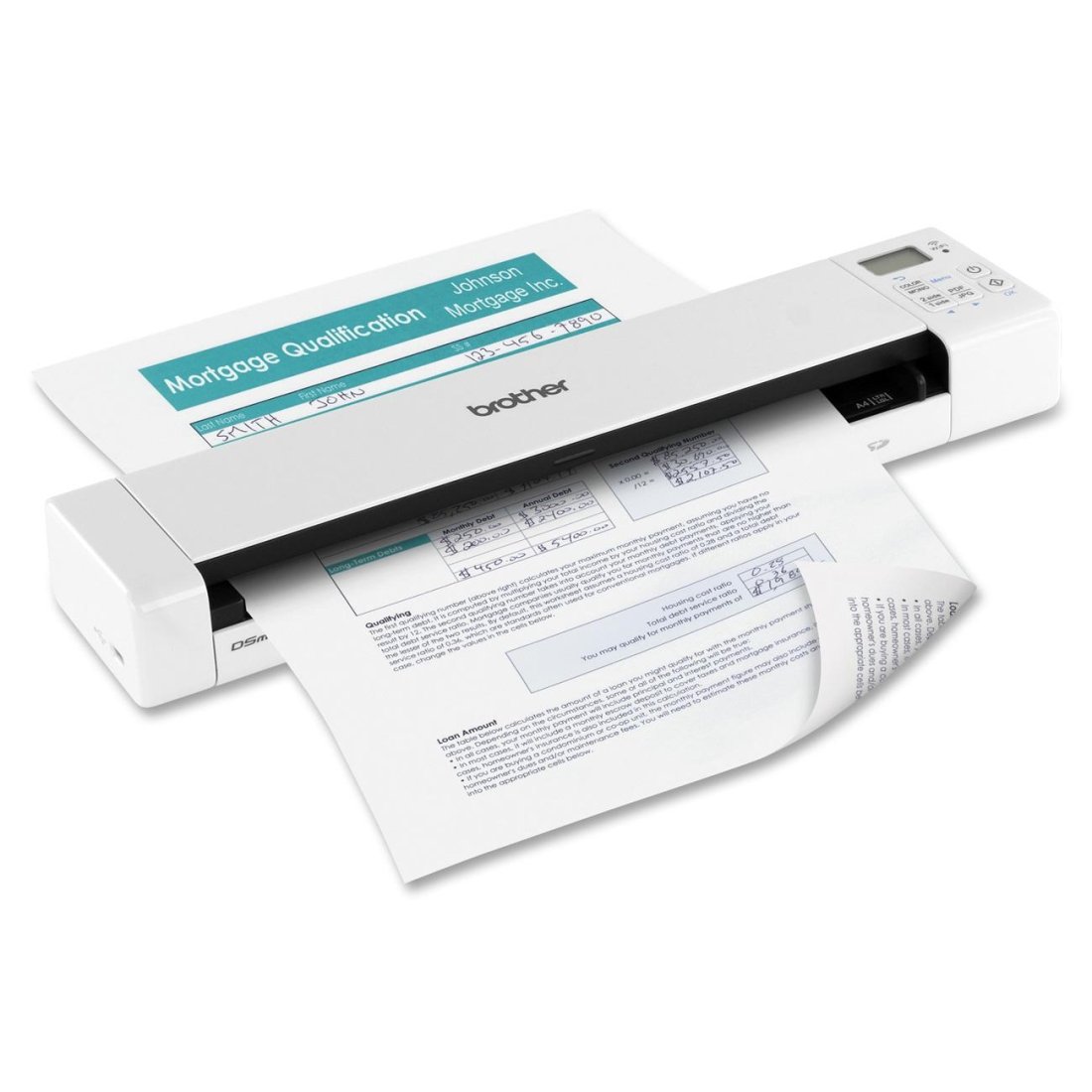
📄 Scan smarter, move faster, work anywhere.
The Brother DS-920W is a compact, wireless mobile color scanner designed for busy professionals. It offers fast duplex scanning at up to 8 ppm, high-resolution 600 x 600 dpi scans, and versatile Wi-Fi transfer to computers and mobile devices. Lightweight and rechargeable, it fits easily into any work setup, complemented by a robust software suite for seamless document management and sharing.
C**S
Nice portable scanner if you learn to get it to work for you
After spending few days with the scanner I come to the conclusion that it is a good device for the money I paid, with some quirks to be aware, and workarounds available. You can probably get something better but for much more money. I also like how portable it is and that it can take care of scanning without being hooking up to a computer. It is also easy enough to use that even my kids can do it. Think how helpful that could be ;-).What I want to give you is all the ins and outs of this device so you do not have to get frustrated setting it up, and know exactly what you're getting. I'm a technology savvy person and I'm writing this so you do not have to be.Here is list of issues I found while reading other reviews and my related findings: 1. I can't connect it to my WiFi network. The device works only as access point so I lose internet access while remotely connected to it.This is not accurate. You can connect the device in infrastructure mode to your network. It only works with 2.5GHz, and not 5 GHz band. Setting this up allows you remote file access using web interface, or better yet, by using FTP tool like FileZilla. With FPT you can download your files fast in bulk without having to swap SD card. You will need to use the admin username and password you used during device setup to gain access and make connections. 2. I can see some background color during scanning on the duplex side in otherwise white areas.There is some bluish or grayish tint added during scanning on the duplex side but it is minimally visible in some areas, and it is almost not visible in print. It can be also completely removed adjusting contrast and white balance in scanning software. This is just a side effect of the default setting on the device which are unfortunately not configurable for SD card scanning. It only affects document scans. I believe the default setting is aimed for better color representation for picture scanning instead of giving the documents perfect white background. 3. I can't scan multiple pages into single file.You can only scan multiple pages by using accompanied software. Scanning into SD card in stand alone mode will always generate multiple files. Look for configuration option on main screen of bundled software to change dropdown setting File Format: Select Multi-page PDF 4. Battery is not keeping charge. Poor battery performance.It appears that while WIFI is enabled the battery will slowly discharge even if you connect scanner to external power source. You should only enable WIFI mode to transfer the files off of the device SD card and then turn it off. Without WIFI enabled the battery will last for a long time and you will not experience this issue. 5. PDF generated scan documents are not searchable.This is correct. To make document searchable you would have to run it through OCR (optical character recognition) software. Such processing requires considerable computing power. You're not going to find it on a battery operated scanner like this. What is surprising is that accompanying software does not have this feature either. Luckily there is an easy way to fix that. Look below for more information on how.Device quirks: 1. I found some additional quirks about this product like the fact that you need to power off the device after you change WIFI admin username and password during initial setup. After changing password it is prompting you to log in and it will fail unless you power it off and on. Most people might just return the device thinking it is defective. 2. Another quirk was the fact that somehow time setup got messed up where timestamp on generated files on SD card would have a proper month and day but wrong year. I tried setting the year to 2020 instead and I got the proper year 2018 to be used on file dates. Maybe it happened because I had to hard reset the device few times while trying to troubleshoot the WIFI password issue after the year was already configured. Since I found a way to make it use proper year it is not an issue for me. You might not experience this problem. 3. One more quirk with this is that the Access Point WIFI mode can't be disabled. Once you have hooked up the device to your WIFI network you should be able to turn off AP mode since configuration is done. You do not need another WIFI device unnecessarily broadcasting in your house creating WIFI noise. This is probably the reason why battery drains even while being supplied external power and why device will get really how while in WIFI mode. The fix is to just enable the WIFI when you need to transfer files from the device and then turn it off.Tips, Tricks and my recommendations: 1. Easiest way to get files from scanner is to turn on WIFI and use free FTP client software like Filezilla or WinSCP. You will need to configure WIFI Infrastructure mode and configure admin user name and password (need to turn on and off device to use new user pass combo). Make a note of the IP address the device shows in configuration screen, you might want to use your WIFI router's static DHCP table to make sure the scanner always gets the same IP address. You depend on knowing the IP address to be able to connect to it. DHCP will give your device another IP after lease expires in 3 day of device WIFI inactivity. 2. I found that best way to scan is to scan into JPG images using 300 dpi for documents 600 dpi for pictures only. The JPG have advantage of being easily convertible into other formats, including multi page searchable PDF files. However if you want to go the other way around it is much harder. It also makes it easy to flip through images looking for something specific using picture viewer or just thumbnail images (vs. viewing multiple PDF files equals pain). 3. Search multiple PDF files can be done using Adobe Acrobat. Just google search for "How to Search for Text Inside Multiple PDF Files at Once" and you will find instructions on how to do this. This of course only works if your PDFs are of searchable kind. 4. Never delete the last scanned file from SD card. This will cause the next scanned image to be named with 0001 again and so on, which in turn will cause you grief when you realize some files now have duplicate file names. Leaving the last numbered file will ensure the incremental numbering will continue. 5. Think ahead on how you're planning to archive files. Specifically how you're going to create directory structure so you can easily find what you need. What worked well for me is to just create a category folder like BankStatements and then create year (2018, 2019 …) subfolder for documents for that given year only. 10-20 years from now you will thank me. 6. Get the right software for the job. Included software, well is not good enough to put it politely. Luckily there are some free alternatives. After spending half a day looking I chose the "Not Another PDF scanner 2". Just google search for it. You should be able to find the download link on SourceForge website. This is reputable source of free software. If you like it, make sure you donate couple of bucks to the author so he can continue making good stuff. What you need to do is install the included driver software first then install "Not Another PDF scanner 2". After installation, from within the app, you will need to download language pack for OCR capability and create profile for your scanner. Now you should be able to just drag and drop JPG images and save them as a single searchable PDF file. Since this software also allows you to replace the scanning software that comes with the scanner you can readily use it that way. It has much better range of controls on top of the built in OCR capability, which the bundled software does not have. That's what I call a win win situation.There are also other options to make your documents searchable and converted but the one I'm recommending seems by far the easiest way to go. If you google search for "The 3 Best Free OCR Tools to Convert Your Files Back Into Editable Documents" you will find an article that covers some of the options like google docs and other free methods etc.I personally have a QNAP NAS that has OCR converter app. It took me about 1 minutes to install the app and 5 minutes to setup a daily job that converts JPG or PDF into a searchable PDF and/or text based on folder they are located in. So I just drop my files into the NAS subfolders and let the software automatically take care of the OCR process each night so it is ready when one day I want to search for some specific document I care about.If you can look past the few quirks, lacking documentation and lacking bundled software, this is a great portable scanner.If you have any question about this review, or if you want me to add anything please leave a comment.Thanks.
G**X
Solid battery life, reasonably quick, simple to use
Charges and runs off a micro-USB which is fantastic, and lasts for hours - more than enough to handle everything I've used it for.Wireless has been only rarely used, but for those rare times it has been the only option, so it may be worth the price. It's not a great experience, but it works - I don't really think there is a way to make it much better, most of the annoyance comes with connecting to its wifi, which all ad-hoc wifi stuff has to deal with.Most of the time though, we just scan a bunch of documents at once to the SD card, and then optimize the images a bit afterward (lots of software has a "scanned text" mode, which produces a better result than scanner software does anyway. Or just play with brightness/contrast curves a little and it'll look flawless). Scanning to the SD card is absolutely trivial, and speedy enough to deal with a couple dozen sheets without complaint, and you can read the data over USB or an SD card reader, which most computers have (or you can get a dirt cheap reader anywhere).
S**S
Not Worth the Money!
After doing a lot of research, I purchased the Brother DS-920//DW wireless portable scanner. DON'T WASTE YOUR TIME AND MONEY on this product. I specifically looked at Brother portable scanners since I have had other Brother products which have worked very well and lasted a long time in my home office. When I first got the scanner, it seemed to be great. It worked as I hoped it would, with some minor limitations, such as where the scans go on my computer which is not easy to locate, but it was acceptable once I got the hang of it. I purchased it last March, 2016 and it has a limited one year warranty. Yesterday, I needed to get in touch with customer service. Nearly one year to the day, and the battery died. I scanned one sheet of paper and the scanner simply shut down. I thought I just needed to charge the battery, although it showed it was over half charged. After the one scan was completed, it just shut down. Of course customer service was of no help and did not offer for me to return it. They simply said "get a new battery." I paid $99.99 for the scanner. It comes with a special production Brother only lithium rechargeable batter. What is not told to the purchaser is that these batteries only last about a year and then cannot be recharged any longer! I searched for the correct battery and found that out of the two places that offer the battery online, (and it does not include Amazon where I had purchased the scanner originally and where the Brother phone assistant suggested I would find a battery), the cheapest price is $55.00! Over half the value of the product is battery! Nowhere in the ads or instruction literature does it say that after a year, a new battery is needed. What I have is a complete piece of garbage now. Don't waste your time or money on this product! And don't expect to get any assistance from the company. I gave it one star since it did work fairly well, it just does not have any lasting power and has extremely expensive upkeep!
R**R
Very pleased, and lots of bells and whistles
This is my first Brother product, and I bought it after hearing a lot of good things about Brother printers. I'm not disappointed. It does its job quickly, quietly, and well. It was clearly built by technologists, and has lots of little nerdy touches, like being able to change all the settings from the control panel instead of having to use an app. It has a little web server so you can download images from your LAN. It even has an FTP server for the same reason, so if you're into photography, you can use this as a wireless SD card reader. Wifi connection is simple, straightforward, and reliable. And you can change ALL of the WiFi settings, if you have an unusual setup.My only complaints are that you'll need some Goo Gone to get all of the NASCAR stickers off of the device. It has an old-fashioned micro USB connector, instead of USB-C. And the scans are a little dark compared with my old Epson scanner, even after calibration. But unlike the Epson, this Brother doesn't slow down when scanning at the higher DPI. Definitely recommended.
G**E
Portability
PROS 1. Portability, and 2. Scan both sides in one pass.CONS 1. Dealing with multiple page documents seems to be manual task, or I just haven't found a way yet to scan multiple pages into a single PDF.
T**F
DEAD/LOST BATTERY = DEAD SCANNER
The battery suddenly stopped recharging, and the Micro-USB won't work without it. Cannot find a replacement battery. Serious flaw. Now I have a perfectly useless scanner, because I have no battery.
J**E
Scsnner works great! (BR Receipts not so much
Scsnner works great! (BR Receipts not so much.)
Trustpilot
4 days ago
1 month ago