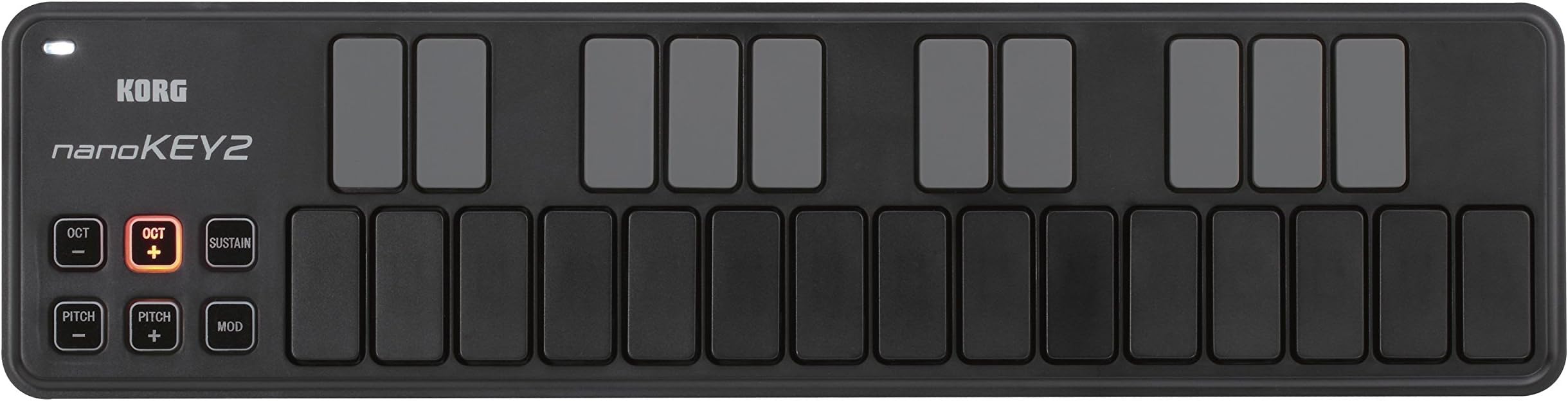
25-Key Midi Controller (NANOKEY2BK),Black
Product ID: 1466122
Details
- BrandKORG
- Connectivity TechnologyUSB
- Model NameNANOKEY2BK
- Number of Keys25
🎹25 velocity-sensitive keys
🔌USB plug-and-play connectivity
🖥️Compact 14.6" slim profile
Desertcart purchases this item on your behalf and handles shipping, customs, and support to Bolivia.
🎶 Your pocket-sized studio powerhouse—compose, create, conquer!
The Korg nanoKEY2BK is a sleek, 25-key USB-MIDI controller designed for professionals and creatives who demand portability without sacrificing playability. Featuring velocity-sensitive keys with advanced touch response, a slim ergonomic design, and plug-and-play USB connectivity, it enables seamless music production on laptops, tablets, and smartphones. Ideal for on-the-go sketching, practice, and beat-making, it combines compact convenience with professional-grade MIDI control.


| ASIN | B004M8UZG0 |
| Additional Features | The nanoKEY2 features an advanced and up-to-date design. By combining the great-feeling ''touch'' that Korg has developed for its professional MIDI keyboards and the low-profile 'thinness' of recent computer keyboard innovations, the nanoKEY2 provides a superior keyboard response for its class and size. It's designed with ample key width and plenty of space between the keys, reducing the chances o… |
| Best Sellers Rank | #11,285 in Musical Instruments ( See Top 100 in Musical Instruments ) #46 in Computer Recording MIDI Controllers |
| Brand | KORG |
| Brand Name | KORG |
| Color | Black |
| Compatible Devices | Laptop |
| Connectivity Technology | USB |
| Connector Type | USB |
| Control Method | Touch |
| Control Type | Keyboard Controller |
| Customer Reviews | 4.5 out of 5 stars 1,278 Reviews |
| Global Trade Identification Number | 00884088605933, 04959112081048 |
| Hardware Interface | USB |
| Hardware Platform | Macintosh or x86_64 |
| Human Interface Input | Buttons, Keyboard |
| Included Components | not included |
| Instrument | Keyboard |
| Instrument Key | Any |
| Item Dimensions D x W x H | 3.7"D x 14.6"W x 1.6"H |
| Item Type Name | Midi Controller |
| Item Weight | 16 ounces |
| Keyboard Description | Ergonomic |
| Manufacturer | Korg USA Inc. |
| Manufacturer Part Number | NANOKEY2BK |
| Material Type | Stainless Steel |
| Maximum Range | 0.5 meters |
| Mixer Channel Quantity | 16 |
| Model Name | NANOKEY2BK |
| Model Number | NANOKEY2BK |
| Model Year | 2018 |
| Noise Control | None |
| Number of Items | 1 |
| Number of Keys | 25 |
| Platform | Mac |
| Product Dimensions | 3.7"D x 14.6"W x 1.6"H |
| Product Style | Slim-Line USB Keyboard |
| Size | Einheitsgröße |
| Special Feature | The nanoKEY2 features an advanced and up-to-date design. By combining the great-feeling ''touch'' that Korg has developed for its professional MIDI keyboards and the low-profile 'thinness' of recent computer keyboard innovations, the nanoKEY2 provides a superior keyboard response for its class and size. It's designed with ample key width and plenty of space between the keys, reducing the chances of a wrong note. The touch and velocity response have been carefully tuned, as only a manufacturer wi Special Feature The nanoKEY2 features an advanced and up-to-date design. By combining the great-feeling ''touch'' that Korg has developed for its professional MIDI keyboards and the low-profile 'thinness' of recent computer keyboard innovations, the nanoKEY2 provides a superior keyboard response for its class and size. It's designed with ample key width and plenty of space between the keys, reducing the chances of a wrong note. The touch and velocity response have been carefully tuned, as only a manufacturer wi See more |
| Supported Software | Ableton Live |
| Total USB 2.0 Ports | 1 |
| Total USB Ports | 1 |
| UPC | 884088605933 989898857562 755756641068 700736573617 |
| Unit Count | 25 Count |
| Warranty Description | 1 year. |
S**1
Not a keyboard, not a sample pad, but a good, portable marriage of the two for on-the-go sketching
Lots of reviews already for the Korg nanoKey2, so I will try to keep it short... This is my second MIDI controller - my first is the excellent Akai MPK25 (version 1). If you are primarily a keyboard player and are okay with the fact that the MPK25 is literally twice the size of the nanoKey2, then I think the Akai is a better option for a more traditional feeling keyboard and sample pad pairing. (Note: it's also more expensive, retailing around $100, so perhaps not a fair comparison). But I like the nanoKey2 as the ultimate portable option for capturing ideas on-the-go on my iPhone and/or iPad. Since it's smaller than a USB computer keyboard, you can slip it into a laptop case with the USB Camera Connection kit and the (included) USB cable, and you have everything you need. This does not have the traditional feel of a synthesizer keyboard. The buttons are velocity-sensitive, but they do not have any real travel or "spring" to them. They are more similar to a computer keyboard response. The downside of this is that if you are a traditional piano player and accustomed to playing complicated passages knowing exactly where the keys should fall under your fingers, you may struggle to do that here. But there are definite advantages to Korg's design choice as well. First of which is that buttons can be pressed in rapid succession, unlike some piano keys. So if you are planning to use this keyboard to tap out rhythms, it's capable of hitting 16th notes or triplets in quick succession, arguably better than a traditional keyboard. Also, some reviewers remarked that they actually found it easier to play the black keys (sharps and flats on the upper row) with this type of slimline keyboard, versus a shrunken-down version of a traditional keyboard. There may be some truth to that - it's nice that all of the keys are of uniform size and feel. At the end of the day, I think the nanoKey2 is well suited to do an adequate job across a variety of needs, ranging from simple monophonic passages, playing simple chords (and recording them as MIDI data), and tapping out beats. It's not going to be the best tool at any of those things, but certainly an improvement on a small touchscreen device. MIDI data editing and quantinization should also help to clean up some of the minor errors you commit using this type of input device. And, best of all, it's extremely affordable and about as small and lightweight as you could expect. The best controller you have is the one that you actually have with you when you need it, and Korg has made a device here that is actually practical enough to carry with you just about anywhere.
R**E
Love, Love, Love: Mobile Practice
This product is fantastic and the only option for highly portable keyboarding practice! Just connect the USB cord, and you are ready to play with a smartphone, tablet, or computer without the need for any further power source connection! I have been looking for a portable keyboard that I could use to practice anywhere: sitting on the couch, on airplane flights, waiting around somewhere, outdoors, etc. I wanted something that would fit in my computer bag, and would with my mobile phone so I couldn't need to wrestle with the extra room needed for my laptop. THE PROBLEM WITH MOST OTHER SMALL MIDI KEYBOARD CONTROLLERS They have mushy plastic keys that are prone to snapping off over time (do a web search to see repair problems. * I didn't want the frustration and cost of trying to fix or replace every few months. * They also require powered USB connections; which, for some laptops and tablets, and any smartphones, requires an additional USB powered hub connected to an electrical outlet or battery pack. I didn't want to have a snarl of wires and a third box to balance on my lap. AWESOME REVOLUTIONARY KEYBOARD LAYOUT If you aren't already fluent in playing scales and cords with correct fingering, this is a fantastic training aide. At first I found the layout difficult to play in certain scales and chords, but then it slowly dawned on me that it was due to my incorrect fingering (e.g. trying to use my thumb to play black keys). When I tried using correct scale fingering, then problem solved! [If you don't know the correct hand fingering to use for each scale, do a web search 'piano scale fingering'.] Practicing with the nanoKEY, it will force me to break my bad lazy habits for melody lines, runs, riffs, and chord inversions. THE KEYS ARE QUIET I had seen some review comments that they keys were noisy and therefore would be distracting to others in quiet settings. I decided to take the risk of ordering it anyways, and I am very glad that I did because I found that this is not the case. People sitting next to me in normal ambient environments will not hear anything from the nonKEY2. It is same noise level as my touch typing on a MacBook Air laptop computer- or quieter; it all depends on how aggressively or smoothly someone hits the keys. If you like to bang away your keys, then yes, you will annoy others in very quite places. But really, do everyone around you a favor and just STOP IT ALREADY! Learn to play (and type) with finesse and skill instead. TIPS FOR SUCCESS * Understand that any midi devices may need some system setting adjustments on your smartphone, tablet, or computer. If you've never used a midi keyboard before with your device, it might not just plug-in and work right away until you enable midi via USB. * Understand that the music software you want to use needs to be configured to use a midi connected keyboard. So you will need to check user the help and settings. * If your music software device doesn't have a full-sized USB port, you will need to an adapter. * When playing along with other software (e.g. Spotify, Worship Team, etc.), you may need to turn your midi music software instrument (ORG 2020, etc.) volumes to maximum. WHAT'S MISSING? * Foot pedal input for sustain This would be important for actual two handed playing performances or recording, but not necessary for highly portable practice or composing. To use a foot pedal would required another item to be transported and stable floor space to use it. Instead, get and use a separate tabletop midi keyboard that has full size, velocity sensitive, weighted keys. * Korg software bundles for Android No specific software isn't needed to use the nanoKey, but many new-player potential customers may not realize that. In the box is a license code that can be used for limited version of software for iPad/iPad, Windows, and Mac, but nothing for Android. Korg is really missing a large market opportunity by not addressing and promoting to Android users. MY SETUPS WITH nanoKEY2 * Smartphone: Motorola X4 running Android v9 + Android music apps (free versions of ORG 2020, Caustic, Perfect Piano, SymprezFM) + USB C adapter * Laptop: MacBook Air + Garage Band
M**X
I should have read all the reviews
I am not a serious musician and just make GarageBand tunes to amuse myself, so this issue could be a “me” thing, but the keys on this controller just wobble too much! I was expecting rubber keys, but these are just unstable plastic. It is really a great looking device and seems cool other than the use of a mini-USB connector from last century. Where did Korg get those from? I was lured in by the description of the keys as being advanced, but what they are not is music keyboard like. I have never felt keys move laterally before, it’s distracting. Also they are not a quiet as some people have said, they are not noisy but can be heard easily. It does function well and connected directly to my iPhone with a USB to lightning adapter. It works with GarageBand out of the box! The smaller buttons on the left light up and are multicolored. If you wanted to not look like you were making music this would work great.
S**E
Awesome little midi controller
I bought this device as a way to avoid dropping thousands upon thousands of dollars on a Moog device to run synth bass in church. Instead, I purchased this controller and ran it through Ableton running a simple sub patch. It worked just as expected. It's super portable, and I had no problems with any dead keys. The board feels great and it works plug and play. It sits perfectly on top of the laptop keyboard and I never noticed any misinputs. Mighty little controller!
J**Y
Unique among compact midi keyboards
What a great little keyboard this is! If all you want is basic keyboard input to your DAW(digital audio workstation) and you want something compact, this is a great choice. Many musicians complain (with good justification) about the feel of many midi keyboards, especially inexpensive ones. They often feel like toys. Most of them make an attempt at reproducing the feel of expensive equipment, even the feel of a real acoustic piano(you know, the kind with strings!), but they often fall short. This is especially true of compact keyboards. Korg came up with a great idea to get around this problem. They completely abandoned the idea of reproducing the feel of the traditional keyboard and went with a different concept. This is the result. It is probably the most compact, light-weight 25 key midi on the market. The feel is unlike anything else. The keys feel like a cross between a pad and a key. They have very little vertical travel, but still maintain well controlled velocity sensitivity. In this way, very fast fingering can be attained since your fingers don't move vertically very much. The less the fingers have to move, the faster they can perform. Another significant feature is that the "black" keys have the same feel as the "white" keys since each key is like a separate pad and does not pivot(the black keys on a piano are shorter than the white keys and since they pivot, they have a different feel from the white keys). I really like that. You don't have to hit the black keys harder to get the same velocity value as you might with a regular piano type key. Let me put it this way: you will either love this new feel or hate it. If you are the type who doesn't like learning new feels and techniques, opt out of this keyboard. The buttons controlling octave location also have a nice feature: they go through several color and lighting modes for each octave change. That includes two shades of red, green and finally flashing. Very impressive. Editing control software is also included as are some nice free plugins. Some of those plugins require a maze of links and codes to obtain, which can be a bit daunting for the beginner, but you should be able to stumble through the process. Let me also remind you, especially you beginners, that midi devices must be plugged into the computer(and wait for the driver to load) BEFORE you open your software(DAWs). If you plug it in afterwards, it will not work. This is the most frequent error people make(even pros make this error at times!). For the price and all the innovations, this is a great choice in compact midi keyboards. It is one of my favorites.
R**.
IT GETS THE JOB DONE AND THEN SOME!
For the price, for the size, for the capabilities... this thing is hard to beat. For professional use, you could definitely do better, but if you're a professional, you should probably be looking to invest in things with a meatier price tag anyways. For casual, on-the-go musicians, this midi controller is fantastic. The buttons are plastic-y with not as much weighted-ness as someone who plays piano or even a cheap keyboard may be used to, but they are velocity sensitive, so once you do get the hang of it, it works like a charm. What surprised me was just how responsive the keyboard was. I do some casual music production on Pro Tools, Logic, and (occasionally, sacrelig, I know) Garageband and sometimes am too lazy to bring out the drum pad. Usually, even with other decent midi controllers (I have the Roland AX-09) there's the occasional lag when it comes to rhythmic tracks, but I so far have noticed close to zero lag with this thing. Overall, I would recommend this to both the pro, the home producer, and the casual Garagebander. There are better controllers out there, no doubt, but for this price-quality ratio... I doubt.
K**E
Decent, But Pricey
It's not even close to a real piano, but if you're just using this to sequence stuff, or in combination with a music training program like Practica Musica, it works just fine. The keys are a little mushy and it makes clacky noises when I throw it in my backpack, but seems sturdy enough. The price though is on the steep end for what it is. I'm seriously considering just returning and picking up a better midi controller for a little more. The velocity sensitivity is there, but really you're way better off with something that has actual keys. If you're in the market for a midi controller and see live performance as a possibility, I'd go with something else for just a few extra bucks. For the home studio on the cheap, or broke musician like myself, it'll do - for now.
P**P
Great portable keyboard for on the go.
This is a great keyboard to get ideas out really anywhere. It's very flat profile lets you slip it in your bag with out worry of breaking knobs or buttons. It's also very portable, I put it in a pocket of my laptop bag that I normally put cables and lost it for a week. I looked all over thinking I left it some where on the road, then switching bags guess what slid out. It's that light and thin. If your used to traditional keys this will take some getting use to. I use it to tap out melodies and trigger drums and samples. Playing chords with this board, at least for me took a little time and adjustments but it can be done. It comes with a link for some music software downloads but it didn't work for me, matbe the links on the pamphlet were broken, still a great portable board.
F**.
KORG nanoKEY2
Genau mein Ding. Leicht, funktionell, plug and play. Super mini Keyboard, extrem gut für unterwegs, oder einfach als zusätzlicher Controller. Das Gerät ist leicht und fühlt sich recht stabil an, natürlich darf man hier keine Wunder erwarten, die Tasten sind etwas wackelig, aber fest, alle Knöpfe funktionieren und das Gerät wurde bisher immer automatisch erkannt und eingebunden. Wer ein Klavierersatz oder die Qualität eines 500 Euro Controllers erwartet ist hier logischerweise falsch, alle anderen dürfen sich ber dieses kleine, funktionale Keyboard freuen. Daumen hoch...
H**A
Küçük ama fonksiyonel
Ürünün boyutları küçük olduğundan masada çok yer kaplamıyor. Tuşlara basım hissiyatı fena değil ama beklediğim gibi de değildi. Klasik midi klavyeden farklı bir hissiyatı var. Tam velocityde basmanız için biraz bastırmanız gerekiyor.
J**S
The best portable midi keyboard
Perfect product at a low price
O**O
Nice, compact and lightweight
Nice compact lightweight product with overall ok quality. The weakness of the Nanokey2 is the keys. In all honesty they feel very cheap and clearly they wont sustain a lot of abuse. However they are pressure sensitive and very responsive. The biggest quality of the Nanokey2 is it's size. I'm going in vacation for 2 weeks and i bough this keyboard to put in my bag with my laptop. Tested it with Ableton and my VST's and it worked fine. It's plug and play so really not complicated to set up. It come with a bunch of software from Korg, UVI and other software manufacturer. So good bang for your buck. I'm giving this a 5 star because it fulfill what it's intended for. Compact, lightweight, responsive and a bunch of software that come with it (worth a couple of hundred dollars by the way) Overall i'm satisfied with this product and would recommand it to anyone who travel and want a decent portable keyboard.
A**ー
シンプルで使いやすい。
大きさ、性能、自分にはちょうど良い製品でした。
Trustpilot
1 day ago
1 week ago