
DOWNLOAD THE APP


Customer Services
Copyright © 2025 Desertcart Holdings Limited
DOWNLOAD THE APP


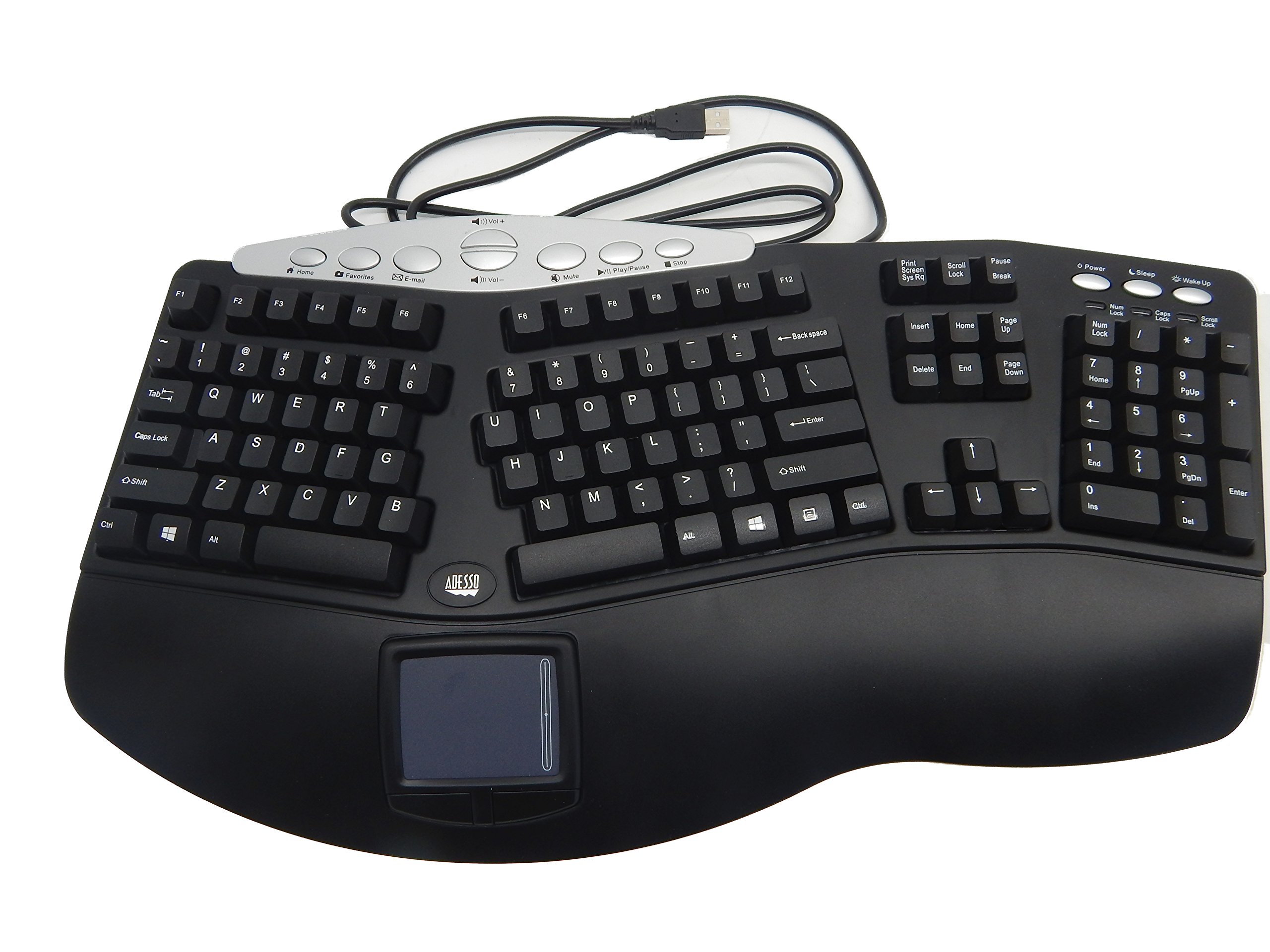

⌨️ Elevate your workspace: ergonomic comfort meets sleek efficiency!
The Adesso TRU-FORM PRO is a USB ergonomic keyboard featuring a 105-key extended layout with a unique 3D contoured split design for wrist comfort. It integrates a built-in touchpad with left/right buttons and scrolling, eliminating the need for a separate mouse and saving desk space. Equipped with multimedia, internet, and power-saving hotkeys, plus a built-in wrist rest, it’s designed to boost productivity while reducing strain during extended use.
| ASIN | B000TUK47U |
| Are Batteries Included | No |
| Brand | Adesso |
| Colour | Black |
| Customer Reviews | 3.9 3.9 out of 5 stars (326) |
| Date First Available | 27 December 2009 |
| Generic Name | keyboard |
| Hardware Platform | Laptop |
| Included Components | USB Cable |
| Item Dimensions LxWxH | 48.9 x 6 x 27.3 Centimeters |
| Item Height | 10.75 Inches |
| Item Weight | 1 kg 20 g |
| Item Width | 2.38 Inches |
| Item model number | PCK-308UB |
| Manufacturer | Adesso |
| Operating System | Windows |
| Power Source | usb |
| Product Dimensions | 48.9 x 6.03 x 27.31 cm; 1.02 kg |
A**E
MAKING FOOL
using since 2 month , but after 4 week keys are get to much tough, in ad they says this is a machenical key board, after using 2 month realize that why i spend 10000 bukcs, road side material is more cheaper this product bad product never going to by adesso product
A**L
ORIGINAL REVIEW: 04/05/2014 Let's just start off with saying I'm not the biggest techie out there. I've always used ergonomic keyboards and wireless mice in the past. But my wrist has always been an issue and now my index finger was killing me at the joint from mouse scrolling. It hurt so bad I had to tape it at night to keep it straight. (I'm a tax preparer and this is my busiest time late March - early April.) Trolling through Amazon for an alternative I thought I would give this a try. It came yesterday and I got rid of the wireless keyboard/mouse combo and plugged this right in. No software to install and works right out of the box. I'm not going to miss the wireless keyboard quirky keystrokes due to wireless connectivity issues. It does take a little getting used to, but so far I've been very happy with it. Yes, I find myself reaching for the mouse, but I'll get used to the touch pad. I'm not the worlds greatest touch pad user since I've always used a mouse in the past. I did have someone suggest to me to turn up the speed on the mouse pointer settings and that made a real difference in the control over the mouse. I use 2 monitors and it was 2 or 3 swipes of the touch pad to navigate from one screen to another before. Now it's much faster. I read some reviews that it was really loud or cheaply made. Looks good quality to me, and it is actually quieter than my Microsoft ergonomic wireless keyboard. The touch pad is textured and pretty nice I think maybe a little small. One quirk I had to get used to was the keyboard spacebar. I'm used to the MS ergonomic spacebar that is one long key - this is actually 2 smaller keys. If you're used to hitting the spacebar in the center like I was you'll have to make a small adjustment in your typing. It's been less than a day and I'm used to it now. I'll update in a couple of months and let you know what I think.
P**1
I was nervous getting this because of some of the negative reviews and because I've had some bad experiences with this product in the past. Unfortunately, my previous Adesso ergonomic keyboard was really . . . old, and replacing it was a necessity. This new keyboard works wonderfully, is an exceptional replacement and a great value. I originally purchased this line of keyboards many years ago because of arthritis in my hands and right arm -- the pain was excruciating and debilitating. The first time I used this (many years ago), I truly despised it and quickly put it back in the box and in my cupboard. However, the pain in my hands did not go away, so I eventually had to pull the keyboard back out and try again. After adjusting to the tilt and set-up of the keyboard itself, along with the new location of the mouse, this has become a lifesaver. Many people will not use this keyboard because of the amount of time it takes to unlearn and relearn; however, it is an incredible relief to 1. not feel the pain in my index finger from using an external mouse, 2. not have to move my arm around to grab the mouse or jump from keyboard to mouse, and 3. be able to lightly tap on the integrated mouse. Yes, I'm gushing. But, everything about this specific style of keyboard has saved my health and my job. When it works, it works wonderfully.(The previous one I purchased had a SERIOUS malfunction). Set-up is easy (plug-and-play). I seriously do not understand why anyone would want to use a traditional keyboard and mouse.
T**E
Been using this for a few weeks, about 4-7 hours each business day. Here's my (dis)likes: + ergonomics is great - the split, the angle, the wristpad - all great. The wristpad is hard plastic - not soft cushion, which doesn't matter to me, but I figured I'd mention it + the extra buttons - volume control, email, internet - all synced easily and work well - no extra programming needed + trackpad with scroll feature works really well + I like the keys. Kind of cushioned; they require enough "push" that you won't type things by mistake - the left/right mouse buttons are not sensitive on the outside of the button - you have to press them just right, which is especially distracting for the right mouse button because... - not all my computer settings for the trackpad work. Particularly, it won't read a 2-finger tap as a right-click. This could absolutely be a computer issue and not a keyboard issue, but it makes my button complaint more annoying. UPDATED 3/2021: while it does not recognize a 2-finger tap, a single tap in the upper right hand corner registers as a right-click. I'm not changing my review score, but I was glad to discover that - the trackpad is off-center to the left. It often seems to not be working at all, and then I realize my finger is on the wrist-rest instead of the pad! Overall, I'm pleased with this keyboard, in spite of its quirks.
A**J
I have been using this model for about 4 years now. At the point when I first started using it, my hands were almost incapacitated. A friend recommended I try it out. Since then I have bought at least 5 of these. Using this keyboard has not solved my carpel tunnel issues but it improved my functionality substantially. The first two days were really weird and my hands were uncomfortable using it. Other friends I recommended it to did not like it, and gave up. I always ended up buying theirs back from them. In terms of keyboard durability, I find that the buttons on the touchpad are the worse; generally they last about 9 months and then its time for a new keyboard. Another negative is I have to prop the lower part of the keyboard up, so it is on a decline. In its natural declining position this keyboard gives me problems. 50/50 chance you'll like this. If you are having serious carpel tunnel problems, its worst the money, given the alternatives run anywhere from several hundred dollars to over $1k (thats what it cost me to pick up a no longer manufactured datahand.) Update 2/13/10 -- Beware: The USB keywords appear to have problems with pressing multiple buttons at once, at least in Windows 7. This is a major issue if you are a gamer. When I connect my serial Tru-Form keyboard to the same machines this is not a problem (while using a serial to USB adapter.) I think this is a Windows 7 driver issue but I am not certain.
K**O
Update: Wanted to lower the rating of the keyboard hopefully to encourage the manufacturer to fix the problem of the touchpad causing the mouse to vibrate on the screen when the finger is on it and the repeated letters when pressing keys. This used to be a one of a kind outstanding keyboard. Now it just gives me headaches trying to work around the issues. I have bought three external touchpads, all of which have not exhibited the problem of this keyboard, so I know it is not my computer. Even though the external touchpads work it has been a hassle having another device to have to reach for to use. Please bring back the old parts and I would buy another of these keyboards in a heartbeat! Previous: I have used tthis keyboard over the last 3 years. I love the design of a ergonomic keyboard integrated witth a touch pad. It is the only one of its type that I have been able to find. It is very simple to use since you just plug and play and there are lots of good hot keys. I recenttly had to replace one because the ttouchpad sttopped responding. TThe new keyboard I received had very serious problems of having the pointter on the screen vibrate wildly while my finger is on tthe touchpad. This makes it very hard tto try to selectt sometthing on tthe screen. Also when ttyping lettters will get repeatted. As you can see the letter "t" is the worst. I stopped trying to correctt the repeattted letters so you can see how bad of a problem it is. I have called ttechnical support for help and tthey didn't have any idea of how to fix it. I have returned and sent back new keyboards 3 times already and all tthe keyboards have had tthe same problems (some worse tthan others). The original keyboard from 2015 that I use att home doesn'tt have tthese problems so it is my guess that they have switched to using inferior parts for cost cutting reasons or their suppliers have been sending in subpar components. I really love tthis keyboard and like I said their isn'tt another one like it on the market so I is very sad for me that the keyboard has become almost unusable.
Trustpilot
1 week ago
1 day ago