
DOWNLOAD THE APP


Customer Services
Copyright © 2025 Desertcart Holdings Limited
DOWNLOAD THE APP
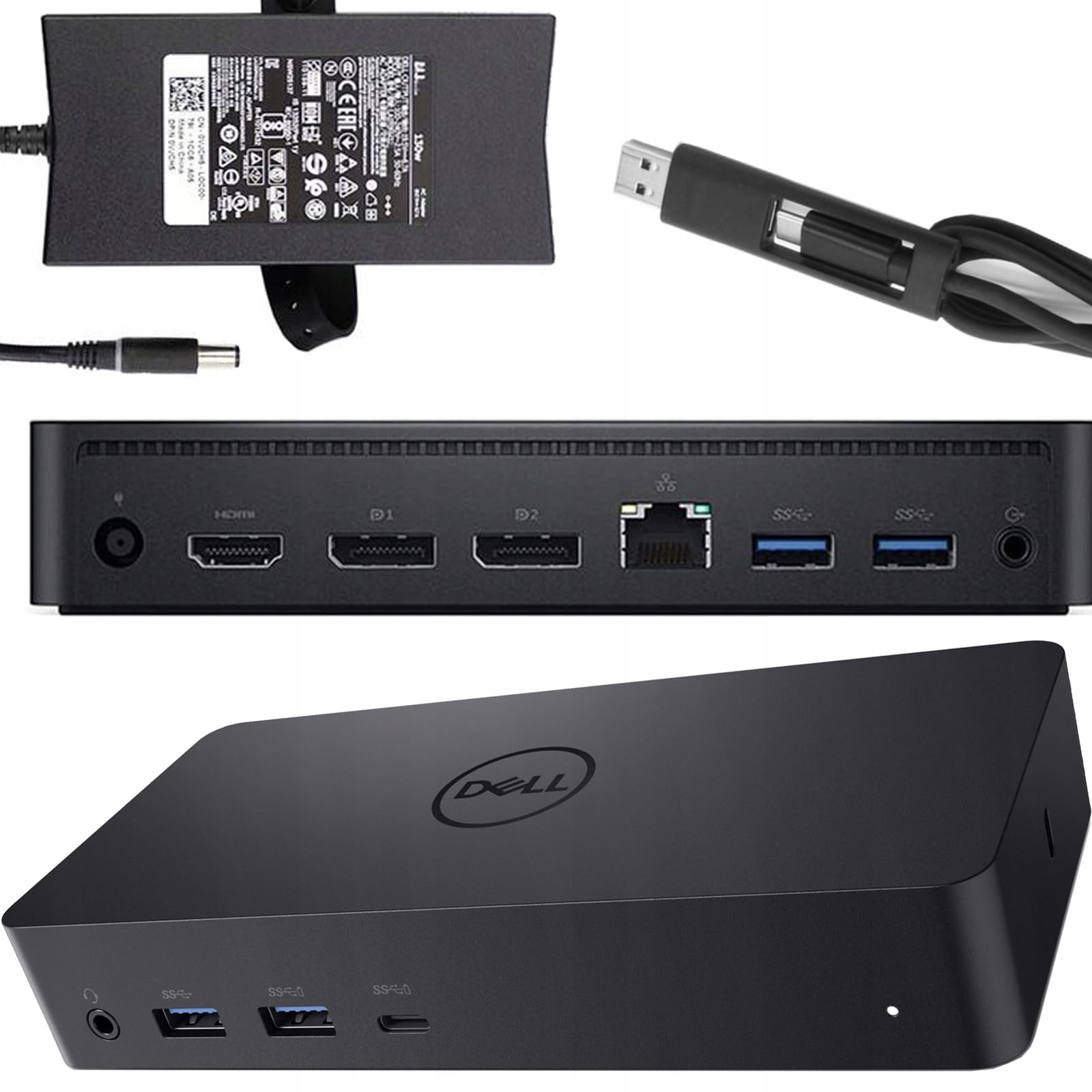
🚀 Elevate your workspace with the ultimate triple-display docking station!
The Dell D6000 USB-C Triple Docking Station is a versatile, high-performance hub that supports up to three 4K or one 5K display, charges laptops up to 65W, and offers extensive connectivity including USB 3.0 ports and Gigabit Ethernet. Designed for universal compatibility with USB-C and USB 3.0 laptops, it streamlines your desk setup with a single-cable solution. This professionally renewed unit ensures reliable performance and comes with a 1-year warranty, making it a smart, eco-friendly choice for professionals seeking a clutter-free, multi-display workspace.
| ASIN | B08BLRH22B |
| Best Sellers Rank | 1,116 in Computers & Accessories ( See Top 100 in Computers & Accessories ) 5 in Renewed Computers & Accessories 11 in Docking Stations |
| Brand | Dell |
| Brand Name | Dell |
| Colour | Black |
| Compatible Devices | Laptops, Speakers |
| Compatible devices | Laptops, Speakers |
| Customer Reviews | 3.9 out of 5 stars 237 Reviews |
| Hardware Interface | Ethernet, USB, USB 3.0, USB Type C |
| Hardware interface | Ethernet, USB, USB 3.0, USB Type C |
| Item Weight | 1.09 Kilograms |
| Manufacturer | Dell Computers |
| Number of Ports | 4 |
| Number of ports | 4 |
| Product Warranty | 1 year limited warranty |
| Total USB Ports | 3 |
| Total USB ports | 3 |
| UPC | 753575617332 |
| Wattage | 65 watts |
S**S
Good clean item of refurbished kit.
Great bit of kit we have bought a few over the years and this model works well with our setups. from a refurbished point of view, we have had a number that would be questionable as to if they have actually been refurbished or tested, one was sent with a damaged lead. However, the item from this seller was packed nicely, had protective covers fitted and was delivered in good order. we use the unit with two dell monitors and a dell laptop with USB keyboard and mouse all worked seamlessly.
N**D
Solid performance and versatility, though design could be sleeker
I bought the Dell D6000 docking station to simplify my desk setup and connect multiple displays through a single USB-C cable — and it performs reliably. It supports up to three 4K monitors or a single 5K display, and handles USB peripherals and Ethernet connections smoothly without noticeable lag or dropouts. Weight & Fit: The dock is compact enough to fit neatly behind my monitors, but it’s slightly bulkier and heavier than I expected for its price range. It feels solid and well-built, but I wish Dell had gone for a slimmer, lighter design to make it easier to move between home and office setups. Setup was quick on Windows, though MacBook users should note that it requires the DisplayLink driver for full multi-display functionality. Dell could make this clearer by including a short leaflet inside the box — it’s an essential step that’s easy to overlook. Overall, this dock delivers excellent connectivity and reliability. A few extra ports or a more streamlined body would make it perfect, but it remains one of the best all-round docking solutions for mixed monitor setups.
J**E
Absolutely perfect - Rock steady video and peripherals
First my set up. Modern Thinkpad laptop. Two hi-res (2560x1440) 32 inch monitors at 60Hz, wired mouse & keyboard This is a solid and very boring Docking station. You wire in your displays and peripherals, then put one USB-C connector into the normal power socket of your laptop - and everything works, all day, every day. It provides power and drives everything through the one port so the laptop is amazingly almost cable-free. I almost enjoy plugging my laptop back in after a trip. I've had a few docking stations before, my previous one needed resetting every few weeks, random failures to sync the displays, mouse not working on some USB ports, ... It's a bit pricey but I bought this one from Amazon Warehouse at half price - but would recommend it at full price. I've had this now for a few months and it's the most boring docking station ever. I've no idea if there's an app or settings - it just works which is all anyone wants.
M**K
These are terrible docking stations. I've had two.
These are terrible docking stations. I've had two. You cannot replace the attached USB cable which means the whole docking station needs to be binned when the cable becomes worn/damaged. Electrical noise immitted from the device makes it sound like you are working next to a fish tank. Glitchy monitors. Incredibly Slow. Do yourself a favour an buy something better. Replaced with Lenovo ThinkPad Hybrid USB-C and my life is much better already.
L**O
Universal! Works with older and newer laptops - even with my Samsung tablet!
Previously I had a Wavlink USB3 docking station. It worked reasonably well. I could connect everything to my old laptops or even to my desktop PC with a single USB cord plus connected the charger for the laptop. I connected two screens to this setup and it was alright. Until I upgraded one of the screen to a QHD one (between full HD and 4k resolution). This extra was too much for that docking station. The new screen could not operate on its full resolution. I started to think maybe I reached the max of the USB3 bandwidth. We use two type of docking stations at work: the HP G5 and this. The G5 only compatible with laptops with Thunderbolt USB C connectors (modern laptops). Even if you convert the USB C to A, it will not work on older stuff. Sad. However, this one works as DisplayLink on older devices with USB A and work on high resolution on 3 screens on USB C Thunderbolt connection. This way, I can still use my old tech but not limiting myself with my modern laptops either. Perfect. I only connected two screen to it, but at work, we have three high resolution screens on them and they work fine over Thunderbolt. I think if you use only they type A connection, you still need to make some compromise with three screens. Two work fine. It has four USB3 type A ports, two display ports and one HDMI and an Ethernet and a 3.5mm headphone jack. All recognised. (I already had the DisplayLink drivers installed from Synaptec). I tried with my Microsoft Surface Pro 3 (old tech) over USB3 type A: all good, two screens on full resolution. Checked on the infamous £99 Geo laptop over the USB C connection. All worked and the device was also charging. On my precious HP Spectre, it was all good over USB C, Thunderbolt. The laptop uses 100W over USB C charging and this dock provides only 65W, so maybe over heavy loads I would still need my original charger, but for office work, it keeps my battery fully charged. Bonus: for a laugh, I connected the USB C plug into my Samsung S7 tablet and it recognised it as external screen and both mouse and the keyboard was working. Dex started and I had a desktop like experience on my tablet. Another observation: the sound worked on the speakers on my screen over HDMI. (The previous docking station had 3.5mm audio ports and the sound was diverted there by default. This one has a headphone connection on its front but luckily the screen speakers worked by default if no headphones connected to the dock) People said that it runs quite warm. It does. I will try to balance my coffee cup on it to keep it warm. Long story short: I am very satisfied with the versatility of the product. I will recommend this to my friends who uses many different devices on the same desk. It was a refurbished product and it was just as good as if I would pick one up from the office. It nicely sit on the stand of the screen.
C**N
Order
Works great thankyou
J**Y
Not reliable with MacBook Air
Disappointed with the reliability. It worked fine with my Dell laptop, but stopped working with my MacBook Air after only a week of use.
B**S
Good value dock
Dock is capable of both usb c and usb a meaning it can be used on multiple devices. Had to install a display driver to make it work on both usb c laptop and usb a laptop. Product has multiple ports and is capable of running multiple monitors. My laptop does complain that the laptop is slow charging when using the dock but this hasn’t caused any issues.
Trustpilot
1 month ago
1 day ago