

Desert Online General Trading LLC
Dubai, United Arab Emirates
Desert Online General Trading LLC
Dubai, United Arab Emirates



🔥 Elevate your binge game with Alexa-powered 75” 4K brilliance!
The Amazon Fire TV 75" Omni Series delivers a stunning 4K UHD viewing experience enhanced by Dolby Vision HDR and Dolby Digital Plus audio. Featuring hands-free Alexa voice control, multiple HDMI ports including HDMI 2.1 with eARC, and seamless WiFi/Ethernet connectivity, it’s designed for effortless smart home integration. The package includes a comprehensive 4-year protection plan with 24/7 support and fast replacements, ensuring long-term reliability. Its ultra-thin bezel and sleek gray metal finish make it a sophisticated addition to any modern living space.
| Resolution | 3840 x 2160 |
| Display resolution | 4K UHD |
| High Dynamic Range (HDR) format | HDR 10, HLG, Dolby Vision |
| Backlight type | Direct LED |
| Refresh rate | 60 Hz |
| Screen size | 75” |
| Viewable display size | 74.5” |
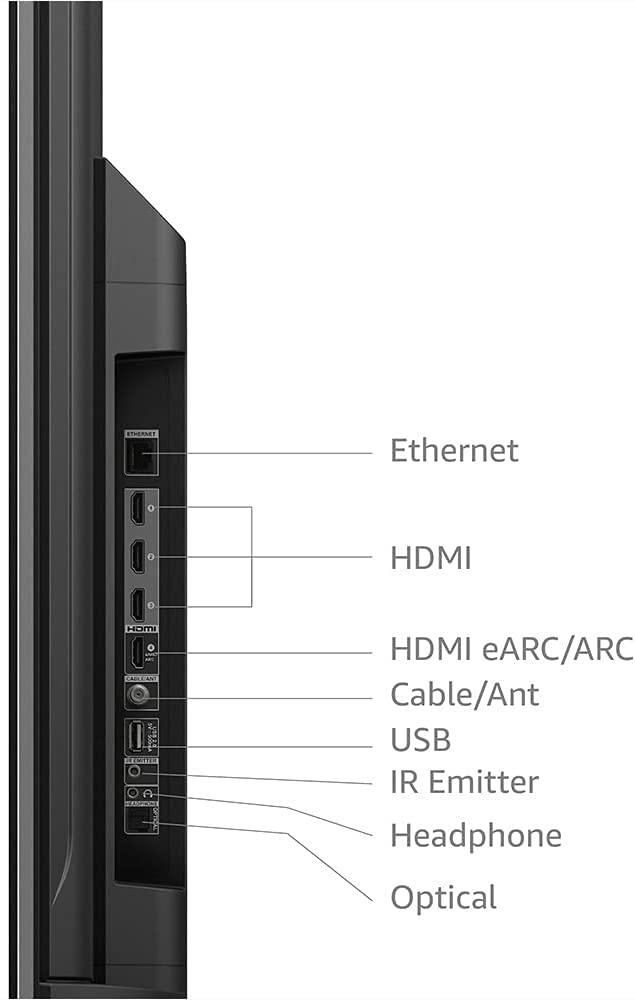
| HDMI ports | 3 HDMI 2.0 + 1 HDMI 2.1 with eARC |
| Ethernet | 1 Ethernet port |
| USB | 1 USB port |
| IR device control with included Fire TV Alexa Voice Remote | The included Fire TV Alexa Voice Remote can certain functions, such as power and volume, on a wide range of compatible IR-enabled devices, soundbars, and A/V receivers. Note: Certain functions may not be available on some IR-enabled devices. |
| Voice support | Yes, hands-free with Alexa, press and ask Alexa with the Fire TV Voice Remote or the free Fire TV app (available for download on Fire OS, Android, and iOS). |
| Audio support | Dolby Digital Plus with passthrough of Dolby-encoded audio |
| Audio power | 8W + 8W |
| OS | Fire TV OS |
| Product size without stand | 65.9” x 38.2” x 3.0” |
| Weight (without stand) | 62.2 (lb) |
| Bezel size (mm) | 1.1 mm |
| Front finish | Gray metal |
| Distance between TV legs | 52” |
| SKU number | 4K75M600A |
| VESA Wall Mount Standard | 400 mm x 300 mm |
| Accessibility features | VoiceView screen reader enables access to the vast majority of Fire TV features for users who are blind or visually impaired. Screen magnifier enables viewers to zoom in and out, and pan around the screen. Text Banner consolidates onscreen text into a compact, customizable banner that appears on the screen. Watch videos and TV shows with closed captioning displayed. Use Audio Description for verbal descriptions of what is happening on the screen, including physical actions, facial expressions and scene changes. Captions and audio descriptions are not available for all content. Fire TV 2-Series, Fire TV 4-Series, Fire TV Omni Series, and Fire TV Omni QLED Series support audio streaming for select compatible Bluetooth hearing aids and devices for a private listening experience. You can also listen to Fire TV with compatible Bluetooth headphones. Learn more about accessibility for Fire TV. Note: “Hearing aids” refers to compatible Bluetooth hearing devices such as traditional hearing aids, cochlear implants, and bone conduction hearing devices. |
| Content availability | Certain apps and services are subject to change or withdrawal at any time, may not be available in all areas and languages, and may require separate subscriptions. |
| Connectivity | Wifi or Ethernet |
| Digital Optical Audio Output | 1 Digital Optical Audio Port |
| Warranty and service | 1-year limited warranty and service included. Optional 3-Year and 4-Year Extended Warranty available for U.S. customers sold separately. Use of Fire TV is subject to the terms found here. |
| Included in the box | Fire TV Omni Series 75”, Fire TV Alexa Voice Remote, power cord, 2 AAA batteries, IR emitter cable, 4 screws, TV stand (2 legs), Quick Start Guide. |
| Software security updates | Learn more about these software security updates. If you already own a Fire TV, visit Manage Your Content and Devices for information specific to your device. |
| Support | Explore the User Manual to view more information about Fire TV Omni Series. |
| Size | 38.2 x 157.7 x 17.1 mm |
| Weight | 51 g (without batteries) |
| Batteries | 2 AAA required (included) |
| Technology | Bluetooth 5.0 |
| Compatibility | Compatible with Amazon Fire TV smart TVs: Fire TV 2-Series, Fire TV 4-Series, Fire TV Omni Series, Fire TV Omni QLED Series, Fire TV Cube (3rd Gen) |
L**S
Awesome Amazon Fire TV with Great Picture!
The things we do like about the tv: 1. The picture quality is spectacular especially when watching college football or playing video games. 2. The ease of setting up our Amazon prime account to the tv. 3. Using Alexa on the tv is very easy and a great function. We can speak into the remote or to the tv and she answers. She can also show us our blink security cameras and ring doorbell. 4. We liked the price of the 75 inch. It was inexpensive and a good quality tv. 5. The tv is light weight, but does require 2 people to hang it due to being awkward. 6. Has all of our apps that we use to stream and can save them to the main menu page.Few things that we don’t like: 1. There is no way to get the tv from going to sleep when paused. We have Googled and tried to look it up on Amazon and can’t find anything. Guess we have to live with that setting. 2. The main menu screen. You can’t customize what you want or don’t want to see. That’s a little bit frustrating. We would like to see a way to delete certain things that don’t interest us on the main menu. Not really a huge deal, but would like it to be more user friendly. 3. The updates take about 45 mins to an hour before being able to setup the tv. Once again, not a huge deal, but want that to be known as we didn’t know the time prior to setting up and being able to use the tv. 4. If you’re a first time user with Amazon Fire. It will take a little bit of time to get used to the Amazon Fire TV settings and functions especially if you’ve been a longtime user of Roku.Overall, this tv is great for the price, quality of picture, ease of use with our Amazon Prime and Alexa functions. We would buy this tv again for other rooms in our house.
J**N
Great display, but needs some upgrades
My wife sent me the listing for this TV when she received it as a special sale item and even though my current old TV was still working fine, I decided that it was a good enough deal that I would upgrade to 4K finally. I liked that it had a lot of potentially beneficial connectivity between other devices, like cameras and other smart home stuff. I already had a TV wall mount from my old TV. The only problem was the mounting holes on the back of this TV were different and I didn't have the leftovers from the mounting hardware, so I had to wait until the next morning to run to the hardware store and get what I needed. After that, it was up on the wall within minutes. Another problem: the mounting of the bracket on the back on the TV is much lower than my old one, so the TV sits about 8-10" higher than before. I will need to take down the TV and move the entire wall bracket down so it sits at the right height.Setup is pretty easy, getting through the general stuff, the WiFi connection, updates, and scanning through the TV channels...yes, I still use antenna for a couple local channels I can't get through streaming. That all went fine. I connected my existing in-wall HDMI cable to the ARC port and set my receiver to the Roku input. I had great picture and audio. I decided that I should also try using the TV with its built-in Fire TV capabilities.That's where things went off the rails. The ARC was working fine for all of a few minutes, and then after changing a couple unrelated settings and rebooting the TV, I had no more sound over ARC. I messed with settings on the TV and my receiver for 10-15 minutes before turning to the internet for help. I found an answer that said to unplug the TV for a few minutes and then it should work again. Great. Did that and I did indeed have sound over the ARC channel, but it would cut out every 5-7 seconds. I tried messing with all sorts of settings but eventually gave up and just connected an optical cable between the TV and receiver to get sound working properly. I might have to try a newer HDMI cable to see if that makes any difference.With that working, I was able to use the native Fire TV apps. I've been using the native Fire TV system now for a couple months and I have to say, it needs work. When the apps work, they work. But every once in a while, and it's happening almost daily now, I'll load an app and it won't respond. I'll have to reboot the TV and then the apps will start working most of the time. Sometimes even a reboot won't work and I just have to wait for the app to eventually load. I don't think its an internet or WiFi issue, since nothing else seems to have any problems. I just think the Fire TV environment is slow. I don't know if it's because of the hardware or the software, but the instant I started using it, I could tell how much slower it was to respond to anything compared to the Roku box I have.Needless to say, as a display, this thing works great. The picture is clear and bright, the details are amazing. I haven't played much with the picture settings, as out-of-box, it was already good. I like that it integrates the OTA TV channels right into the menu so I don't have to change the input. I also like the on-screen notifications from Alexa for specific things that I have set up. I haven't played much with the integration of the Ring doorbell and the picture-in-picture display for it. I also plugged a web camera into the USB port on the TV and it recognized it, but I haven't tried to use Zoom yet with it.I gave it 5 stars, despite the issues with ARC, as that may not necessarily be the fault of the manufacturer, but more an issue with my cable, or the setup between the TV and my receiver...maybe they just don't work well together. I've read that Yamaha's receivers all tend to be finicky with ARC, so it may just be that. I'm also not dropping any stars, despite the speed issues, as it could potentially be related to my network, or might work fine after an update. Either way, I could use it as just a display with my Roku and it would be a 5-star display at that point. But then I'd lose any capabilities with the integrated Alexa and smart features.
V**L
Absolutely amazing and smart TV
Received my 75inches Amazon fire omini TV today and my first impression is absolutely fantastic. Amazon has not shared much technical information like panel type is IPS or VA but since it supports enhanced dolby vision I assume hardware is high end and supports 12 bit depth at panel and graphics/processor level. I have watched so far SDR and HDR 4k contents and performance is absolutely amazing out of box settings. YouTube, Netflix, Amazon prime videos, Pluto tv, Peacock are my frequently used apps and all worked flawlessly. I will return to my updates after spending some more time with various types of contents, specially enhanced dolby vision.Update Oct 30th- watched squid games on Netflix in Dolby vision. When source contents are in DV mode this Tv senses the format automatically and DV logo appears on playback. I watched at night time keeping lights off in room and paid attention to all kinds of scenes that were being presented like day light, night times, indoor, outdoor etc. It scored absolutely 100% movie theater level presentation which I thought was never possible on LCD Tv. Color clarity to the extent no detail missed.Issues- yes I noticed 1 issue too in case Amazon technical team wants to know.1. Video playback turned absolutely black occasionally with just audio sound going on. This happened while watching episodes of LOST season 2, episodes 16 to 20. It happened consistently when commercials that interrupt automatically in between and absolutely after last commercial is complete, episodes playback resumes with only audio and no video. Exiting episode and returning back to resume play manually always resolved this issue. I assume it to be a software glitch either of IMDB TV or Amazon prime.Dec 5th update: Installed Ring door bell, Amazon thermostat, Myq garage door opener and camera. All added as a device on Alexa application. Found that Tv gets integrated to Ring door bell and thermostat automatically. Nothing impressed my wife so far but the ease of announcing to Fire Tv straight from bed even when TV is powered off “Alexa set thermostat to xx temperature “ . Just this one smart feature turned out to be biggest winner. Tv continues to perform fantastic so far!Update Feb 16th,2022 - purchased Amazon studio to enhance dolby atmos sound experience and it made amazing difference. I placed it in center below my bed, found this to be best for room full of sound. Connecting to TV was a piece of cake through Alexa application.Tv continues to perform well till date and seems like Amazon is pushing automated software updates too.Happy customer!
Trustpilot
3 weeks ago
2 weeks ago