We remain fully operational. Our teams are working around the clock to ensure your deliveries continue safely.

DOWNLOAD THE APP


Customer Services
Copyright © 2025 Desertcart Holdings Limited
DOWNLOAD THE APP

🚀 Power your professional edge with ASUS Pro WS W680-ACE — where speed meets stability.
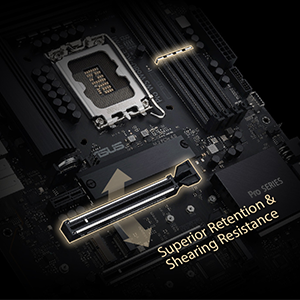
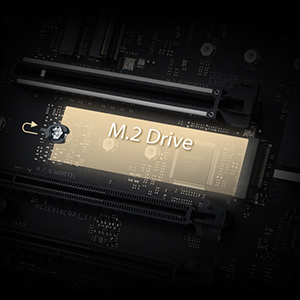
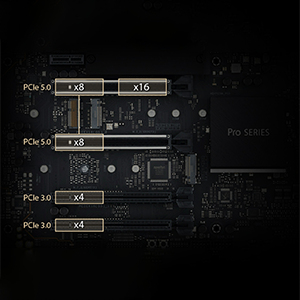
The ASUS Pro WS W680-ACE IPMI is a high-performance ATX workstation motherboard designed for creative and IT professionals. It supports 12th and 13th Gen Intel Core processors with ECC memory, features dual PCIe 5.0 x16 slots, triple M.2 PCIe 4.0 storage, dual 2.5 Gb Ethernet, and advanced remote management via an included IPMI expansion card. Engineered for reliability and expandability, it offers comprehensive cooling solutions and next-gen connectivity including Thunderbolt 4 header support, making it ideal for AI, 3D rendering, and media production workloads.





| ASIN | B0BZGKKCWC |
| Best Sellers Rank | #134 in Computer Motherboards |
| Brand | ASUS |
| Color | BLACK |
| Customer Reviews | 4.2 4.2 out of 5 stars (63) |
| Date First Available | March 24, 2023 |
| Item Dimensions LxWxH | 8.9 x 2.36 x 7.17 inches |
| Item Weight | 4.19 pounds |
| Item model number | PRO WS W680-ACE IPMI |
| Manufacturer | ASUS |
| Memory Speed | 4400 MHz |
| Number of USB 2.0 Ports | 6 |
| Processor | pentium |
| Product Dimensions | 8.9 x 2.36 x 7.17 inches |
| RAM | DIMM |
| Series | PRO WS W680-ACE IPMI |
R**M
Great Board Once You Get An Undamaged One
The CPU socket on the first board I received had bent pins so it was unusable and I sent it back. It looks like I'm not the only once to have experienced this. The second board was fully functional. What I love about this board is that you can switch off the IPMI, Aspeed onboard video and IP functions by simply flicking switches on the motherboard. In the meantime you have a workstation motherboard with high quality components and rock solid stability that supports ECC RAM and all this wrapped up in an mATX format. In other words this motherboard can be the foundation of a very powerful computer in a small package that should turn out to be highly reliable. One of the great things about reading motherboard reviews is that you realize that some reviewers simply don't know what they're talking about or they're not as experienced as they think they are. Read the reviews carefully then and make a decision. This board isn't cheap but if you know what you are doing it's well worth it.
A**H
Excellent / Solid Board
I decided to order this board even though the only reviews that were listed were negative (mine arrived with NO bent pins). I paired it with ECC Ram - Kingston's KSM48E40BS8KM-16HM (2 sticks for 32GB) and an Intel 12600K - lowest/cheapest proc that supports ECC - be sure to check and see if your CPU support ECC before you order - not all do and may cause problems I would imagine. I also decided to run Debian 12 on it instead of Windows (Linux is not listed as a supported OS on ASUS's website). I have been using it for a couple weeks now and everything is working great. Here are a few caveats with this board that I have encountered: BMC remote management works great with Windows. However, I am running Debian and it works but remote control is a bit slow. However, the other features work fine (remote media, power control, etc). You can even flash the BIOS right from the BMC. Awesome! One thing to note with Linux - Do not have a monitor plugged into the server at the same time you are trying to use the Remote Control. The remote control ends up as a second screen and not the primary. This drove me crazy for a bit until I figured out what was going on. Run the server headless and you are ok. There may be a way around this but I haven't found it yet. The SlimSAS-SAS port does NOT support SAS disks unfortunately. I tried a slim SAS to SAS cable and it does not work. SlimSAS to SATA works fine though using the same cable. If you need SAS disk support, you will need a SAS controller card in one of the PCI Express slots. Debian OS - Have to set static ip address. For some reason when using DHCP it will not get an ip address unless you manually click connect in the dialog box (if you are using a GUI and KDE - maybe it will work if you just run without the GUI?? havent tested, need the GUI for my specific use case). 2.5Gbps networking works great. All other items were detected and work perfect - USB, etc. Overall I am happy with this board. Has some unique features that arent in too many boards such as ECC and the BMC. Also being able to use quick sync with the 12600K.
A**R
Great server board
I have this board doing my server duties. I updated BIOS to prevent any issues with 13th generation Intel CPU. Nig plus, it supports ECC memory. It seems to have enough expansion slots, however after adding 10Gbe card, Nvidia GPU and LSi HBA card I'm left with only one more slot. The top two slots support PCIe Gen 4 and only one of them utilizes more PCIe lanes. I may use it to install Asus NVME expansion card. Beware, that this motherboard chip will only allow 2 more additional NVME drives. I could not get SlimSAS connector to work initially. However, after poking in the BIOS I was able to find option that enabled SlimSAS. This option is not in Bios Storage setup. I believe, SlimSAS can be passthrough to VM. I have a tiny complain. Why there are only 4 SATA ports? Not enough.
J**H
Missing Features and Poor Customer Service
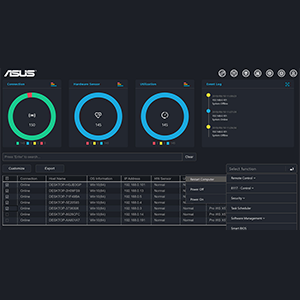
A good portion of this motherboard is frustrating. 1. BIOS Updates: The recommendation from the product support page claims that you should update Intel ME before updating the BIOS. Fun fact, you can only do that from within a Windows OS. This is a server motherboard and should not have that limitation as something close to >90% of servers are running a flavor of Linux. This means you need to standup a special VM just to update the BIOS on this machine. 2. ASUS Control Center Express does not work with this motherboard. One of the perks of a server board is the BMC/IPMI functions so you don't need to be sitting in front of the box with a monitor and keyboard to use it. The advertising for this product claim that you can make that functionality even better by using a product that they provide a license for along with the purchase. Unfortunately, it's not compatible with the BMC/IPMI on this motherboard. Screenshots provided as evidence that nothing is populated in the dashboard and it throws an error when attempting to use the various functions. 3. SlimSAS Port doesn't come with a cable. For a motherboard of this price, you should include small things like that, in my opinion. 4. Customer Service is atrocious. I registered the product and reached out to customer service after spending a week of doing my own troubleshooting with the previous issues. Not only was the initial customer service representative not able to help, they "escalated" me to another person who didn't respond for TWO WEEKS! That is unacceptable customer service for a board of this price. Who knows how long it'll be before they respond again. I'm not returning the motherboard because the hassle of taking all my services down and migrating them again is greater than the cost of keeping it, but I'm very disappointed overall. I expect better from server quality components and from ASUS as a whole.
A**E
Ich habe ein P-10S-E 4/L mit onboars IPMI, sprich BMC. Das Teil funktioniert tadellos. Der Mist, den die hier fabriziert haben hat Bugs noch und nöcher. Zuerst gab's Probleme mit der Verkabelung IPMI zu Motherboard pins. Das Kabel muss verkehrt rum eingesteckt werden. Dann BIOS update auf 2802 und Nvidia Modeset funktioniert nicht mehr, der Rechner bleibt hängen. Wenn man den Strom trennt, dann funktioniert der BMC, welcher mit der IPMI Karte verkabelt ist, beim ersten hochfahren. Dann ist auch die IPMI Karte erreichbar via LAN. Self test PASSED. Dann nach dem Reboot schaltet sich einfach die Aspeed GPU wieder an und das IPMI aus, also BMC Self Test FAILED. Ich habe diese Version gekauft weil ich von unterwegs den PC booten will und das Betriebssystem wählen. Und später, wenn der Rechner ausgedient hat, soll er eine Server Node im Heimnetz werden, die ich an und ausschalten kann wenn ich will, egal von wo aus. Aber der IPMI Mist funktioniert nicht. Ist verbuggt. Asus Support zu erreichen ist nicht möglich. Den Rechner zusammenzubauen war eine Folter. Nichts als Stress und Probleme. 2400€ für Stress und Probleme. Danke Asus. Könnte den ganzen Mist nehmen und denen in die Fenster schmeissen, so genervt bin ich. Ich habe auch keine Lust das alles jetzt auseinander zu nehmen und zurück zu schicken. Das Board wurde in den USA bestellt bzw von dort aus geliefert. Lieferzeit über 1 Monat. Asus support, wie geschrieben, Katastrophe. Man kommt immer bei Asus Deutschland raus. Dort muss man sich registrieren mit Geburtsdatum und was die nicht alles wissen wollen an persönlichen Daten. Das Formular funktioniert nicht, man muss irgendwie auf die US Seite, dort dann im Nicht-Kunden Support ein Formular finden das ohne Status 500 oder 404 als Antwort funktioniert. Und dann bekommt man keine Antwort. Support auf Reddit NULL Reaktion. Support per Mail, irgendwas von wegen No-Reply und Privacy Policy. Effektiv KEIN SUPPORT. 1 Stern ist noch zu gut.
ア**ン
業務用にこのマザボ選びました。 PCIeスロットがたくさんあって、m.2 Eキーがあって、LGA1700対応のATXマザーは、自分が見つけられたのはこれしかなかった。でも期待通りでした。 m.2 EキーはCNViではないWi-Fiカードが使えました。USBもちゃんと接続されていますね。 自作PCにm.2のWi-Fiカードを接続しようとする人は多くないと思いますが、とりあえずこれはOKでした。 その他いくつかのPCIe増設ボードを付け、Windows11 pro環境で普通に使えています。 あと、最近は組立をあまりしていないのでわかりませんが、この手のマザーボードはPOSTがちょっと時間かかり起動は遅めな気がします。でも状態表示の7セグLEDを見ていればすぐですね。
A**R
Manual is poor and certain configurations can and will fail to boot and cause balding. Look into the gigabyte alternative or supermicro instead.
S**H
Great Board for Jellyfin Server, it's been running 24 hours a day for 6 months with no problems so far.
T**R
128GB RAM, x1 NVMe drive, 10Gbe nic, NVMe enterprise pcie x4 card; and x2 3090's had to use a riser to handle the second 3090 as the pcie ports are not far enough a part all works amazingly well pretty much pushing it to its max ... beyond this would be server grade boards
Trustpilot
3 days ago
1 month ago