We remain fully operational. Our teams are working around the clock to ensure your deliveries continue safely.

DOWNLOAD THE APP


Customer Services
Copyright © 2025 Desertcart Holdings Limited
DOWNLOAD THE APP

🎮 Elevate your handheld gaming — dock, charge, and conquer in style!
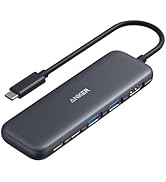
The Anker 6-in-1 Charging Station is a premium USB-C hub designed for Steam Deck and ROG Ally users, featuring 100W fast charging, 4K@60Hz HDMI output, 1Gbps Ethernet, and multiple USB ports. It transforms your portable console into a powerful desktop gaming and productivity station with stable connections, crisp visuals, and seamless plug-and-play setup, all housed in a sleek, durable design.






| ASIN | B0CS6BWL4Q |
| Best Sellers Rank | #74,149 in Computers ( See Top 100 in Computers ) #1,285 in USB Hubs |
| Item model number | A83S1 |
| Manufacturer | Anker |
| Product Dimensions | 13.2 x 7.45 x 2.67 cm; 200 g |
P**L
The Anker Steam Deck Docking Station is a premium accessory that transforms the Steam Deck into a versatile desktop gaming setup. Built with Anker’s signature quality, it has a solid, compact design that sits securely on any surface without wobbling. The multiple ports—including HDMI, USB-A, USB-C, and Ethernet—provide seamless connectivity for monitors, peripherals, and wired internet, making it perfect for both gaming and productivity. Setup is plug-and-play, with no drivers required, and connections remain stable during extended use. Video output is crisp and lag-free, and USB devices respond instantly. The dock also allows charging while in use, eliminating the need for extra cables cluttering your desk. While it is slightly pricier than some generic alternatives, the durability, reliability, and polished performance make it well worth the investment. For Steam Deck owners seeking an all-in-one docking solution, this is a top-tier choice.
A**E
The Anker 6-in-1 Charging Station for Steam Deck/ROG Ally has quickly become an indispensable accessory for my handheld gaming setup. This isn't just a charging dock; it's a well-thought-out and robust USB-C hub that significantly expands the functionality of both my Steam Deck and (when I get around to it) my future ROG Ally. Build Quality and Design (5/5): Anker has a reputation for quality, and this charging station is no exception. It feels solid and well-built, with a nice heft that keeps it firmly planted on my desk. The black finish is sleek and doesn't look out of place alongside my gaming devices. The dock is specifically designed to cradle the Steam Deck securely, with a snug fit that inspires confidence. I appreciate the subtle Anker branding and the overall minimalist aesthetic. Charging Capabilities (5/5): The 100W fast charging is a game-changer. It efficiently charges my Steam Deck at top speed, ensuring I'm ready to jump back into gaming quickly. I've also used it to charge other USB-C devices, and the power delivery is consistently reliable and fast. The fact that it handles the power demands of the Steam Deck without any issues is a major plus. Connectivity Options (5/5): This is where the Anker dock truly shines. The inclusion of a full-bandwidth HDMI port supporting 4K at 60Hz is fantastic for hooking up to my TV or monitor for a big-screen gaming experience. The image quality is crisp and clear, with no noticeable lag or artifacts. The Gigabit Ethernet port is another welcome addition, providing a stable and fast wired internet connection – a significant improvement over relying solely on Wi-Fi, especially for downloading large game files or engaging in online multiplayer. The two USB-A ports and the additional USB-C port significantly expand the peripheral options. I've successfully connected my wired gaming mouse, keyboard, and even external storage without any issues. This transforms the Steam Deck (or Ally) into a more desktop-like experience when needed. The data transfer speeds through the USB ports seem to be as expected and reliable. Ease of Use (5/5): Setting up the Anker charging station was incredibly simple. Just plug in the power adapter (which, thankfully, is included – a big plus!), connect the USB-C cable to your Steam Deck or ROG Ally, and you're good to go. The dock holds the device at a comfortable viewing angle, whether you're charging or using it as a desktop setup. The ports are clearly labeled and easily accessible. Value for Money (4.5/5): While the Anker Charging Station isn't the cheapest dock on the market, the quality of the build, the reliability of the charging, and the comprehensive connectivity options make it a worthwhile investment. The inclusion of the power adapter further sweetens the deal. Considering the functionality it adds to your handheld gaming device, I feel it offers excellent value for money. Minor Considerations: - The dock is primarily designed for the Steam Deck's form factor. While it technically works with the ROG Ally (as advertised), the fit isn't quite as seamless or secure. This isn't a major drawback, but something to be aware of if the ROG Ally is your primary device. - While the dock itself is relatively compact, the included power brick is fairly substantial. This is understandable given the 100W power delivery, but it's something to consider for portability. Overall (5/5): The Anker Charging Station for Steam Deck/ROG Ally is a fantastic accessory that significantly enhances the versatility of these handheld gaming consoles. The combination of fast charging, 4K@60Hz HDMI output, Gigabit Ethernet, and multiple USB ports makes it an essential dock for anyone looking to expand their gaming experience beyond handheld mode. The build quality is excellent, and the ease of use is commendable. Despite a couple of minor considerations, this dock delivers on its promises and earns a solid five-star rating from me. It's a must-have for serious Steam Deck (and soon-to-be ROG Ally) users.
T**I
I bought this for my steam deck. Direct internet cable connection showed the Latency of 17 with GeForce Now ultimate tier (definitely get it with your steam deck btw). Cable connected to docking station then to deck showed the latency of 19 which is exceptional considering the internet going through a middle device first and then to steam deck. PD 100w worked without any problem with a 100w single-port only USB-C charger (also from Anker btw). HDMI connects flawlessly as well. Peripherals USB-A port also directly recognised the controller with zero lag/latency. I haven't been disappointed with Anker until now. Been using the brand for 5-6 years at least. I will update this post in case in the future the docking station caused any problems but so far so good everything seemes very well way above average brands for a very good price. If you see this post like this without updates, know that the device is still working flawlessly regardless of the time you read this post.
B**Y
The Anker Steam Deck Dock is a great compact hub that makes using the Steam Deck on a monitor or TV incredibly easy.It provides all the key ports you need—HDMI for 4K at 60 Hz, Ethernet, USB-A, and USB-C—so you can plug in a keyboard, mouse, and other accessories without hassle. Charging is fast and reliable, letting you play while docked without worrying about battery life. The dock feels well built and stable on the desk, and the angled USB-C connector keeps the handheld seated comfortably while gaming. Overall, it is a very practical and high-quality dock for anyone wanting a simple way to turn the Steam Deck into a mini desktop setup.
S**E
Visto il prezzo di quella della Valve ho deciso di acquistare questa molto più economica. La utilizzo quando devo collegare alla Steam Deck alcune periferiche come mouse e tastiera. La qualità dei materiali è molto buona, è in metallo e ha una striscia di gomma dove vai ad appoggiare la Steam Deck per non graffiarla. Il cavo con cui lo colleghi alla porta usb-c è della lunghezza giusta e le porte delle periferiche sono sul retro, facili da raggiungere. La maggior parte delle volte la utilizzo collegandoci mouse e tastiera (scomodissima altrimenti da richiamare su steam deck) e il monitor per avere più spazio. Certe volte collego anche un controller così da giocare usando il monitor come schermo principale. Molto comodo anche per collegare chiavette o hard disk per spostare file. Questo prodotto praticamente vi trasforma la Steam Deck in un computer.
Trustpilot
1 month ago
3 weeks ago