
🎮 Code, Create, Control — Own the Future of Play!
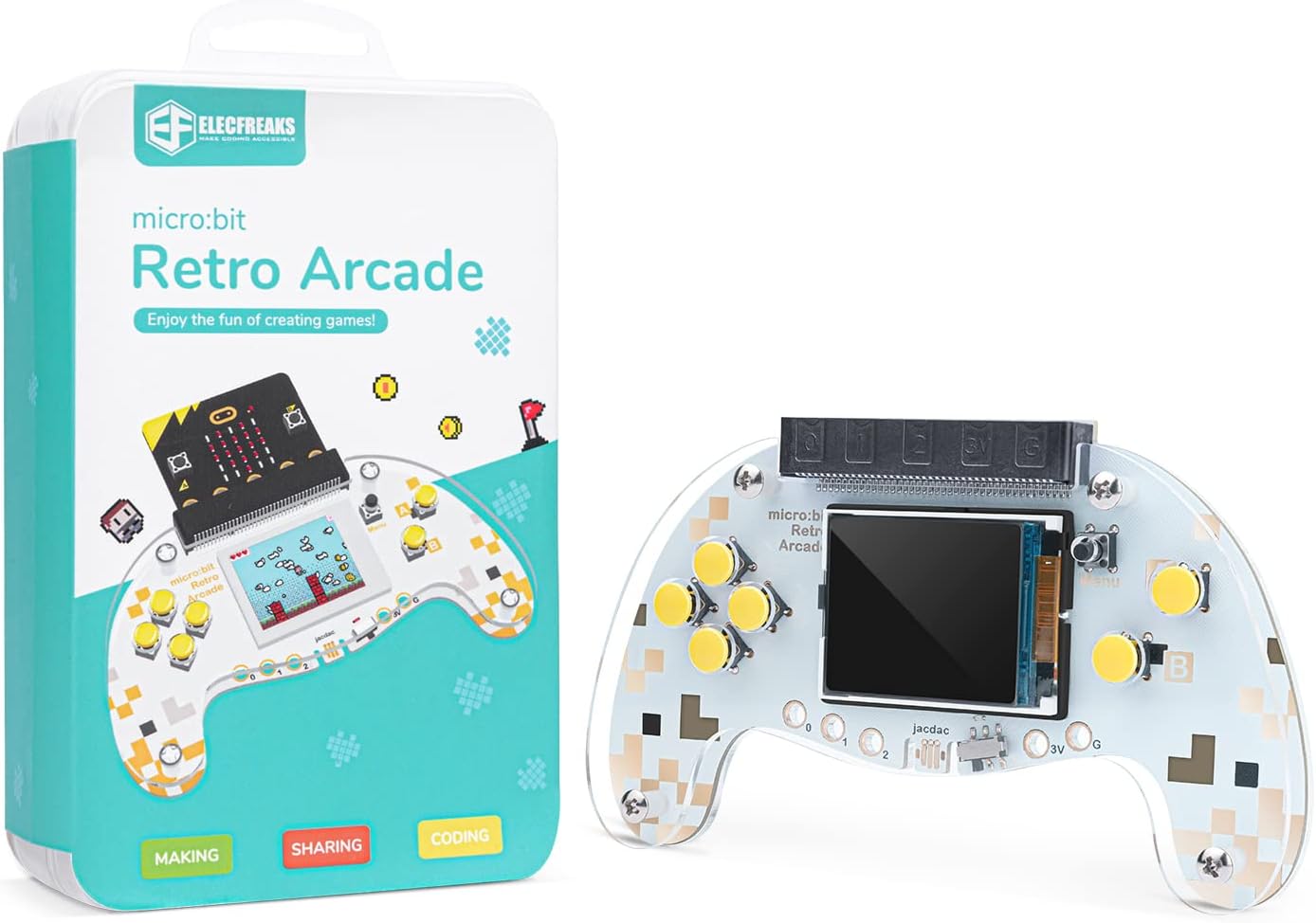
ELECFREAKS micro:bit Retro Makecode Arcade is a handheld joystick expansion board designed for micro:bit V2, featuring a 160x128 TFT color screen, 4 directional buttons, 2 A/B buttons, and a reset button. It supports dual functionality as a game programming platform and a remote control device, leveraging Makecode graphical programming to enhance STEM education. Crafted from translucent acrylic with a sleek design, it comes with extensive tutorials and technical support, making it an ideal tool for kids and educators to develop computational thinking and coding skills. Note: micro:bit motherboard not included.


| ASIN | B0C5XLSZRB |
| Age range (description) | Kid |
| Assembly Required | No |
| Batteries Included? | No |
| Batteries Required? | No |
| Battery description | Requires battery power |
| Best Sellers Rank | #95,966 in Computers ( See Top 100 in Computers ) #1,433 in Single-Board Computers |
| Color | Berry |
| Controller type | Remote Control |
| Customer Reviews | 4.0 4.0 out of 5 stars (43) |
| Date First Available | 8 April 2025 |
| Display type | TFT |
| Educational Objective(s) | Teach programming and computational thinking skills, and basic robotics and control concepts |
| Form factor | Handheld |
| Item model number | micro:bit Retro Programming Arcade |
| Item weight | 0.18 Kilograms |
| Manufacturer maximum age | 144 |
| Manufacturer recommended age | 0 - 12 years |
| Material | Acrylonitrile Butadiene Styrene (ABS) |
| Material Type(s) | Acrylonitrile Butadiene Styrene (ABS) |
| Package Dimensions | 14.3 x 9.19 x 4.19 cm; 181 g |
| Power source | Battery Powered |
| Screen size | 20.32 Centimeters |
| UPC | 779288989122 |
| tech_spec_battery_description_toys | Requires battery power |
D**U
I use this in my teaching to kids in the 10 y/o range. Sometimes with the game controller sometimes with one of the robots. Versus Scratch or Makecode alone, it makes coding very real to kids. They are programming a device to do something. So far all the devices have worked, though you have to precisely follow directions. It’s not unified yet.
N**.
Mal servicio no prende lo voy a devolver
M**S
If you’re in the market for something like this, you already know what you’re getting. Your question is thus “did it work?” Yes - it was exactly as advertised, the price was solid, and it’s entirely functional. It was a bit smaller than expected (I was thinking it would be the size of an Xbox controller), but it’s for my 12yo so it’s fine. This is not a toy, it is a tool. If you do not have the background to teach your child how to use it, unless they’re exceptionally bright (and already have associated tools) it will not be useful. Since it is set up as a toy I’m saying it’s appropriate for 7 and below, however, this assumes a child advanced enough to program and patient enough to be interested. Do not get this as an unsolicited present.
A**N
The micro:bit board is not included in this kit. You only receive the arcade board (the screen with the buttons). The micro:bit shown in the pictures is for display purposes only, to show how it looks when assembled, but it is not included in the package.
T**R
Here's what you need to know: (0) Start by going to the elecfreaks site and read the wiki for this product. Seriously, try that first. (1) The chipset used with this board is still considered experimental on the Makecode site. That means it won't show up as an option for your .hex code until you enable the use of experimental hardware on the site. (2) Because it's experimental, you also can't use webUSB (the preferred file transfer protocal) to download your hex files directly like you can on the main micro:bit programming sites. You have to download the file to your PC, then transfer it to the microbit manually. (3) You microbit probably won't compile the hex file correctly, though, if you just drag and drop from within the file explorer app. Expect an error and a frowny face. (4) So, you will usually have to open a terminal window in the directory with the hex file on your PC and use robocopy to transfer it to the microbit. You want to unplug immediately after the file transfers, too, to avoid a timeout error. Not exactly kid friendly, is it? Not to mention it's a pain to assemble and you'll probably need to ream out the buttons with a 1/8" drill bit (BY HAND!!!) to get them to fit on the switches. All in all, this was not ready for widescale release if it really is aimed at kids.
Trustpilot
2 weeks ago
3 weeks ago