


📺 Elevate your entertainment game — don’t just watch, experience!
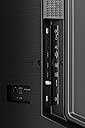
The Hisense 65U6K is a 65-inch Mini LED 4K Ultra HD Android TV featuring 4 HDMI ports and 2 USB 2.0 ports. Designed for gamers and cinephiles alike, it boasts an 8ms response time, Auto Low Latency Mode, and Variable Refresh Rate for smooth visuals. Dolby Atmos speakers deliver immersive sound, while smart Android TV capabilities provide seamless access to apps and web browsing. This TV combines cutting-edge display tech with versatile connectivity, making it a powerhouse for both work and play.




| ASIN | B0C6XMCWBR |
| Item model number | 65U6K |
| Manufacturer | Hisense |
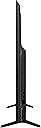
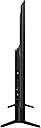
| Product Dimensions | 7.87 x 145.03 x 84.07 cm; 27.5 kg |
F**T
This thing is huge, and looks terrific. Amzn shipped it fast and w/o any dmg. For the price, it's a heck of a bargain. I'd been struggling btwn the u6 vs u7, and 65" vs larger, but went w the *much* cheaper 65u6 to test out using it in my situation before (years later, I hope) splurging on a later, better, larger one. I really am stunned by how big it is, and the picture looks much better than my (comparably priced) 4k 32" pc monitor from LG. Settings are mostly straightforward. The docs are just hilariously inadequate; fortunately it's simple enough you can figure it out. Eventually. I liked the ability to disable things via turbo mode, as I'm just using it as a pc monitor and don't need all that nonsense running. The sound quality on the built in speakers is surprisingly good! I have a high end stereo as my main output, but when I forget to turn it on I'm always surprised at how good the sound from this is! The bass is a little one note but that's to be expected simply from the volume needed to do low bass well; the huge area of the monitor already helps here a lot. End result; excellent "proof of concept" of using a modern large-ish tv to replace my monitor (eyestrain from focusing close up all day was just killing me). I'm just using it as a pc monitor currently and really didn't want all the telemetry, advertising, etc crap. So I simply never set up networking, never connected it to the router or wifi. It works fine (as a monitor) w/o any of that. Game mode looks terrific and cuts the latency a fair bit. There's a "turbo mode" (which you can configure) that turns off a lot of bloatware, which is a really nice feature. Glare/reflection problema are moderate; that's one of the strongest arguments for the u7 series (for my use case), but I wanted an affordable and usable test mule. This is excellent for my use (browsing/gaming at a reasonable focal length in a bright room, but I can appreciate the better reflection mitigation of the higher tier versions. Overall, I'm super happy with it.
A**X
After checking out the various settings under Settings > Picture > Advance Settings -- things like Motion Enhancement, Motion Clearness, Noise Reduction, Digital Noise Reduction -- I noticed that my TV was in a mode where the brightest areas of the screen seemed to be flickering or pulsating at a very high frequency. It didn't matter if I was watching antenna or HDMI or even the CVBS input, this flicker effect was always there. It was very annoying to me, though other people didn't necessarily see it... but I couldn't decide if I had just not noticed it before or if it was something to do with those settings or if it was new but coincidental... or if I was just having migraine auras or something. This impacted all inputs, though I don't recall whether it impacted built-in apps like Netflix, since I rarely use them. So I put the settings back to defaults, turned the advanced options on and off, etc., and it didn't seem to change the flicker problem... so I just lived with it until one day in frustration with the idea that I must have a nearly-new TV that is borderline defective unless I can fix it, I went for a deep dive through all the options to see what else it might be. It should have been nothing, because there should not be a setting that would mess up a TV like this, but... I noticed that under Settings > Picture > Advance Settings > Instant Game Response there was something called High Refresh Rate Mode. This setting is only available on HDMI, not antenna, and is off on all inputs. I thought "well, maybe high refresh rate mode would get rid of this annoying flicker." At least on HDMI, since that setting isn't available for Antenna. My reasoning is was not necessarily sound, but this was my thought process. I had to try something. Anything. I switched that option on and -- whoa -- it worked... the high refresh mode did not flicker... but that's when things got weird. I checked the Antenna input and the flicker was gone from there, too, even though (like I already mentioned) that option can't even be enabled for the antenna input. But things got weirder still. I went back to HDMI and turned off High Refresh Rate Mode and turned off Instant Game Response, and then problem was still gone. No flicker. Say what? Then I switched back to antenna and the problem is still gone. I fixed the flicker by turning something on and back off again. Not a good sign. But, it gets worse. Fast forward several days and everything had been great, no flicker... but I noticed that my remote had become sluggish when changing channels. Low remote battery? Not so fast. You can only actually switch through the channels so fast, of course, but previously I could flip through and see the channel numbers changing (with the picture catching up after I stopped clicking through channels) but now even this was laggy and unreliable. The number of up and down channel clicks didn't correspond, like before, to how many channels you stepped through. Weird, and annoying. So I decided to reboot the TV. You should not have to reboot your television, but I thought "meh, poorly written software sometimes needs a reboot. Let's try it." The reboot fixed the channel changing problem. And the reboot brought the flicker back. 🤬 But the same steps as before, turning on Instant Game Response and then High Refresh Mode, then turning them right back off, for one HDMI input, has fixed the issue again for all inputs. Bad software. Checking for update shows no updates are available. Today is 2023-10-23 and here's what's running: Android OS Version 11 Android TV OS security patch level Feb 5, 2023 Kernel Version 4.19.116+ #1 Thu Jun 15 18:31:27 CST 2023 Android TV OS build RTT2.220118.001 Software Version V0000.01.00S.N0615 Extended Version D01 I also own a Hisense 43A6H, which has never given me any similar trouble. It doesn't have the "High Refresh Rate" option even though it does have the "Instant Game Response" option, which do I use on the other TV when I connect it to my computer. My satisfaction with the 43A6H is actually why I bought this model (65U6K, 2023 version), which has not been the same overall positive experience. --- Another annoyance with this model is that the CVBS (composite video plus analog stereo audio) input is a single 1/8" TRRS jack, not a set of RCA jacks. There was no cable or adapter furnished and the pinout appears to be completely undocumented. Reverse-engineering and googling suggests that it may be this: T - Audio Left + R1 - Video + R2 - Audio & Video Signal Ground S - Audio Right + I am using what I had on hand -- a TRS cable -- and I only needed video (not audio), so I might have R2 and S transposed, since my TRS connector's sleeve touches both the R2 and S contacts inside the unit. Some people online say the connector should be "longer" than a standard 1/8” connector, but it isn't -- these people are just unfamiliar with TRRS connectors. --- Another annoyance with both this model and my other Hisense TV is the signal strength indication for the antenna, which is hidden in settings under "manual scan." It shows only signal strength as a percentage, in what appear to be 1 dBuV increments up to about 66% (though I'm not claiming that e.g. 60% == 60 dBuV, just that the strength seems to increment in 1 dB steps at least at the high end -- but I don't know what the reference level is) and everything above that is reported as 100%. Does 100% mean max (and beyond that you are nearing overload?) or does 100% mean optimal and there's still a lot of headroom? Changing the channel selection on the manual scan screen does not change which channel's signal you are reading on the meter unless you rescan the channel. Otherwise you have to go out of settings, change the channel, then come back in. Signal strength and quality are important tools and should have been given a better presentation.
J**D
After two previous attempts at replacing a tired but terrific 14 year old big screen Toshiba, I found a TV I like. The QLED display is bright, colors are crisp, and black is very black. There is also a good deal of adjustment available for fine tuning. The sound is also very good, although a sound bar in next to take advantage of the TV's Dolby Atmos/IMAX Enhanced capability. I am not a serious gamer, but I do play local games with a PlayStation, and that works well; no blurry motion, no slow response. The TV does have a 144Hz Game Mode Pro port. I also have a digital antenna for local broadcast and that works well. In addition to the RJ45 LAN connector, there is composite input and 4 HDMI ports and 2 USB Ports. The TV supports Bluetooth, Ethernet, HDMI, USB, and Wi-Fi connectivity. TV set up is easy and well guided. The only thing that took time was getting my brain to think Google, rather than it predecessor's Roku. If it turns out I don't like Google, I can reset the TV to eliminate Google and go back to Roku. I don't think that will be necessary or desired. I was worried about condition on delivery, especially the potential of a damaged screen, based on some reviews. It arrived UPS, front porch, with the shipping carton in perfect condition. It was light enough to be lifted and moved around and unpacked by one person. I'm 78 years old, and the unboxing process was easy. I did need a second person to help lift the TV onto its stand, because of the display needs to be handled carefully, and because of the TV's unwieldy size. One additional note on use of Roku. I am partial to Roku, probably because of prior use. I plugged a 4k Ultra version into an HTMI, paired the remote to the TV and now I can watch with the Google platform using the TV remote, or switch to HDMI Port 2 and use the Roku remote and platform. The standalone Roku unit takes the load off of the TV CPU used by Google, making Roku much faster.
K**A
Ordered 65U6K and the TV has exceeded my expectations. The Packaging was really good and Amazon was Spot on in delivering with care. The video quality of the tv is really good and it far exceeded my expectations if you are watching any HDR content or with 2k resolution and contrast is picture perfect due to local dimming for the price point may not as good as a U8K or Sony but for the price point this TV punches out video and competes with TVs that are a tier higher. The colors really pop out and the TV is bright enough to fight the glare in a well lit room. Sound quality and dialogue clarity is really good but lacks bass. A good sound bar to pair up with this would be nice but could get away with out one. Also there are two positions for the stand the inner placement helps you to keep the TV on a relatively smaller table. Draw backs: If you are not planning to mount the TV, I personally think that the TV stand is a bit small so TV wobbles a little, the stands with the TV might be good for a 50 or 55 but for 65 and 75 they are on smaller side. U6Kis really good with 4k or HDR content but when you are watching any content less than 1080 the video quality drastically decreases and this TV suffers a bit with content smoothing.
M**U
This unit lands high on the value for your money. You will not feel disappointed. Now if you know about TVs and care about picture brightness and upscaling… this tv is very middle of the road. Anything less than 1000nits of brightness is just not going to give you that wow factor. For what this tv is and capable of its great for just normal viewing. Movies and shows look just fine. Gaming will not be as enjoyable because of input lag and response time. You should not be buying this tv to game (seriously)on with an Xbox or PlayStation. Nintendo switch is fine. This TV will not defeat glare because it does not get bright enough. Your tv should be placed accordingly in your room along with lights and windows. Use common sense and you will also have a W product. Tv was easy to mount and factory speakers are acceptable. If you can upgrade to the Hisense U7 or higher model you should. If you can’t you’ll be just fine with this unit.
Trustpilot
3 weeks ago
3 weeks ago