We remain fully operational. Our teams are working around the clock to ensure your deliveries continue safely.

DOWNLOAD THE APP


Customer Services
Copyright © 2025 Desertcart Holdings Limited
DOWNLOAD THE APP

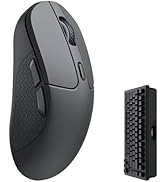
🖱️ Elevate your workflow and game with silent precision and lightning-fast control!
The Keychron M6 Silent Wireless Gaming Mouse combines cutting-edge PixArt 3395 optical sensor technology with ultra-low latency 1000Hz polling and versatile Bluetooth 5.3/2.4GHz/wired connectivity. Its lightweight 86g ergonomic design and fully programmable buttons via browser-based software make it the ultimate tool for professionals and gamers seeking precision, comfort, and seamless multi-device use.






| ASIN | B0FP2D8DW6 |
| Batteries | 1 12V batteries required. (included) |
| Best Sellers Rank | #83 in Computer Mice |
| Customer Reviews | 4.3 4.3 out of 5 stars (281) |
| Date First Available | August 28, 2025 |
| Item Weight | 11.3 ounces |
| Item model number | M6S |
| Manufacturer | Keychron |
| Package Dimensions | 7.64 x 5.59 x 2.36 inches |
J**Z
Great value for the features.
This is a great "do everything" mouse. Productivity work is excellent, easily customizable, and you can do it all on a web browser, so no software needed. I mapped the side scroll wheel to the left and right arrow keys for music production and it works insanely well. I love the tactility of the side scroll. I've had it for 2 months and charged it only once last week at around 40% while using it at least 4 hours a day. And up to 6-7 hours on the weekend using the dongle. And you can use it while it's charging (imagine that Apple). The mouse is really light which didn't bother me as much as I thought it would. The clicks are quiet, and feels really comfy in my hand. I used it for gaming in MOBAS and it's great. Biggest downside, is that there's only 1 profile. So if you want to map different buttons for different uses, it doesn't seem like you can. Not even on the software. Kind of a bummer but not a deal breaker for me. Either way. This is a solid mouse for the cost. Yeah you'll get a more premium experience with an MX master, but this is like 85% there at a quarter of the cost.
K**O
More than worthy replacement for MX Master 3
Completely replaced my MX master 3 (non-silent). First impressions was that it's all plastic compared to the logitech mouse, lighter and feels less sturdy, but no issues so far w/ heavy use. Clicks feel a bit unstable compared to some of the silenced MX masters I've tried, and the infinity scroll lock is a bit unwieldly. However, very reliable, no inputs ever dropped on me. Have even used it for non-comp gaming with little to no noticeable lag (on USB dongle, forget about bluetooth). Trades the thumb button (switches Destkop 1-2) with a left/right rocker on the middle mouse, the latter of which offers more functionality imo. Huge benefit exists in the software, which can be accessed from a browser rather than an app. Mouse configuration exists entirely its own memory, which is huge. Can't believe this is not more common.
A**.
Your mouse was the problem, not the monitor. But don’t buy this one for its side scroll wheel.
Edit: I’ll leave my original review below but I’m going to keep using this mouse, even with the side scroll wheel problems I was having (read below). In my review, I was comparing this mouse to my rapoo mouse, which I thought was $35 but was actually $50. So yeah, $10 more than this one. You know which one is better? DEFINITELY this mouse. I said I could instantly feel the difference in responsiveness, but that was on the desktop. Yesterday I opened up Minecraft and now it’s not even comparable. I thought I needed a higher refresh rate monitor. No, it was the mouse the whole time. Not to say that a higher refresh rate monitor won’t feel smoother, I've felt 120hz phone screens and there is no doubt they are better, but the difference this mouse made for me was much, much bigger than that. Now I know this is meant to compete with the MX master. I never had one so I don't know if it had this problem. But the side scroll wheel, which is one of the main reasons I chose this mouse and something I find very useful, is too small and embedded in the mouse to be useful. The amount you can move it in one stoke of your thumb makes it useless - you'll only get ~4 "notches" of movement out of it. I want to zoom through things like excel spreadsheets or quickly scan through zoomed in photos. With that said, the rest of the mouse is good. I had a Rapoo mouse before this, but I could just feel the horrible tracking on that mouse and hated it. To confirm my suspicion, and to confirm it wasn't just my computer, I got this mouse. And not only does it track better, but it is _so_ much more responsive, which I now realize was the real reason my other mouse felt off - it wasn't responsive enough to my movement. No problems with the infinity scrolling either, scrolls you to the bottom of a page nearly instantly, just as you would expect. This was something I was missing compared to my much older mouse, before the Rapoo, the logitech M650. While I don't trust logitech now that both times I got that mouse it stopped clicking a few days after the warranty ended, it still had the best scroll wheel I ever used - you could scroll normally, but if you scrolled fast, it would act like infinity scrolling. Onto less important things, I got an ~25ms better reaction time on this mouse, but I don't see that as outside the realm of potential bias from subconsciously wanting this mouse to be better than my old one (which should tell you something about how much better the tracking on this mouse is because I definitely wouldn't say the same about that). Also, it feels slightly better material wise, and is way lighter than my Rapoo mouse. The only complaint on fee is that the side buttons are way too far back. The front one rests exactly where I want the back one to go. I got the online launcher to work, but as of yet it’s a bit lacking. It still let me set mouse wheel tilt to something useful, but game key functionality didn’t work and while I was hoping there was some way to make the side scroll wheel scroll faster, maybe even using something like the macro functionality, but to no avail - macros and game key didn’t support outputting side scrolling actions, just left/middle/right click, forward/back, and keyboard keys. Sad. Final note: despite buying the $40 PixArt 3311 option, mine still had a metal scroll wheel. I don't believe this is the case on the other listing for the same mouse I found on Amazon or, iirc, the Keychron store either. Nice little bonus if you don't care about the side scroll wheel and want this mouse for everything else.
P**R
Ergonomic, good battery, quiet
Great mouse, no complaints. Wireless works very well, browser program is easy to use and effective. Quiet clicks that don’t feel too soft (good tactile feedback) but don’t click loudly. Ergonomics are good for bigger hands. Incredible battery life. Perfect for the casual gamer who also uses computer for spreadsheets/word processing or other productivity. 5/5
L**H
Good not great
This is overall a good mouse overall. I used it for a full day of CAD work. The issue was the scroll wheel, it required a heavy press and did not perform as well as I hoped. The build quality is nice with the exception of the scroll wheel, it has almost a rattle or grainy feel to it.
J**.
Great competitor to the MX Master 4s
Almost half the price of the MX Master, yet about 90 percent of the features available on it. Grip is slightly different, so if you're used to that, it takes some time to adjust. Otherwise it fits all of my needs (infinite scrolling, side scroll, forward/back button) I opted for the 8k version and its very smooth. Perfect for a mix of productivity and gaming.
H**N
The mouse is perfect for me, I wanted an MX Master however I cannot deal with the low polling rate for gaming, for me this is the next best thing. The mouse wheel takes some time to get used to as it scrolls either notch less or semi notch less but is great now I'm used to it. Button clicks are quiet and soft which is perfect for me, if you're used to normal gaming mice with hard loud clicks this will be a bit jarring.
R**N
Very good. Light and speed
B**N
Légère et performante, elle est parfaite. Peut-être un poil petite pour les grandes mains... Ça ne me gêne pas
K**R
This is basically an alternative to Logitech MX Master mice, but with a higher polling rate for those who want productivity and gaming features together. I've got the 8K version, as it was the only one with the metal scroll wheel. With a price tag of $140 this is an expensive mouse. My main problems: * Mushy left and right buttons with low feedback * Left and right buttons are not silent and also have noticeably different noises. My left button sounds way louder and cheaper * The scroll mode selector button should be pressed hard to change mode * Scrolling does not wake the mouse up so reading a long documents requires constantly moving the mouse to stop it from going into power save * Plastic side scroll wheel that is difficult to use * The overall shape of the mouse is uncomfortable for me * Keychron refers warranty to the supplier rather than upholding their own product
H**H
Excellent leaves any semblance of illogic competition in the dust. Only nitpick would be the scroll wheel feels a little less premium than what I was used to, not the same full metal ratcheting feel. However I understand the choice to allow a lighter overall mouse and it still feels quite premium.
Trustpilot
2 days ago
1 month ago