Desert Online General Trading LLC
Dubai, United Arab Emirates
Desert Online General Trading LLC
Dubai, United Arab Emirates


🚀 Command the room with precision and style!
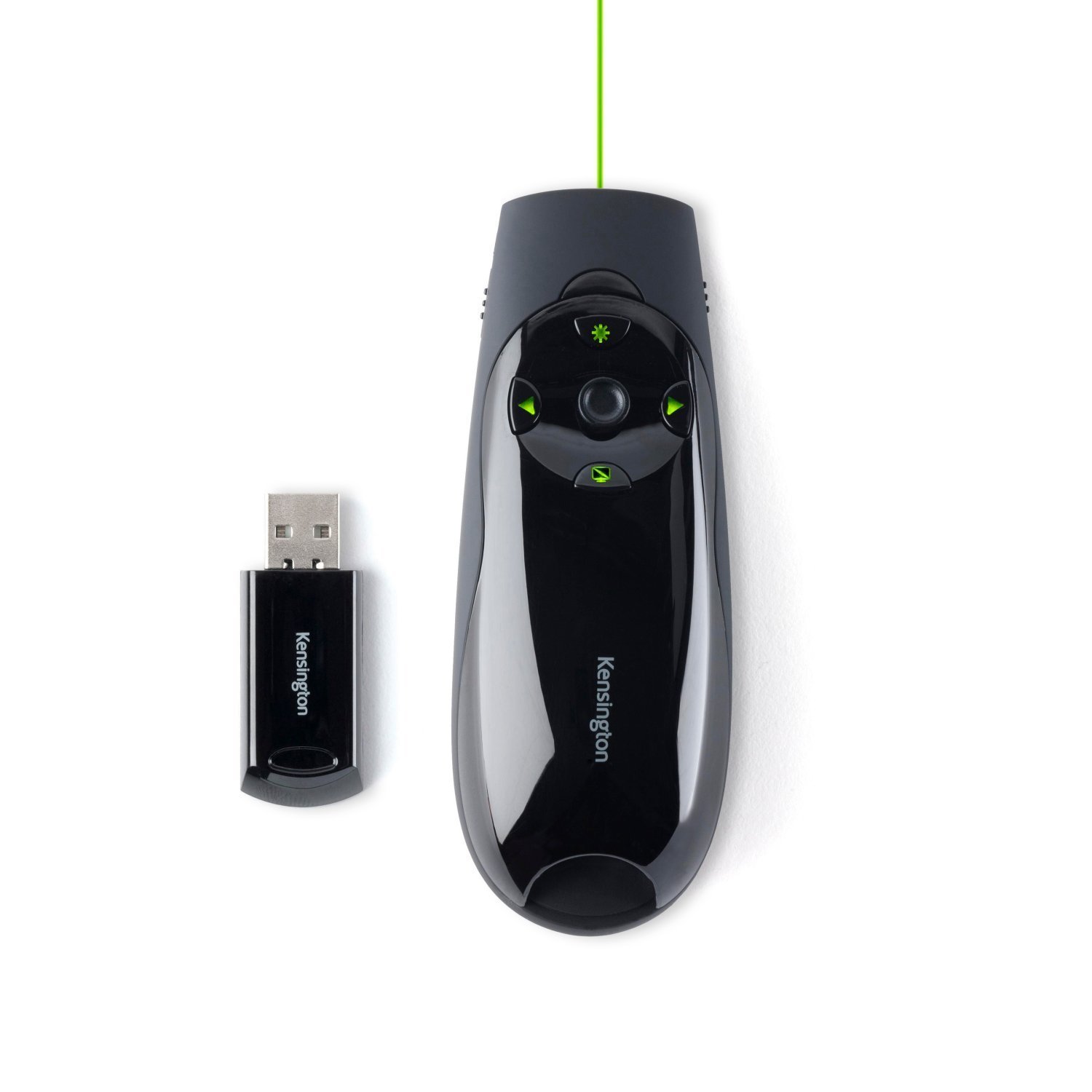
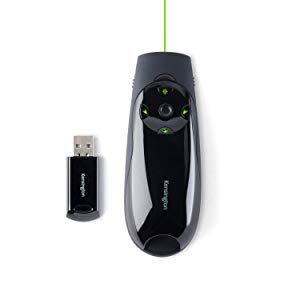
The Kensington Presenter Expert features a high-gloss green laser pointer that’s 10 times brighter than standard red lasers, ensuring visibility on bright LCD and plasma screens. It operates on a 2.4 GHz wireless connection with a 50-meter range and includes a USB receiver that stores inside the device. Backlit buttons and a joystick enable easy navigation and cursor control, compatible with PowerPoint and Keynote without drivers. Advanced AES encryption secures your data, while battery-saving features keep you powered through every presentation.



| Manufacturer | Kensington |
| Brand | Kensington |
| Model Number | K72426EU |
| Product Dimensions | 3.6 x 14.1 x 17 cm; 200 g |
| Batteries | 2 LR44 batteries required. (included) |
| Colour | Green Laser |
| Number of Items | 1 |
| Size | One Size |
| Manufacturer Part Number | 6015478 |
| Item Weight | 200 g |
M**N
Excellent presenter with bright, safe Class 2 green laser diode that does everything right
Laser: The Kensington Presenter Expert Green contains a Class 2 laser diode with ~505 nm wavelength and <1 mW power. This means that, while it appears much brighter than red Class 2 laser pointers, it remains equally safe for your retina (unless you deliberately stare into the beam). This is because green is the wavelength that the human eye perceives most brightly for a given power level.Buttons: This presenter features the usual PageUp, PageDown and "b" keyboard buttons (to switch slides and blank the screen, respectively, in slide-show programs like Impress or PowerPoint). A tiny joystick simulates basic mouse movements (no acceleration) and mouse button 1 if you press it. Also positive: the laser button just activates the laser and does not cause any unwanted keypress events.Switches: On the left side there is an on/off switch, and the four buttons are illuminated if the device is on. Thanks to that switch, unlike with other presenters, you do not have to remove the USB receiver plug from its little garage before you can use the laser. On the right side is a switch that converts the three non-laser buttons into mouse button 1, 2, 3, respectively.Overall an excellent design that really fixes all the things I didn't like about earlier presenter models. Very pleased with my purchase and I will definitely recommend this model to my colleagues.
A**N
Looks good quality and professional
The product certainly looks the part sleek design and up to now works very well. Very easy use and unlike stated in one review I read it has auto switch off for those times when you forget to. The green laser is definitly much more effective than the red.It also comes with a neat little storage case. If I had to have one criticism (and it is probably personal preference) I'm not to thrilled with the joy stick control, feels a little weak to me might break easily. However that said no issues so far overall good value for money a nice product. Would definitly recommend it.
A**R
A bit pricey, but worth it
This presenter is a bit more expensive than a lot of pointers on the market, but for me it was worth it. The main benefit for me is that I am (very slightly) colourblind and so sometimes struggle to see red laser dots, and the brightness of this green laser is fab - I can see it pretty much anywhere. I am a teacher and use this to change between slides, blank screens, highlight with the laser - all the usual shebang - but it also has a tiny joystick to move the mouse cursor, which is kind of handy if you've got any content to activate on a slide (though it's pretty clow, so to be honest you might just resort to walking over and using the mouse).Some pointers take a lifetime to get going the first time you insert the usb into your PC, but this little beauty was much quicker than most I've seen. It's very handy and nicely made, to a good quality; it's compact and the laser button works very nicely - again, on some cheaper models the laser button is sometimes a bit iffy.Overall, this has been a great purchase, in spite of the somewhat steep price.
S**R
Not very bright laser-mislabelled-USB receiver easy to lose
The packing says it has a red laser! Decided to try it to make sure. It IS a green laser - although (like the old red laser Kensington device I have) not especially bright as these things go. Probably not much of an improvement in terms of visibility on the projector screen. The USB receiver stick does not click into place as on the old device (where it also functioned as the "off" switch), and it might be easy to slide it out inadvertently and lose it.
J**W
Really good buy!
Works really well! The pointer light is very bright & streets ahead of my last one - it even works on LCD TV screens! The only niggle is the battery compartment sometimes slides open when you turn it on, but if you use your other hand for the switch or adjust your grip slightly it’s fine. Once you’re up & running it work brilliantly - I like the blank screen option too & the ability to turn off the device & save battery without having to remove the transmitter from the laptop. Really good buy!
C**S
confusing
The Kensington Presenter expert green laser with cursor control is in general a good product. However, the new cursor function is positioned in the centre of the control surface, which is a bad place. I will explain - when you are operating the forward/reverse buttons it is very easy to accidentally press the cursor button as well, which will move your presentation to the next slide. That is a nightmare scenario for a presentation - thus I rate this item with only one star.I liked the previous model, as it was simple to operate. The cursor function could be nice, but it is wrongly implemented in this presenter. Besides the presenter works well.I will try to return the item and get the normal model, without cursor function, which is surprisingly more expensive (you wonder why)
N**E
Firstly the fact that the USB dongle slides into the presenter itself is a great, it means they are always together and the ...
Simple to use, stylish design and powerful functionality. Firstly the fact that the USB dongle slides into the presenter itself is a great, it means they are always together and the inevitable loss of the USB dongle seems slightly less inevitable. The carry case offers a little cushioning for it in my bag which is lucky as otherwise it'd be in pieces by now I'm sure.Functionality - you plug in the USB and you're away; clicking and pointing until your hearts content. The little joystick gives you control over the mouse pointer but in all honesty I don't see why anyone would find this useful really. It isn't quick enough to actually use for more than one or two clicks on things - so unless the PC your using doesn't have a mouse or the mouse is unreachable - I'd say find another way.If you want to point at things and click to move between slides then I heartily recommend this product!
Trustpilot
3 days ago
2 months ago